Press [LEFT] and [RIGHT] keys to scroll, press [UP] and
[DOWN] keys to select in sequence.
Press [0K] key to select the datastream
Press [ESC] key to read the datastream.
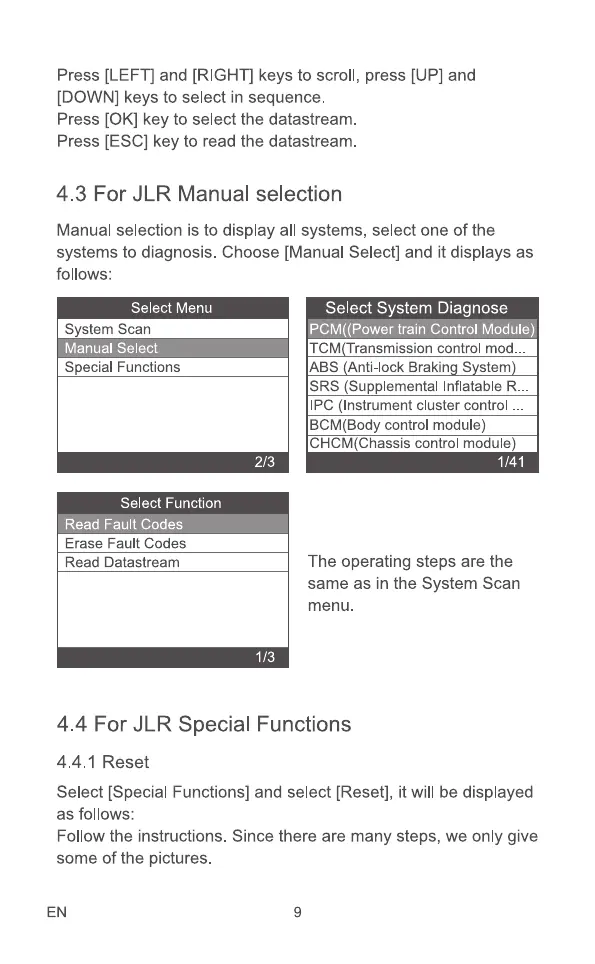
4.3 For JLR Manual selection
Manual selection is to display all systems, select one of the
systems to diagnosis. Choose [Manual Select] and it displays as
follows:
Select Menu
S stem Scan
Manual Select
Special Functions
Select Function
ea au o es
Erase Fault Codes
Read Datastream
2/3
1/3
Select System Diagnose
TCM Transmission control mod.
ABS Anti-lock Brakin S stem
SRS (Supplemental Inflatable R
IPC (Instrument cluster control .
BCM(Body control module)
CHCM(Chassis control module)
1/41
The operating steps are the
same as in the System Scan
menu.
4.4 For JLR Special Functions
4.4. I Reset
Select [Special Functions] and select [Reset], it will be displayed
as follows:
Follow the instructions. Since there are many steps, we only give
some of the pictures.
EN 9



 To Next Page