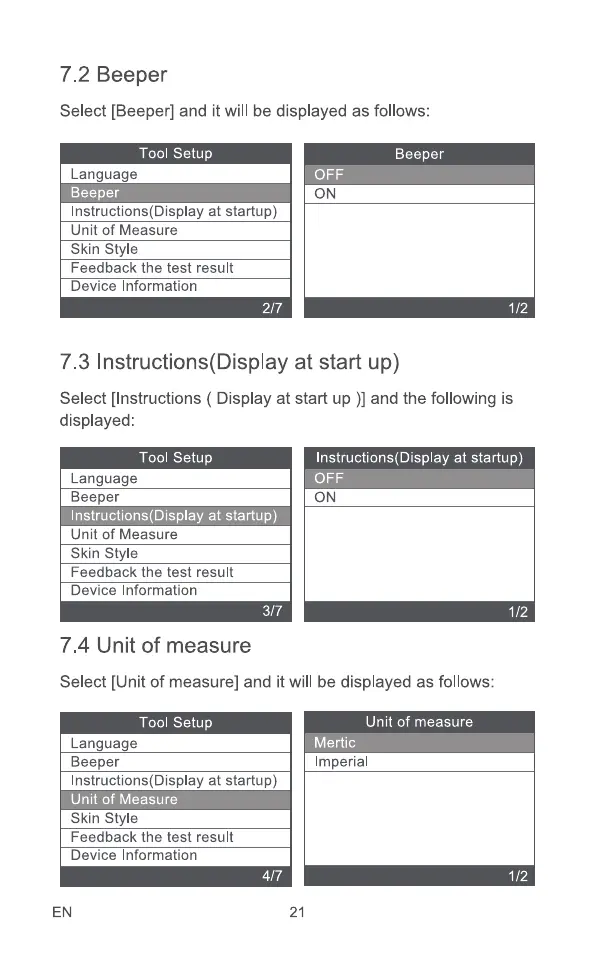
7.2 Beeper
Select [Beeper] and it will be displayed as follows:
Tool Setup
Language
Beeper
Instructions(Display at startup)
Unit of Measure
Skin Style
Feedback the test result
Device Information
2/7
Beeper
ON
1/2
7.3 Instructions(DispIay at start up)
Select [Instructions ( Display at start up )] and the following is
displayed:
Tool setup
Language
Beeper
Instructions(Display at startup)
Unit of Measure
Skin Style
Feedback the test result
Device Information
3/7
7.4 Unit of measure
Instructions(DispIay at startup)
ON
1/2
Select [Unit of measure] and it will be displayed as follows:
Tool Setup
Language
Beeper
Instructions(Display at startup)
Unit of measure
Imperial
Unit of Measure
Skin Style
Feedback the test result
Device Information
EN
4/7
21



 To Next Page