7.5 Skin style
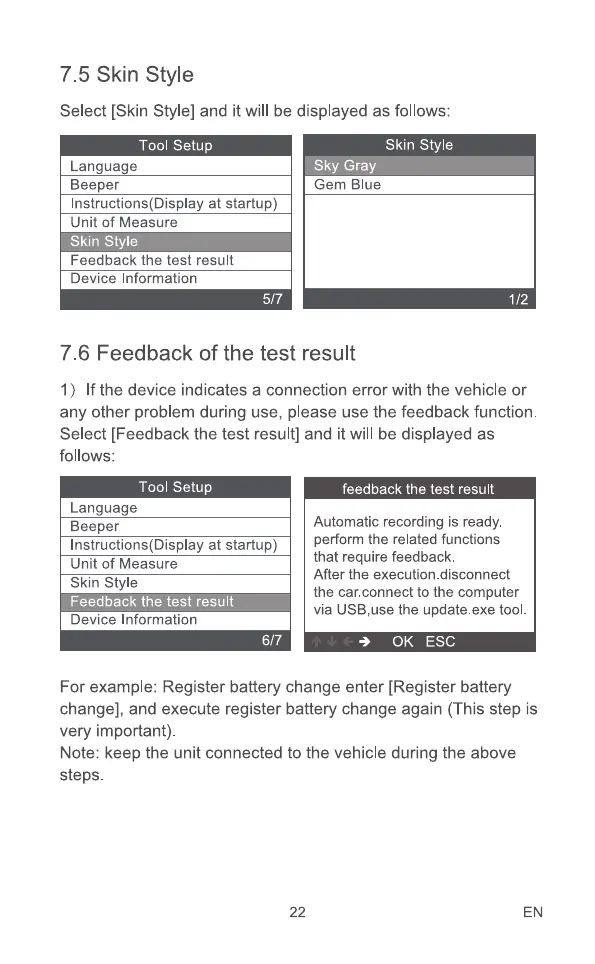
Select [Skin Style] and it will be displayed as follows:
Tool Setup
Language
Beeper
Instructions(Display at startup)
Unit of Measure
Skin Style
Feedback the test result
Device Information
5/7
Skin style
Gem Blue
1/2
7.6 Feedback of the test result
I) If the device indicates a connection error with the vehicle or
any other problem during use, please use the feedback function.
Select [Feedback the test result] and it will be displayed as
follows:
Tool Setup
Language
Beeper
Instructions(Display at startup)
Unit of Measure
Skin Style
Feedback the test result
Device Information
feedback the test result
Automatic recording is ready.
perform the related functions
that require feedback.
After the execution.disconnect
the car.connect to the computer
via USB,use the update.exe tool.
0K ESC
For example: Register battery change enter [Register battery
change], and execute register battery change again (This step is
very important).
Note: keep the unit connected to the vehicle during the above
steps.
22 EN



 To Next Page