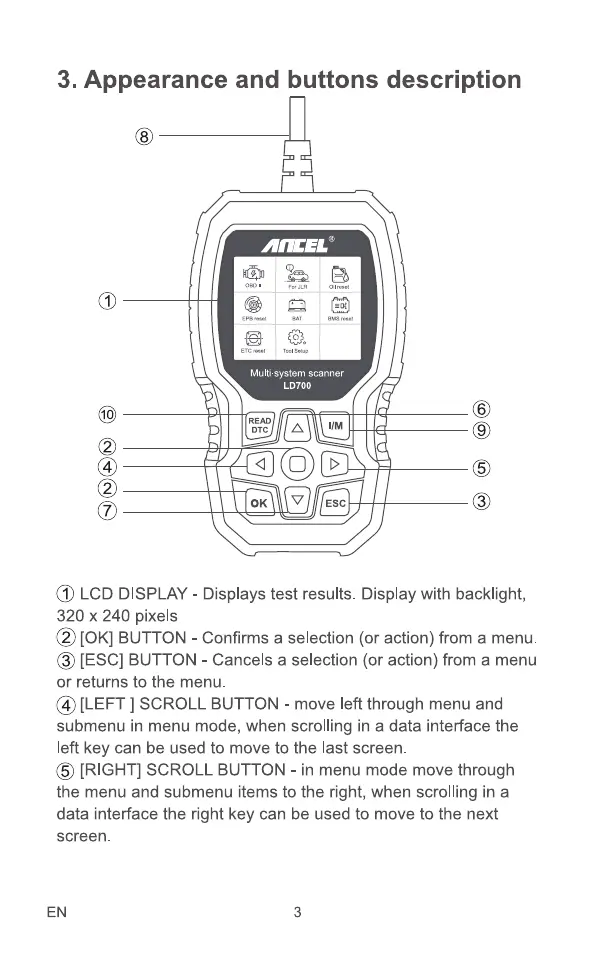
3. Appearance and buttons description
Multi-system scanner
LD700
READ
DTC
11M
ESC
6
@ LCD DISPLAY- Displaystest results. Displaywith backlight,
320 x 240 pixels
@ [0K] BUTTON- Confirmsa selection(or action)froma menu.
O [ESC] BUTTON - Cancels a selection (or action) from a menu
or returns to the menu.
@ [LEFT] SCROLLBUTTON- moveleftthroughmenuand
submenu in menu mode, when scrolling in a data interface the
left key can be used to move to the last screen.
6 [RIGHT] SCROLL BUTTON - in menu mode move through
the menu and submenu items to the right, when scrolling in a
data interface the right key can be used to move to the next
screen.
EN 3



 To Next Page