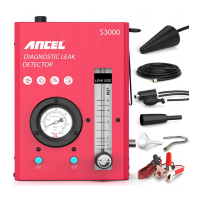
Leak Status Indication
In many cases excessive smoke exiting a leak may
make it difficult to determine the exact location of
the leak. The purpose of the Flow Control Valve is to
decrease the amount of smoke exiting a leak so that
its position may be pinpointed without the masking
effect of excessive smoke. Turn clockwise to
decrease flow, counterclockwise to increase flow.
This valve is also used to lock out the system under
test and observe any pressure decay on the
pressure gauge.
Flow Dial
Configured for
certain models
Configured for
certain models
The <Left - LED Indication> LED has two states.
RED: Power ON.
GREEN: Pressurized air production.
While power up the unit, the LED would turn RED.
Press <Air Control switch>, the <Left - LED Indica-
tion> would turn GREEN, and the unit start to
generate pressurized air.
Press <Air Control switch> again anytime, the <Left
- LED Indication> would turn RED, and the unit
stops generating pressurized air.
State Indication
and Air Control
Configured for
certain models
The <Right - LED Indication> LED has three
states.
OFF: Smoke generation not started.
GREEN: Smoke generation.
RED: Overheat.
While not smoke the unit, the LED would be OFF.
Press <Smoke Control switch>, the <Right - LED
Indication> would turn GREEN, and the unit start
to generate smoke.
Press <Smoke Control switch> again anytime, the
<Right - LED Indication> would turn OFF, and the
unit stops generating smoke.
While the smoke generating chamber is overheat,
for protection, the smoke generation would be
halted and the <Right - LED Indication> would
turn RED and restart generating smoke while the
smoke generating chamber cooled down, or you
can switch it OFF by pressing <Smoke Control
switch> .
State Indication
and Smoke Control


 To Next Page
 Loading...