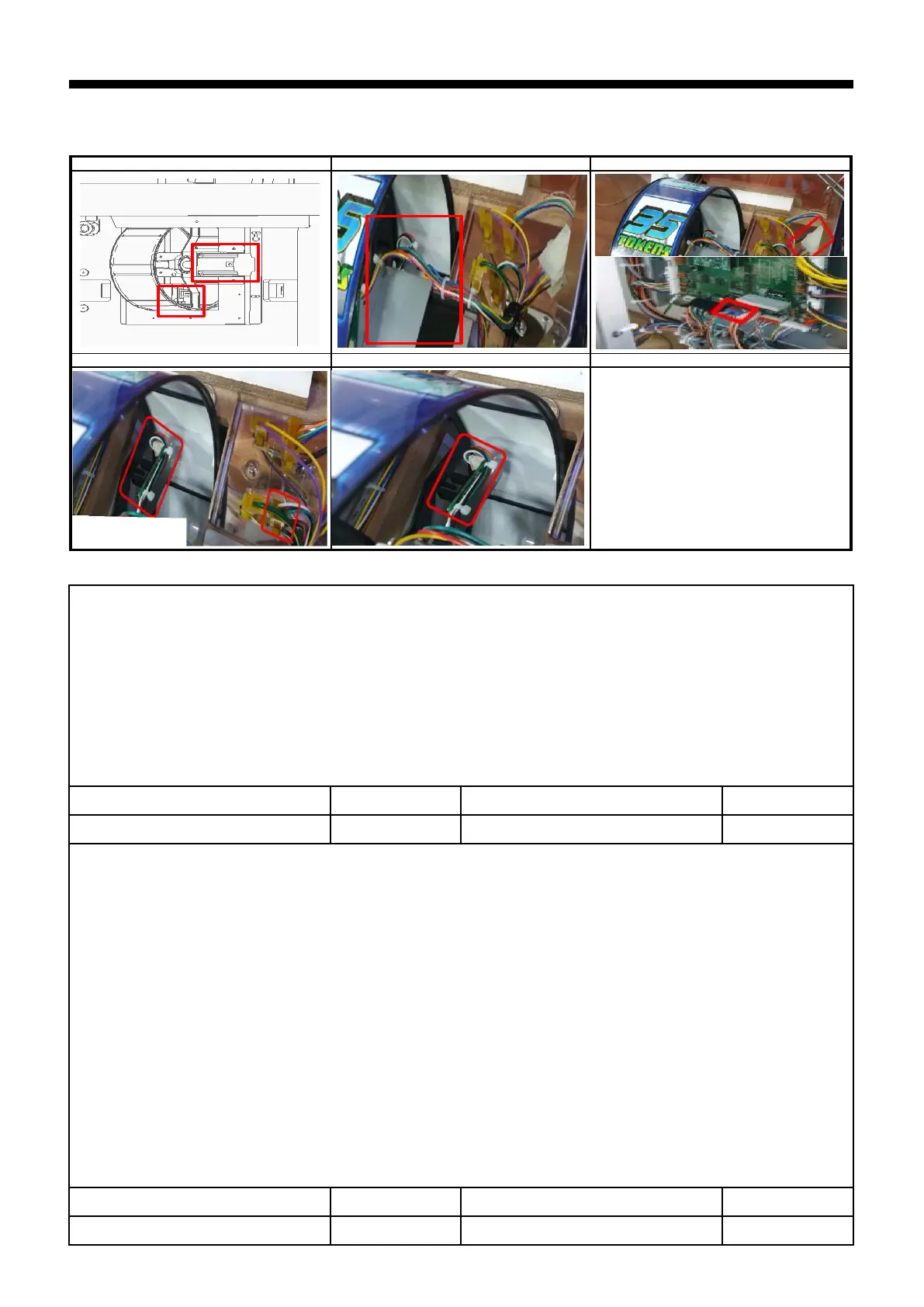
1) REEL MOTOR ERROR [E.31], REEL SENSOR ERROR [E.31]
▶SOLUTION : REEL MOTOR ERROR [E.31]
1 HOW TO TEST : TEST MODE → REEL TEST
2 Check connection of motor connector ( P1 )
3 Check assembly status of motor ( P1 )
4 Check connection of join connector and main pcb connector ( P2 )
5 Replace MOTOR
6 Replace MAIN PCB
▶SOLUTION : REEL SENSOR ERROR [E.31]
1 HOW TO TEST : TEST MODE → REEL TEST
Setup pcb- Select button -Shooting button-Sensor status check
(Detected Sensor : " _ " / Non-Detected sensor : " 0 ")
2 Check connection of sensor connector ( P3 )
3 Check assembly status of sensor , Check position of sensor bracket ( Center ) ( P4 )
4 Check the dc voltage ( SENSOR PCB )
: PIN 1 : over 4.5V , PIN 2 : below 0.5V , PIN 4 : GND ,


 To Next Page