Need help?
Do you have a question about the Andamiro SpongeBob Squarepants VR Bubble Coaster and is the answer not in the manual?
Unboxing the unit, removing protective straps, pipes, and the main display.
Attaching support pipes to the back display and mounting it onto the simulator base.
Opening compartments, routing cables through pipes, and connecting LED, wind, power, and sound systems.
Closing the simulator seat and securing it using the locking latches.
Placing VR headsets onto the designated goggle holders on the seat.
Guiding the headset's USB cable through the back display's grommet and hook.
Attaching headset hooks and connecting USB cables to the computer or USB hub.
Turning on the VR headset and the simulator's internal power button.
Securing the back display compartment door using the provided keys.
Turning on the Rilix Coaster keyboard for network configuration.
Navigating to the desktop and locating the Wi-Fi status icon.
Selecting a Wi-Fi network and entering the password if required for connection.
Confirming a successful Wi-Fi connection by checking the system's network icon.
Using the Rilix Coaster keyboard buttons to increase or decrease the audio volume.
Contact details including phone numbers for Rilix support and emails for Andamiro USA.
 General
| Category | Arcade Game Machines |
|---|---|
| Manufacturer | Andamiro |
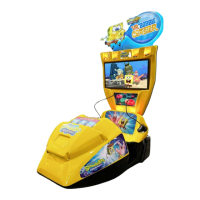
| Game Title | SpongeBob Squarepants VR Bubble Coaster |
| VR Headset | Yes |
| Motion | Motion Simulator |
| Theme | SpongeBob Squarepants |
| Special Features | VR Experience |

 To Next Page