INSTRUCTIONS FOR USE OF CONTROL DEVICES
(ACCORDING TO THE MODELS)
TIMERS
Our ovens can be fitted with different types of timers:
MINUTES COUNTERS
Turn the knob clockwise to set
the desired cooking time.
The minutes minder can be
adjusted from 1 to 60 minutes.
A sound signal will inform you
that the chosen time is up.
«LED» PROGRAMMER
Features
24 hours clock with automatic programme and minutes counter.
Functions
Cooking time, cooking end time, manual position, clock, minutes counter,
times to be set up to 23 hours 59 minutes.
USING THE GRILL
The grill is situated in the top of the oven compartment. The grill pan
should be located on the top oven shelf position and is provided with
a detachable grill pan handle fig. 10 which is engaged centrally over
the front edge of the pan between the indications provided. A wire
grid is supplied. The grill pan handle should be removed from the grill
pan during the grilling operation and only fitted for removal or insertion
of the grill pan particularly when hot. Always preheat the grill on full
for 3-5 minutes before inserting the food.
Fig. 10
Tasto + e -
+ and - buttons.
The + and - buttons increase or decrease the time at a speed depending
on how long the button is pressed.
Setting the time
Press any two buttons (manual) at the same time, and + or - button
to set the desired time. This deletes any previously set programme.
The contacts are switched off .
Manual use
By pressing the manual button the relay contacts switch on, the AUTO
symbol switches off and the saucepan symbol lights up. Manual
operation can only be enabled after the automatic programme is over
or it has been cancelled.
Automatic use
Press the cooking time or end time button to switch automatically from
the manual to the automatic function.
Semi-automatic use with cooking time setting
Press the cooking time button and set the desired time with + or -.
The AUTO and cooking time symbols light up continuously. The relay
switches on immediately. When the cooking end time corresponds to
the time of day, the relay and cooking time symbol switch off, the
sound signal rings and the AUTO symbol flashes.
Semi-automatic use with end time setting
Press the end time button. The time of day appears on the display.
Set the cooking end time with + button. The AUTO and cooking time
symbols light up continuously. The relay contacts switch on. When
the cooking end time corresponds to the time of day, the relay and
the cooking time symbol switch off. When the cooking time is up, the
AUTO symbol flashes, the sound signal rings and both the relay and
the cooking time button switch off.
Automatic use with cooking time and end time setting
Press the cooking time button and select the length of the cooking
time with + or - button. The AUTO and cooking time symbols light up
continuously. The relay switches on. By pressing the cooking end time
button the next cooking end time appears on the display. Set the
cooking end time with + button. The relay and the cooking time symbol
switch off. The symbol lights up again when the time of day corresponds
to the cooking start time. When the cooking time is up, the AUTO
symbol flashes, the sound signal rings, the cooking time symbol and
the relay switch off.
Minutes counter
Press the minutes counter button and set the cooking time with + or
- button.
The bell symbol lights up when the minutes counter is operating.
When the set time is up, the sound signal rings and the bell symbol
switches off.
Sound signal
The sound signal starts at the end of a programme or of the minutes
counter function and it lasts for 15 minutes.
To stop it, push any one of the functions buttons.
Start programme and check
The programme starts 4 seconds after it has been set. The programme
can be checked at any time by pressing the corresponding button.
Setting error
A setting error is made if the time of day on the clock falls within the
cooking start and end times. To correct the setting error, change the
cooking time or cooking end time. The relays switch off when a setting
error is made.
Cancelling a setting
To cancel a setting, press the cooking time button and then press the
- button untill 00 00 appears on the display. A set programme will
automatically cancel on completion.
Display
4-figures, 7-segments diplay for cooking times and time of day.
Cooking time and manual function = saucepan symbol
Automatic function = AUTO
Minutes counter = bell symbol
The symbols light up when the corresponding functions are selected.
Setting
To set, press and release the desired function, and within 5 seconds set the
time with + and - buttons.
9
max
50
75
100
125
150
175
200
225
SELECTOR KNOB THERMOSTAT KNOB
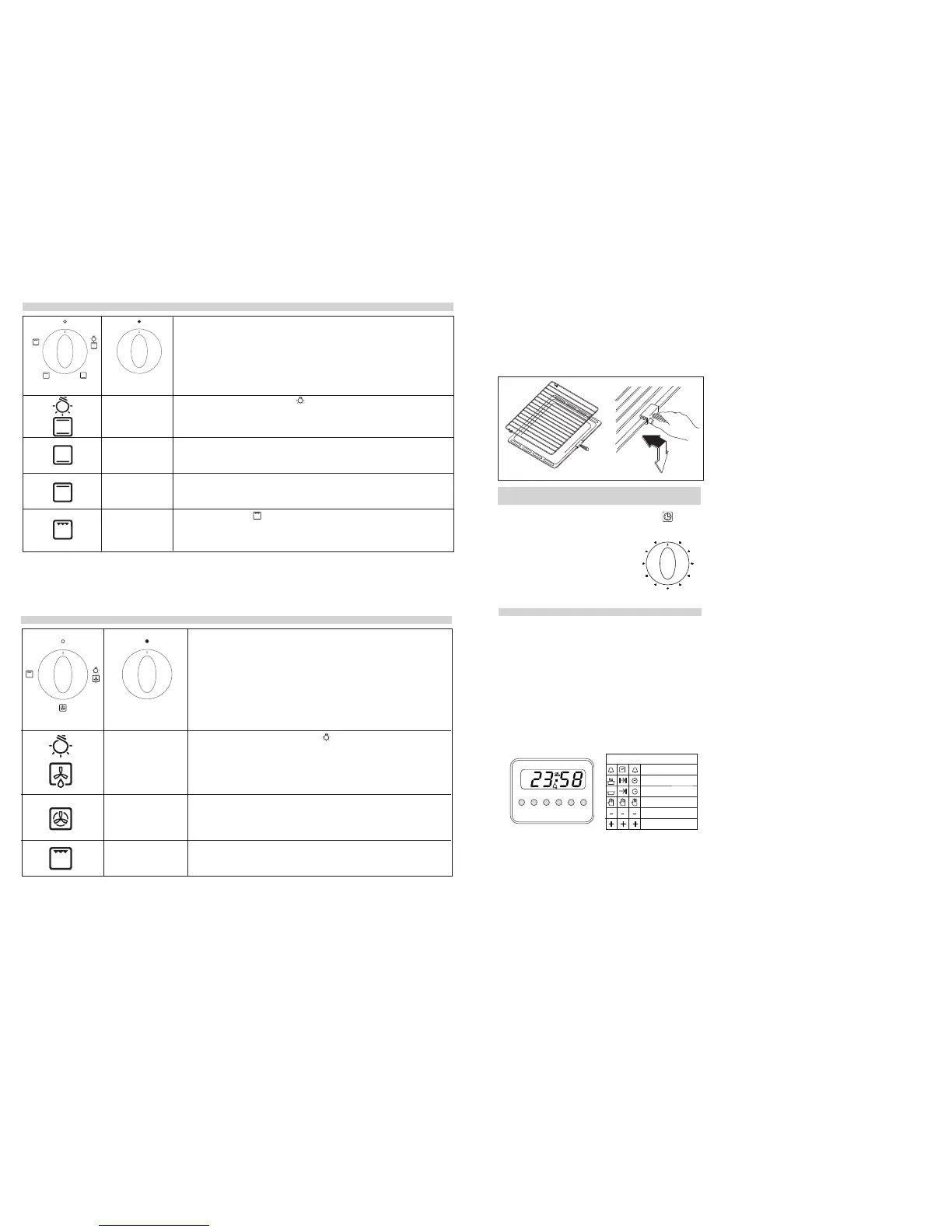
AIR FORCED OVEN
N.B.: All functions will start after selecting the oven temperature with the thermostat knob.
The oven is fitted with:
• a lower heating element;
• a circular heating element, which surrounds the fan.
When you turn the control knob to position the light will be on for all the following
operations.
Defrosting
The air at ambient temperature is distributed inside the oven for defrosting food more
quickly and without proteins adulteration.
Fan oven
Both the fan and the circular heating element operate together. The hot air adjustable
between 50 and MAX°C is evenly distributed inside the oven. This is ideal for cooking
several types of food (meat, fish) at the same time without affecting taste and smell. It is
indicated for delicate pastries.
Grill
It is indicated for grilling and gratinating traditional food.
NOTE: utilize, as maximum temperature 200°C.
50 ÷ 200
50 ÷ MAX
CONVECTIONAL OVENS
50 ÷ MAX
50 ÷ MAX
50 ÷ MAX
50 ÷ 200
max
50
75
100
125
150
175
200
225
N.B.: All functions will start after selecting the oven temperature with the thermostat knob.
The oven is fitted with:
• a lower heating element;
• an upper heating element, which according to the cooking mode can be used for grilling or
baking.
When you turn the control knob to position the light will be on for all the following operations.
Natural convection
Both the lower and upper heating elements operate together. This is the traditional cooking,
very good for roasting joints, ideal for biscuits, baked apples and crisping food. You obtain
very good results when cooking on a shelf adjusting the temperature between 50 and MAX°C.
Lower heating element
This function is particularly indicated for cooking from the bottom, warming up food or sterilizing
glass jars. It is also indicated for food requiring long and slow cookings, i.e. casserole. This
function can be used between 50 and MAX°C.
Upper heating element
It is indicated for warming up pre-cooked food when placing the grid on the second shelf from
the top, or for defrosting pastry placing the grid on the first shelf from the bottom. This function
can be used between 50 and MAX°C.
Total grill heating element .
It is indicated for cooking on the spit, grilling and gratinating.
NOTE: utilize, as maximum temperature 200°C.
SELECTOR KNOB THERMOSTAT
4
Minute timer
Cooking time
Cooking end
Manual
Subtract time
Add time
According to the models
Note: the oven must be used with the door closed.
Note: the oven must be used with the door closed.
STOP
TIMER
10
15
20
25
30
35
40
45
50
55
5
0
A
U
T
O



 To Next Page
 Loading...