EasyManua.ls Logo

Andrea EDU-255M - User Manual

Andrea EDU-255M
2 pages
Print Icon
To Next Page IconTo Next Page
Loading...
C46-5468-25 Rev B
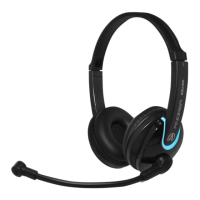
The Andrea Mobile Noise Canceling Headset
EDU-255M features, state-of-the-art, Noise
Canceling microphone technology that
removes background noise for optimal voice
recognition.
Users receive:
• Andrea microphone technology in a
high-fidelity headset
• A rigid wire boom which keeps the
microphone accurately positioned in place
• Increased speed and accuracy of PC speech-
driven applications
• Cable module with earphone volume control
Connecting the EDU-255M
To connect the Andrea EDU-255M Mobile
Headset to your device
1. Plug the black plug into your mobile device’s
shared microphone/speaker port
COMPATIBILITY
The EDU-255M is compatible with most mobile
devices such as smartphones, laptops, tablets
and Computers with a single shared
microphone/speaker port.
HEADSET INSTRUCTIONS
1. Fit the adjustable headband over your head
to secure the headset with the speakers
resting comfortably around your ears.
2. Adjust the microphone boom so that the
microphone is approximately 3/4" in front
of your mouth.
Package includes: One (1) EDU-255M Mobile
Headset, and
One (1) EDU-255M Headset Publication
C46-5471-25 Rev B
WARRANTY INFORMATION
Please visit our website at:
www.andreacommunications.com/warranty
for all warranty information.
Congratulations on your purchase
of the Andrea Mobile Headset
EDU-255M!
EDU-255M
Headset
TROUBLESHOOTING
If you encounter the following problems:
No sound from headset ear piece while
audio plays from computer.
A. Check all connections.
B. Consult your sound card instruction booklet.
C. Check output volume level adjustment in
software.
Microphone does not record sound when
using a voice-recording application.
A. Check all connections.
B. Bring the microphone closer to your mouth.
C. Check input control for proper level in
software.
D. Check that microphone is not muted in the
PCs microphone audio panel.
TECHNICAL SERVICE
We hope that you enjoy your Andrea
EDU-255M Headset. If you have additional
questions, please visit our website at:
www.andreacommunications.com/support or
call Andrea Communications Technical Service
team at 1-800-442-7787 (USA & Canada) for
assistance.
Question and Answer IconNeed help?

Do you have a question about the Andrea EDU-255M and is the answer not in the manual?

Overview

The Andrea Mobile Headset EDU-255M is a noise-canceling headset designed for clear voice communication and enhanced speech-driven applications. It features state-of-the-art noise-canceling microphone technology that effectively removes background noise, ensuring optimal voice recognition.

Function Description:

The primary function of the EDU-255M is to provide high-quality audio input and output for mobile devices and computers. Its noise-canceling microphone is specifically engineered to improve the accuracy and speed of PC speech-driven applications by isolating the user's voice from ambient sounds. The headset is suitable for various applications, including online meetings, voice recording, and general communication.

Important Technical Specifications:

  • Microphone Technology: Andrea's proprietary noise-canceling microphone technology.
  • Boom Type: Rigid wire boom for stable microphone positioning.
  • Connectivity: Single black plug for shared microphone/speaker port.
  • Controls: Cable module with earphone volume control.
  • Compatibility: Compatible with most mobile devices such as smartphones, laptops, tablets, and computers that feature a single shared microphone/speaker port.

Usage Features:

  • Comfortable Fit: The adjustable headband ensures a secure and comfortable fit, with speakers resting comfortably around the ears.
  • Optimal Microphone Positioning: The microphone boom is designed to be adjusted so that the microphone is positioned approximately 3/4" (20 mm) in front of the user's mouth for best performance. This precise positioning is crucial for maximizing the effectiveness of the noise-canceling feature and ensuring clear voice pickup.
  • Volume Control: An in-line cable module provides convenient earphone volume control, allowing users to easily adjust audio output levels without interacting with their device's software settings.
  • Ease of Connection: To connect the headset, users simply plug the single black plug into their mobile device's shared microphone/speaker port. This straightforward connection process makes the headset user-friendly and quick to set up.
  • Enhanced Speech Recognition: By significantly reducing background noise, the headset contributes to increased speed and accuracy in PC speech-driven applications, making it ideal for dictation, voice commands, and other voice-controlled tasks.

Maintenance Features (Troubleshooting and Support):

The manual provides comprehensive troubleshooting steps for common issues:

No sound from headset ear piece while audio plays from computer:

  • Check all connections: Ensure the headset is properly plugged into the device.
  • Consult sound card instruction booklet: Refer to the device's sound card documentation for specific settings or issues.
  • Check output volume level adjustment in software: Verify that the audio output level is not muted or set too low in the computer's sound settings.

Microphone does not record sound when using a voice-recording application:

  • Check all connections: Confirm that the headset is securely connected.
  • Bring the microphone closer to your mouth: Adjust the microphone boom to ensure the microphone is approximately 3/4" (20 mm) from the mouth.
  • Check input control for proper level in software: Verify that the microphone input level is not muted or set too low in the device's sound settings.
  • Check that microphone is not muted in the PCs microphone audio panel: Ensure the microphone is enabled and not muted within the operating system's audio settings.

Technical Service and Warranty:

  • Website Support: Users can visit www.andreacommunications.com/support for additional questions and resources.
  • Technical Service Team: For direct assistance, users can contact the Andrea Communications Technical Service team at 1-800-442-7787 (USA & Canada).
  • Warranty Information: Detailed warranty information is available at www.andreacommunications.com/warranty.

The EDU-255M is designed to be a reliable and high-performance audio solution, particularly beneficial for users who require clear voice input in noisy environments or those who frequently use speech-driven applications. Its robust design, combined with user-friendly features and comprehensive support, makes it a valuable tool for various communication and productivity needs.
Andrea EDU-255M Specifications

General IconGeneral
BrandAndrea
ModelEDU-255M
CategoryHeadsets
LanguageEnglish

Related product manuals