Need help?
Do you have a question about the Andrea NC-255VM and is the answer not in the manual?
Instructions on how to fit the adjustable headband and position the microphone boom correctly for optimal use.
Guidance on the standard setup for connecting the headset to a computer or device via USB.
Overview of the in-line controls including volume adjustment and microphone/speaker mute functions.
Steps to resolve issues where no sound is heard from the headset earpiece during audio playback.
Troubleshooting steps for when the microphone fails to record sound in voice applications.
Information and contact details for obtaining technical assistance and support for the headset.
Guidance on how to access detailed warranty information for the Andrea NC-255VM USB Headset.
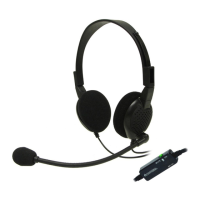
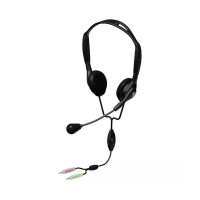
The Andrea NC-255VM USB Headset is a high-fidelity audio device designed for clear communication and enhanced PC speech-driven applications. It features state-of-the-art noise-canceling microphone technology, which effectively removes background noise, ensuring optimal voice recognition. This makes the headset suitable for various uses, including online meetings, gaming, and dictation, where clear audio input is crucial.
The primary function of the NC-255VM USB Headset is to provide both high-quality audio output and clear microphone input. It connects to a computer, laptop, tablet, or MAC via a standard USB port, making it widely compatible across different operating systems and devices. The integrated external USB soundcard ensures consistent audio performance, bypassing the need for an internal soundcard and offering a plug-and-play experience.
The noise-canceling microphone is a core feature, specifically engineered to filter out ambient sounds, allowing the user's voice to be transmitted with exceptional clarity. This is particularly beneficial in noisy environments, such as open-plan offices or homes with background distractions. The microphone is mounted on a rigid wire boom, which allows for precise positioning. Users can adjust the boom to place the microphone approximately 3/4" (20 mm) in front of their mouth, optimizing sound capture and further enhancing voice recognition accuracy.
For audio output, the headset delivers high-fidelity sound through its speakers, ensuring that incoming audio, whether from calls, music, or other applications, is clear and immersive. The adjustable headband allows users to comfortably fit the headset, with the speakers resting gently around their ears, providing a secure and comfortable fit for extended periods of use.
The NC-255VM USB Headset is designed for ease of use and convenience. Its plug-and-play functionality means that connecting the device is straightforward: simply plug the black USB connector into an available USB port on your device. No complex driver installations are typically required, allowing users to get started quickly.
In-line volume controls are integrated into the headset's cable, providing quick and easy access to audio adjustments. These controls include:
LED indicators are also present on the in-line control unit to provide visual feedback on the headset's status:
The adjustable headband and microphone boom contribute significantly to the headset's usability. The headband can be adjusted to fit various head sizes, ensuring comfort during long sessions. The microphone boom's flexibility allows users to position the microphone optimally for their voice, which is crucial for maximizing the effectiveness of the noise-canceling technology and improving speech recognition accuracy. The ability to swing the microphone boom up and down also allows users to move the microphone out of the way when not in use, providing greater flexibility.
The headset's design, with a rigid wire boom, ensures that once the microphone is positioned, it stays in place, preventing accidental shifts that could degrade audio quality. This stability is a key advantage for users who rely on consistent microphone placement for professional applications.
While the manual does not explicitly detail routine maintenance procedures, the design of the Andrea NC-255VM USB Headset suggests a focus on durability and reliability, minimizing the need for frequent maintenance. The robust construction of the headband and boom arm is intended to withstand regular use.
Troubleshooting guidance is provided to address common issues, which can be considered a form of user-level maintenance. For instance, if there is no sound from the headset earpiece, users are advised to:
If the microphone does not record sound, the troubleshooting steps include:
These troubleshooting steps empower users to resolve minor issues independently, reducing the need for external support. For more complex issues or if the problem persists, technical service is available through Andrea Communications, offering phone support and an online support portal. This ensures that users have access to professional assistance when needed, contributing to the long-term usability and satisfaction with the product. The headset also comes with warranty information, indicating manufacturer support for potential defects. The overall design emphasizes a user-friendly experience with built-in features to address common operational challenges, thereby simplifying maintenance from the user's perspective.
 General
| Headset type | Binaural |
|---|---|
| Product type | Headset |
| Product color | Black, Blue |
| Wearing style | Head-band |
| Control unit type | In-line control unit |
| Recommended usage | Office/Call center |
| Charging stand | - |
| USB connector | USB Type-A |
| USB connectivity | Yes |
| Connectivity technology | Wireless |
| Microphone type | Boom |
| Microphone frequency | 100 - 10000 Hz |
| Microphone sensitivity | -44 dB |
| Impedance | 32 Ω |
| Driver unit | 40 mm |
| Ear coupling | Supraaural |
| Headphone frequency | 50 - 20000 Hz |
| Maximum input power | 40 mW |
| Headphone sensitivity | 114 dB |

 To Next Page