EasyManua.ls Logo

Andrea SG-100 - User Manual

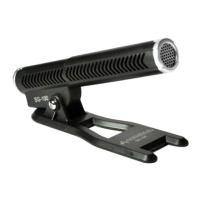
Andrea SG-100
2 pages
Print Icon
To Next Page IconTo Next Page
Loading...
C46-5450 Rev B
C46-5450 Rev B
Congratulations on your
purchase of the Andrea
SG-100 Microphone!
SG-100
Unidirectional
Shotgun
Microphone
WARRANTY INFORMATION
Please visit our website at:
www.andreacommunications.com/warranty
TECHNICAL SERVICE
We hope that you enjoy your Andrea SG-100
Microphone. If you have additional questions,
please visit our website at:
www.andreacommunications.com/support or
call Andrea Communication's Technical Service
team at 1-800-442-7787 (USA & Canada) for
assistance.
TROUBLESHOOTING:
Microphone does not record sound when
using a voice-recording application:
A. Check all connections.
B. Check input control for proper level in
software.
C. Check that microphone is not muted on
the digital recording device or in the PCs
microphone audio panel.
To connect the Andrea SG-100
Microphone to your digital recording
device:
1. Plug the 3.5mm connector into the
microphone input on your digital recording
device.
To connect the Andrea SG-100
Microphone to your computer:
1. Plug the 3.5mm connector into the “mic
level” microphone input on your computer.
The Andrea Communications SG-100
Microphone is a unidirectional microphone that
offers the highest quality and performance for a
single element microphone.
Features Include:
• Solid rotation base.
• Small size for ease of portablity.
• Can be used with Andrea's USB-SA Digital
Audio Adapter. With the Digital Audio Adapter
users receive our partner Andrea Electronics
DSDA
®
and PureAudio
®
software to enable:
• Digital noise reduction for clean noise free
recordings
• Voice over IP Internet Telephony.
Microphone Performance (polar plot):
COMPATIBILITY:
The Andrea SG-100 Microphone is compatible
with most major digital recording devices,
computers and laptops.
Package includes:
One (1) SG-100 Microphone,
One (1) Travel Pouch and
One (1) SG-100 Microphone Publication.
Enhance your Andrea Communications USB
Headset with a Download of patented audio
enhancement software PureAudio
Voice
Solutions from our partner Andrea Electronics
Corporation:
http://www.andreaelectronics.com/acl/
audiocommander
FEATURES INCLUDE:
PureAudio
®
Patented noise reduction speech enhancement
algorithm.
Designed for hi-fidelity sound quality and compatible
with speech recognition software.
Reduces repetitive background noise on both
acoustic and electronic system noise.
Can be utilized on microphone output and received
earphone audio.
Software compatible with: Mac OSX, Windows XP, Vista
and Windows 7 and 8 operating systems.
AudioCommander
®
A virtual dashboard to audio features and functions.
10-band graphic equalizer with built-in presets.
Microphone volume control with audio enhancements.
Basic voice recorder.
Software compatible with: Windows XP, Vista and
Windows 7 and 8 operating systems.
Question and Answer IconNeed help?

Do you have a question about the Andrea SG-100 and is the answer not in the manual?

Summary

Microphone Compatibility and Connection

Compatibility Overview

The SG-100 microphone is compatible with most digital recording devices, computers, and laptops.

Connect to Digital Recording Device

Instructions and diagram for connecting the SG-100 microphone to a digital recording device.

Connect to Computer

Instructions and diagram for connecting the SG-100 microphone to a computer's microphone input.

Connect to Computer via USB Adapter

Instructions and diagram for connecting via optional USB-SA or USB-MA adapter for computer use.

Troubleshooting Microphone Issues

No Sound Recording

Steps to resolve issues where the microphone does not record sound in a voice-recording application.

Technical and Warranty Support

Technical Service Information

Contact details and website for technical assistance and questions regarding the SG-100 microphone.

Warranty Information

Information on where to find warranty details for the SG-100 microphone.

Overview

The Andrea SG-100 Microphone is a unidirectional shotgun microphone designed for high-quality audio recording and voice communication. It offers superior performance for a single-element microphone, making it suitable for various applications, including digital recording, computer use, and Voice over IP (VoIP) internet telephony.

Function Description:

The SG-100 is primarily used to capture sound with a focused pickup pattern, minimizing background noise. When paired with Andrea's USB-SA Digital Audio Adapter, users gain access to Andrea Electronics' DSDA® and PureAudio® software. This software suite enhances the microphone's capabilities by providing:

  • Digital Noise Reduction: Ensures clean, noise-free recordings by reducing repetitive background noise from both acoustic and electronic systems.
  • Voice over IP Internet Telephony: Optimizes the microphone for clear voice communication over the internet.
  • PureAudio™ Voice Solutions: A patented noise reduction speech enhancement algorithm designed for high-fidelity sound quality and compatibility with speech recognition software. This technology can be applied to both microphone output and received earphone audio.

Important Technical Specifications:

  • Microphone Type: Unidirectional shotgun microphone.
  • Connectivity: 3.5mm connector for microphone input.
  • Compatibility: Compatible with most major digital recording devices, computers, and laptops.
  • Software Compatibility (AudioCommander®): Windows XP, Vista, Windows 7, and Windows 8 operating systems.
  • Software Compatibility (PureAudio®): Mac OSX, Windows XP, Vista, Windows 7, and Windows 8 operating systems.
  • Polar Plot: The provided polar plot illustrates the microphone's directional sensitivity, showing a strong pickup from the front (0°) and significantly reduced sensitivity from the sides and rear. This characteristic is typical of a unidirectional microphone, helping to isolate the desired sound source.

Usage Features:

  • Solid Rotation Base: Allows for flexible positioning and adjustment of the microphone.
  • Small Size: Enhances portability, making it easy to carry and set up.
  • Ease of Connection:
    • To a Digital Recording Device: Simply plug the 3.5mm connector into the microphone input of the device.
    • To a Computer: Plug the 3.5mm connector into the "mic level" microphone input on the computer.
    • To a Computer with Optional USB-SA or USB-MA Adapter: Plug the SG-100 microphone into the USB port using the optional adapter. This setup also allows for connecting speakers to the USB port via the adapter.
  • Software Enhancements (with USB-SA Digital Audio Adapter):
    • AudioCommander®: A virtual dashboard offering a range of audio features and functions, including:
      • 10-band graphic equalizer with built-in presets.
      • Microphone volume control with audio enhancements.
      • Basic voice recorder.
    • PureAudio™: Patented noise reduction and speech enhancement for improved sound quality and recognition.

Maintenance Features:

The manual does not explicitly detail maintenance features but provides troubleshooting steps for common issues:

  • Microphone Not Recording Sound:
    • Check Connections: Ensure all cables are properly connected.
    • Check Input Control: Verify that the input level is set correctly in the software.
    • Check Mute Status: Confirm that the microphone is not muted on the digital recording device or in the PC's microphone audio panel.

Technical Service and Warranty:

For additional questions or support, users can visit the Andrea Communications website at www.andreacommunications.com/support or contact their Technical Service team at 1-800-442-7787 (USA & Canada). Warranty information is available at www.andreacommunications.com/warranty.

Package Contents:

The product package includes:

  • One (1) SG-100 Microphone
  • One (1) Travel Pouch
  • One (1) SG-100 Microphone Publication (this manual)

Andrea SG-100 Specifications

General IconGeneral
BrandAndrea
ModelSG-100
CategoryMicrophone
LanguageEnglish

Related product manuals