Recharging Your Power Station
AC recharging (1000W Max)
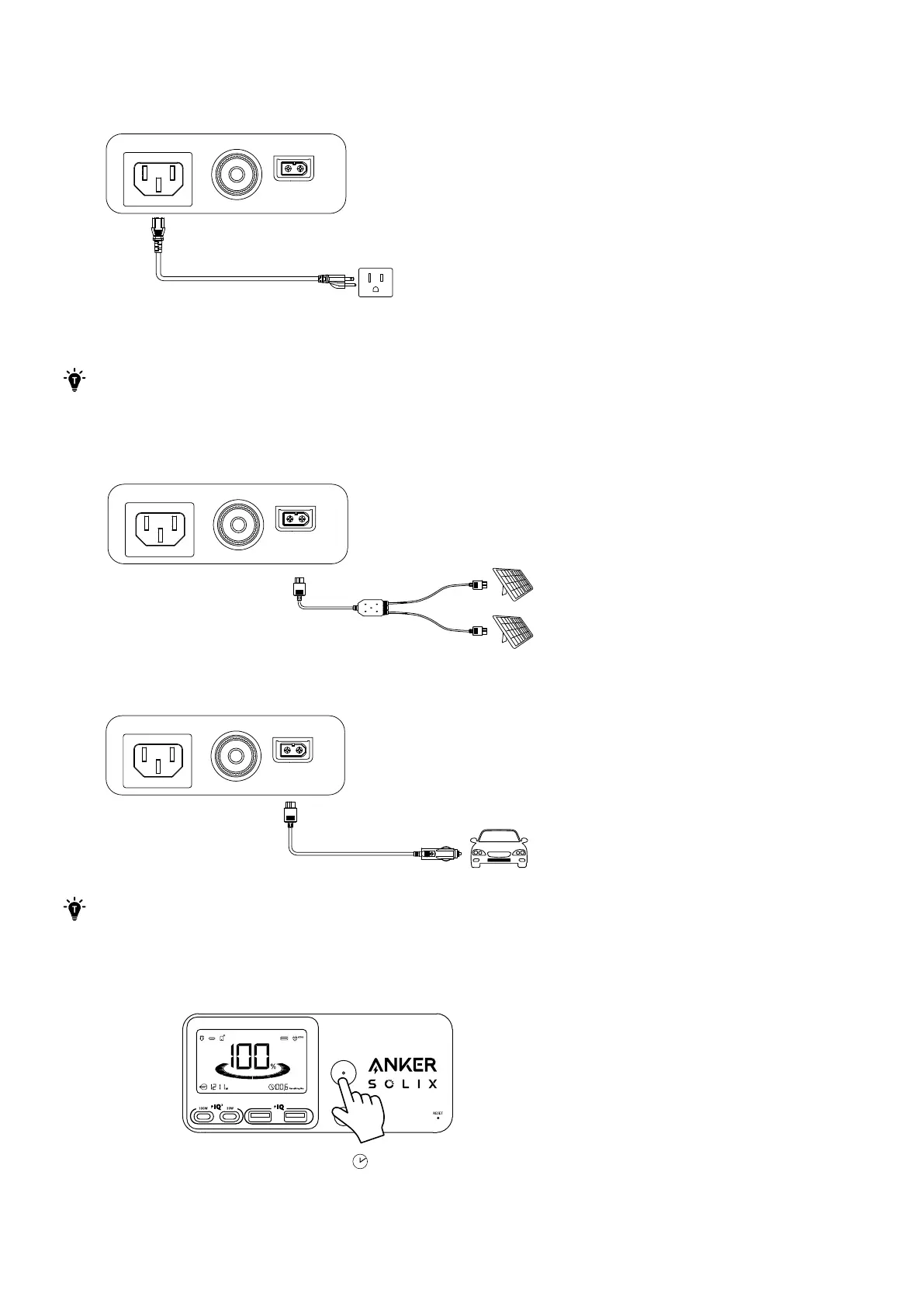
Recharge your power station by connecting to a wall outlet with the AC charging cable.
UltraFast Recharging (1300W Max)
The UltraFast feature gives your power station a maximum 1300W recharge via the AC charging cable. You can enable or
disable this feature in the Anker app.
Recharging at a normal speed can best protect the battery. We recommend using UltraFast recharging when necessary.
Solar Panel Recharging (600W Max)
Recharge your power station with a maximum solar input of 600W by connecting up to two solar panels, as shown in the
figure, with a solar charging cable.
Car Recharging
Recharge your power station by connecting to a car's output port with the car charging cable.
When your portable power station only has 1% battery remaining, the "Remaining Battery" indicator will flicker to
remind you to recharge.
Powering On / O
3s
Press the main power button for 3 seconds to turn your power station on or o.
When the "Remaining Battery" indicator shows on the LCD screen, your power station is ready to charge devices.


 To Next Page