4
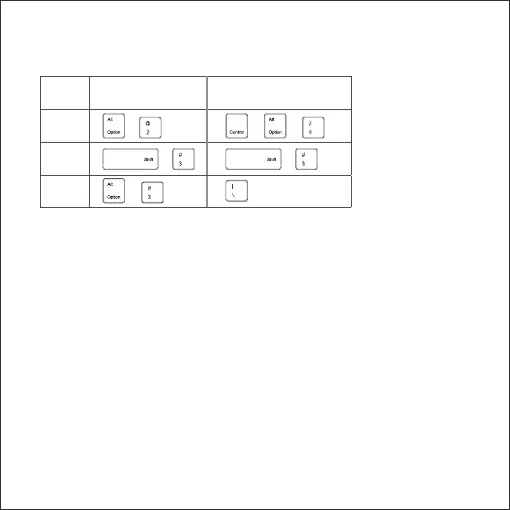
Special symbols (€, £, #) for UK input
iOS & Mac Android & Windows
€ + + +
£ + +
# +
For Android and Windows users: please note “@” and“””are reversed.
Pairing Instructions
■
Turn the power switch to the ON position.
■
Press the Fn and Bluetooth keys together to enter pairing mode.
The indicator light will turn on for 2 seconds and start to flash.
■
Activate your device’s Bluetooth function and search for the keyboard.
■
On your device, click the keyboard name “Anker A7726” to
connect. On your laptop find the keyboard and follow the on-screen
instructions.
■
Once the Bluetooth keyboard has successfully connected to your
device, the indicator will turn off.


 To Next Page