EN
15
[Upgrade]
[Check Update]
Check if it is the latest version. Follow the
on-screen instructions to upgrade the
rmware version.
[About]
[Recovery]
All data on the built-in storage will be
erased.
Using the Nebula Capsule Max
1.
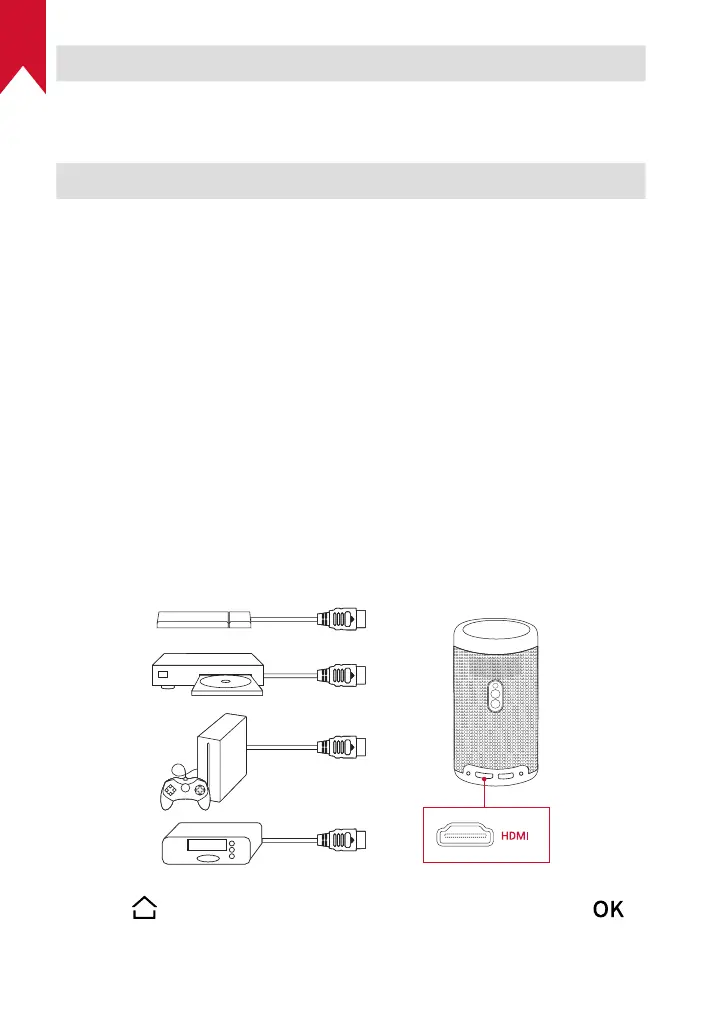
Play from HDMI Playback Devices
Nebula Capsule Max can be connected to various HDMI playback
devices such as a TV box, TV stick, DVD player, set-top box (STB),
gaming consoles, or other devices.
To play content from HDMI playback devices:
①
Connect Nebula Capsule Max to an HDMI playback device with an
HDMI cable (not provided).
②
Press to access the home menu, select [HDMI], and press .
• It will automatically start HDMI playback once connected to an
HDMI playback device for the rst time.



 To Next Page