14 15
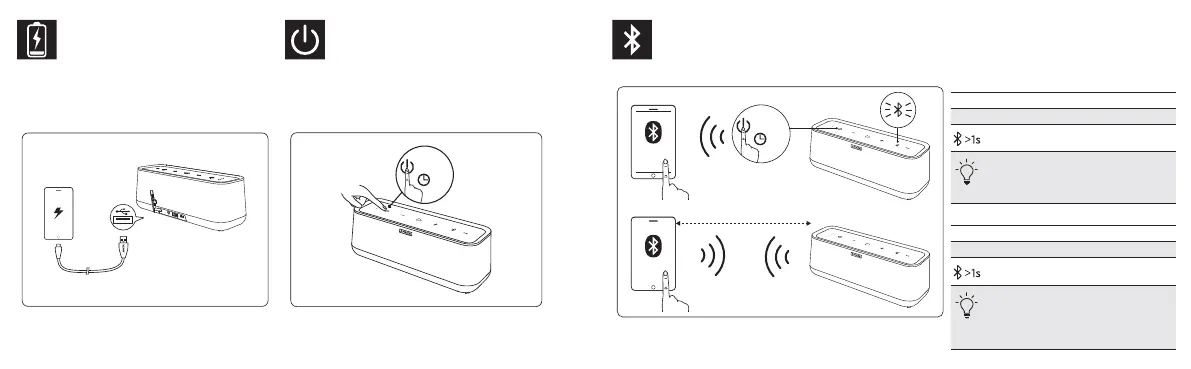
Charge USB Devices
So laden Sie USB-Geräte | USB機器の充電
Charger vos appareils USB | Caricare dispositivi USB
Cargar dispositivos USB | 絛USB霃㢊⯎歏
ijŌŜūŐŖŌ USB-şŝŞŜŚŕŝŞŎ | USB ةزﮭﺟأ نﺣﺷ
Turn on / off
Ein- / Ausschalten | 電源オン / オフ
Allumer / Eteindre | Accendere / Spegnere
Encender / apagar | 䒓劼 / Ⱒ劼
ĮŖŗŪţőřŔő / ŎŧŖŗŪţőřŔő | لﯾﻐﺷﺗ فﺎﻘﯾإ / لﯾﻐﺷﺗ
Bluetooth Pairing
Bluetooth-Kopplung | Bluetooth ペアリング | Couplage Bluetooth | Collegamento Bluetooth
Emparejamiento mediante Bluetooth | Bluetooth ꂁ㼆 | ĽŚśŜūŒőřŔő ţőŜőœ Bluetooth | Bluetooth ﺔﯾﻧﻘﺗ ﺔطﺳاوﺑ نارﻗﻹا
ON
SoundCore Pro
1m
English
Rapidly flashing blue Pairing mode
Steady blue Connected to a device
Un-pair connected device and re-
enter pairing mode
When turned on, SoundCore will
automatically connect to the last
connected device if available. If not,
SoundCore will enter pairing mode.
Deutsch
Schnell blau blinkend Pairing-Modus
Durchgehend blau Mit Gerät verbunden
Verbindung zu verbundenem Gerät trennen
und wieder in den Pairing-Modus treten
Sobald der SoundCore eingeschaltet
ist, verbindet er sich automatisch mit
dem zuletzt verbundenen Gerät. Ist das
zuletzt verbundene Gerät nicht verfügbar,
schaltet er sich in den Pairing-Modus.



 To Next Page