3
4
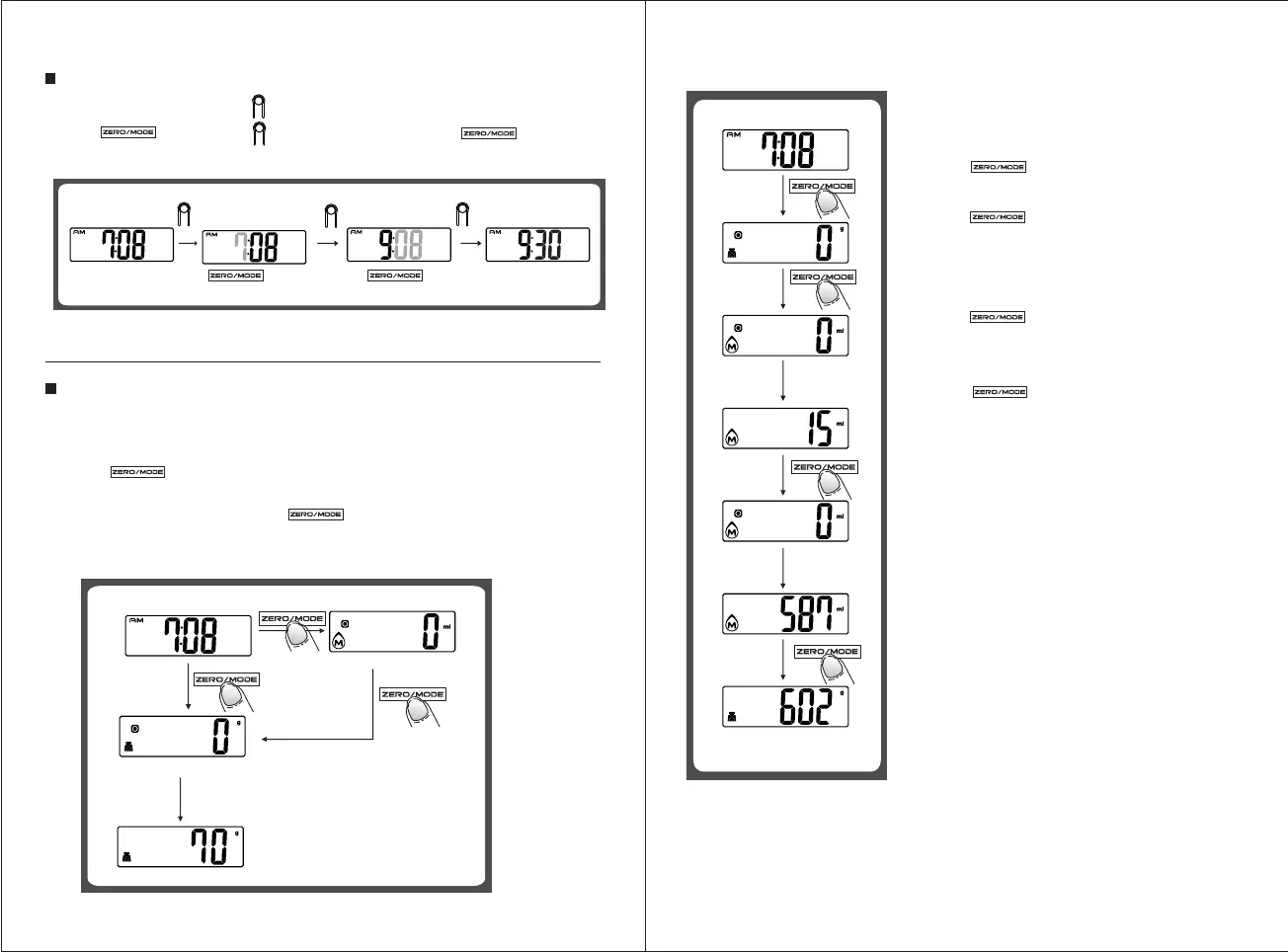
TO RE-SET TIME
Under real time display mode, press for 3 seconds to enter time setting mode. Set hour first, then minute.
Press to adjust time and for confirmation. (Continuous pressing will speed up the
advance of value)
Remark: In time setting process, return to real time display automatically after idling for 60 seconds.
Press for 3 seconds
Press
Press to confirm
Press to adjust time Press to adjust time
TO START WEIGHING
1.Weighing mode
A. Place the scale on a solid and flat surface.
B. Press to change the mode from clock to weighing status, and wait until LCD shows "0".
C. If LCD shows weighing mode,please enter to Step D directly.
If LCD shows volume mode, please press to convert to weighing mode, and then enter Step D.
D. Load weighing object on scale (or bowl) to start weighing, LCD will show the weighing reading.
E. Place bowl (if used) on the scale and tare the reading before weighing. ( Tare function described additionally)
Weighing mode
Load weighing object
Show weighing reading
Milk volume mode
2. Volume indication mode
A. Place the scale on a solid and flat surface
B. Press to change the mode from clock to weighing
status, and wait until LCD shows "0".
C. Press and hold 3 seconds to convert to Water or
Milk mode (Refers to mode setting specifically)
D. Put a liquid container onto the scale platform, LCD shows the
weight of container.
E. Press to reset "0" and tare.
F. Pour liquid (water or milk) into the container, LCD shows the
volume of the liquid.
G. Press to convert to weighing mode, and check the
weight of liquid.
Put on a liquid
container
Pour in liquid


 To Next Page
 Loading...