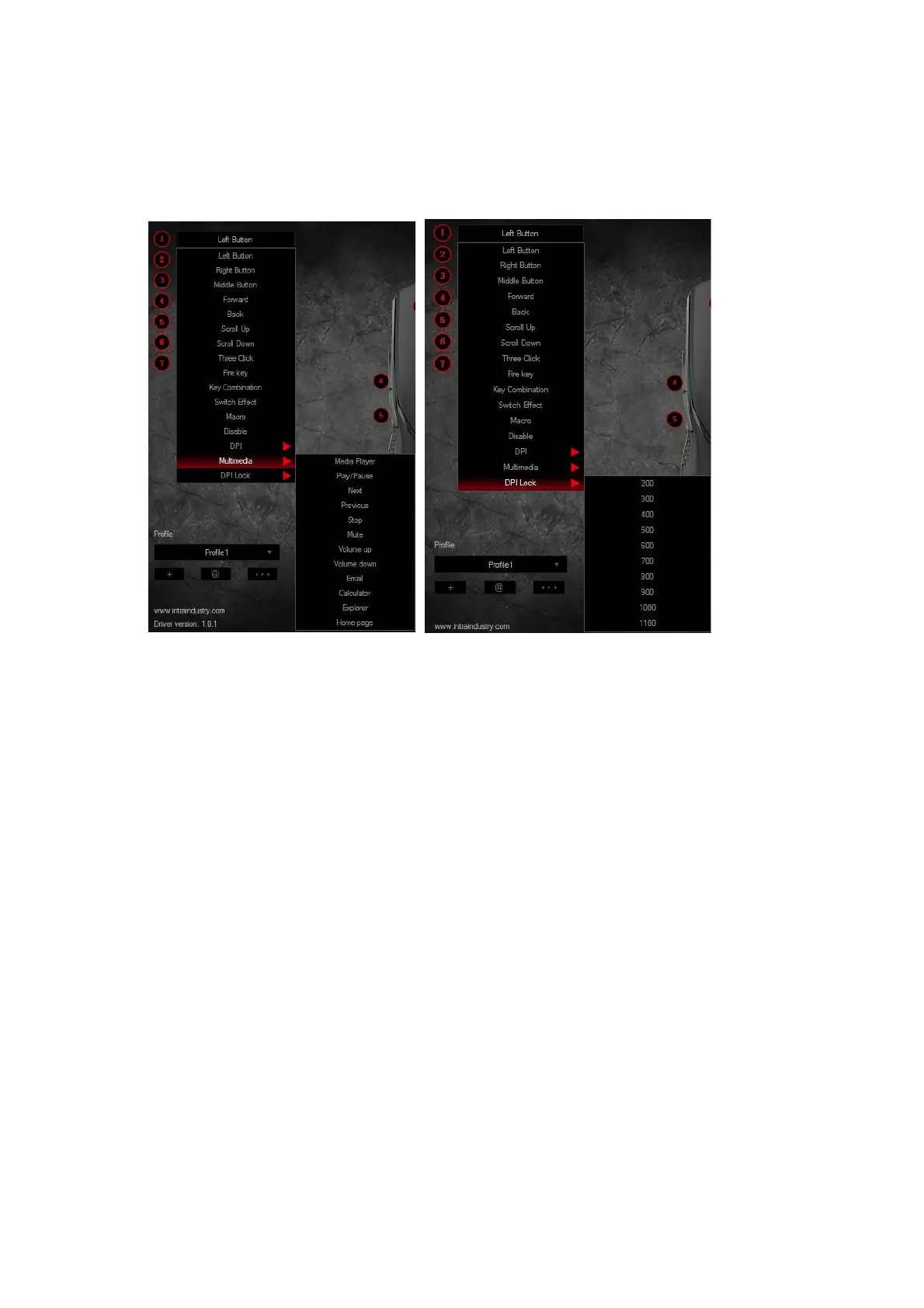
5. Back button: back to previous page
6. DPI loop: DPI loop switch
7. Three click:Equivalent to click the left key for 3 times
8. Fire key: Speed rate can be adjust in software for the mouse key.
9. Key combination: customize Ctrl, Shift, Alt, Win and any of the keyboard buttons to
combine button functions (support 3 reassembles farthest, such as Ctrl+ A+B)
10. Switch effect: led switch function
11. Marco Function: see more details in Macro Editor
12. Disable the key: to set bottom has no function.
13. DPI: DPI+, DPI- and DPI loop
14. Multimedia function: include Media Player, Play/Pause, Next, Previous, Stop, Mute,
Volume Up, Volume Down, Email, Calculator, Explorer and Homepage functions.
15. DPI lock: Locking DPI, from 200-1100 to lock any of the DPI values.


 To Next Page