EasyManua.ls Logo

anko 43157129 - How to Use the Keyboard; Connecting the Receiver; Matching the Receiver; Keyboard Functions

anko 43157129
4 pages
Print Icon
To Next Page IconTo Next Page
To Previous Page IconTo Previous Page
Loading...
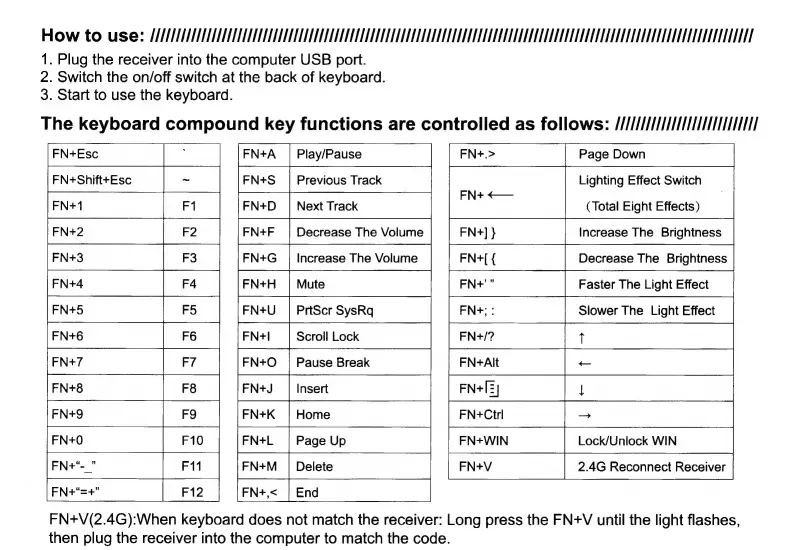
How
to
use:
MMMM
1.
Plug
the
receiver
into
the
computer
USB
port.
2.
Switch
the
on/off
switch
at
the
back
of
keyboard.
3.
Start
to
use
the
keyboard.
The
keyboard
compound
key
functions
are
controlled
as
follows:
////////MMIMMMHI
ne
FN+
<—
:
(Total
Eight
Effects)
Faster
The
Light
Effect
FN+;
:
Slower
The
Light
Effect
FN+Esc
FN+Shift+Esc
FN+1
F8
F9
FN+V(2.4G):When
keyboard
does
not
match
the
receiver:
Long
press
the
FN+V
until
the
light
flashes,
then
plug
the
receiver
into
the
computer
to
match
the
code.
Play/Pause
FN+U
|
PrtScr
SysRq
FN+I
Scroll
Lock
FN+/?
T
TI
Z Z
+
+
I
>
FN+Alt
FN+Ctrl
n/m
+
|
+
mn
Qa
FN+L
FN+WIN
FN+M
|
Delete
FN+,<

Related product manuals