Chapter 3 Measurement
3-40
3.8.1.1 Parameter Area
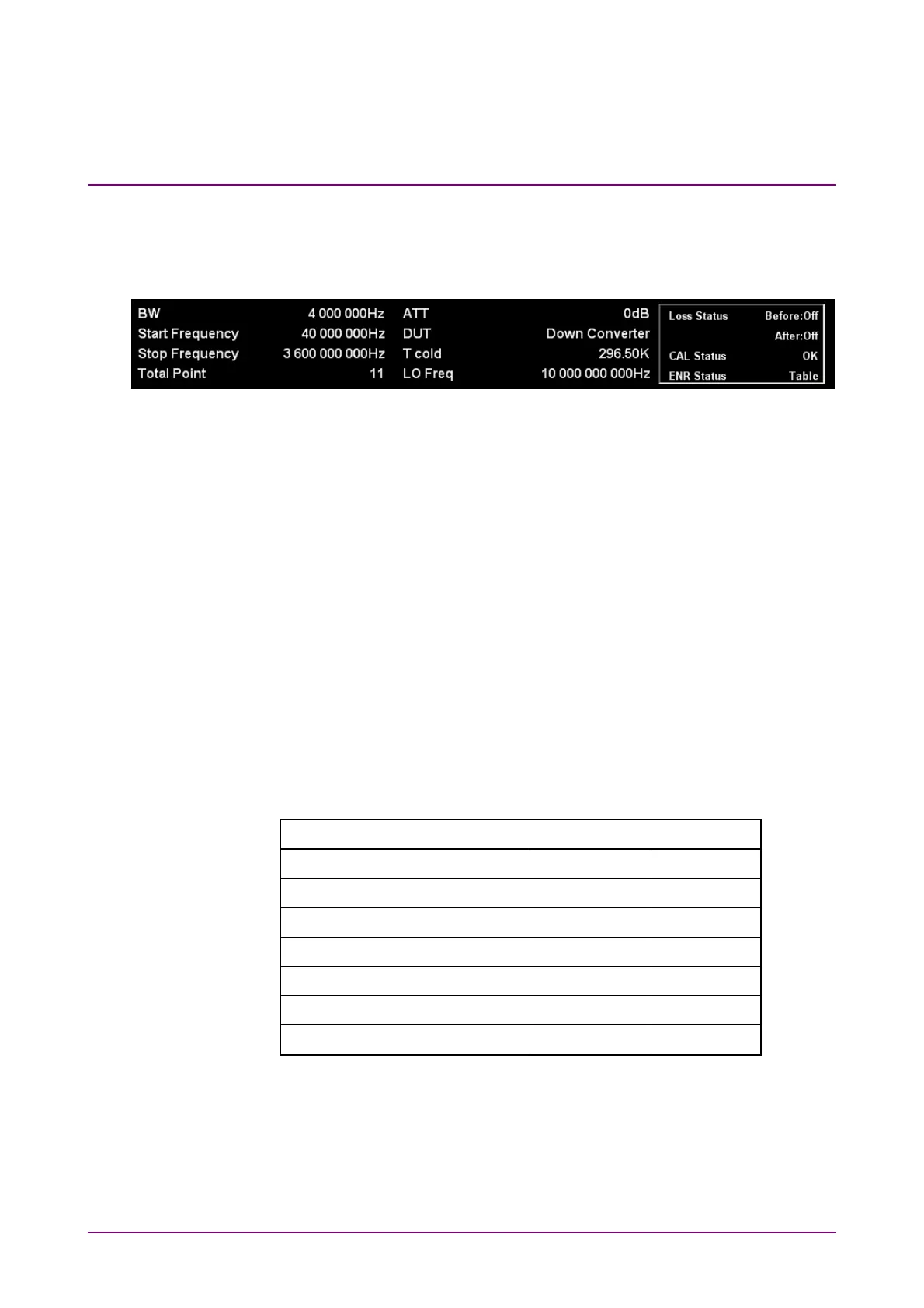
This section describes the detail of the parameter area. The parameter
area is common for all of List display, Graph display, and Spot display.
Figure 3.8.1.1-1 Close Up of the Parameter Area
[1] BW: Displays the BW value.
[2] Start Frequency: Displays the value of Start Frequency only when
the Frequency mode is set to Sweep.
[3] Stop Frequency: Displays the Stop Frequency value only when the
Frequency mode is set to Sweep.
[4] Total Point: Displays the value of Total Point only when the
Storage Mode is set to Fixed.
[5] ATT: Displays the Attenuator value.
[6] DUT: Displays the DUT mode.
[7] T Cold: Displays the T Cold value.
[8] Loss Status: Displays the value of Loss Status, depending on the
Before DUT and After DUT settings.
Table 3.8.1.1-1 Loss Status Display List
Loss Status Display Before DUT After DUT
Before: Off After: Off Off Off
Before: Fixed After: Off Fixed Off
Before: Off After: Fixed Off Fixed
Before: Fixed After: Fixed Fixed Fixed
Before: Table After:Off Table Off
Before: Off After: Table Off Table
Before: Table After: Table Table Table
Note:
When Before DUT or After DUT is set to Table, if Table loading
fails, Loss Status is displayed in red. Performing measurements as
it is does not provide correct measurement results. After Table
loading is completed, perform the measurement.
[1]
[2]
[3]
[4]
[5]
[6]
[7]
[8]
[9]
[10]
[11]






 To Next Page