
 Need help?
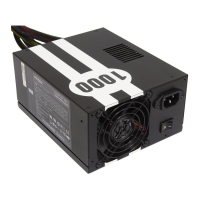
Do you have a question about the Antec TruePower Quattro TPQ-1000 and is the answer not in the manual?
Describes the innovative fan design for noise reduction and superior cooling.
Details the system for using only necessary power cables to reduce clutter and improve airflow.
Instructions for mounting the power supply unit into the computer case using screws.
Guide for connecting the 24-pin main power connector to the motherboard.
Instructions for connecting the 8-pin or 4-pin connector for the CPUs.
Steps for connecting cables from the cable pack to the power supply sockets.
Procedure for connecting the AC power cord and turning on the power supply.
Highlights advantages like energy savings, reduced cooling load, and increased system reliability.
 General
| Model | TPQ-1000 |
|---|---|
| Wattage | 1000W |
| Efficiency | up to 85% |
| 80 PLUS Certification | 80 PLUS Bronze |
| Form Factor | ATX |
| Cooling | 120mm Fan |
| +12V Rails | 4 |
| Main Connector | 24-pin |
| Floppy Drive Connector | 1 |
| Over Voltage Protection | Yes |
| Over Power Protection | Yes |
| Short Circuit Protection | Yes |
| Modularity | Fully Modular |
| Input Voltage | 100-240V |
| Input Frequency | 50-60Hz |
| PCI-Express Connector | 6+2 pin |
| Dimensions | 150mm (W) x 86mm (H) |
| Input Current | 10A @ 115V, 5A @ 230V |



 To Next Page