15
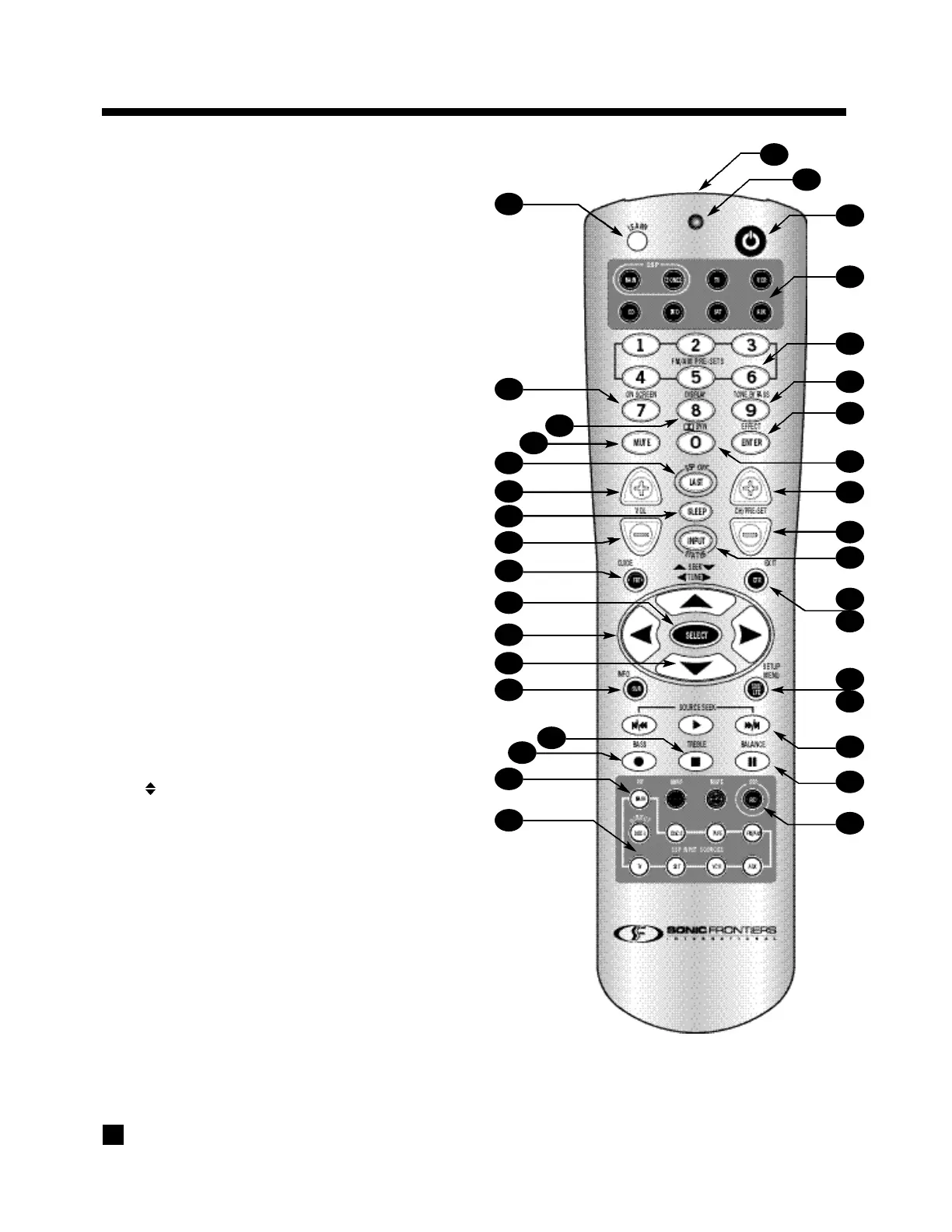
3.3 REMOTE CONTROL LAYOUT
1 – IR Transmitter (front face)
2 – Transmission Indicator LED (red)
3 – AVM 2 Power ON when MAIN or ZONE2 is selected
Power ON/OFF for other components (see #4)
Note: This does not turn the AVM 2 off (see #31)
4 – Zone/Path/Component ‘Personality’ Selection
5 – FM/AM Station Preset Selection (6)
6 – Tone Bypass Selection
7 – Dolby Pro-Logic / Effects / 96 kHz Stereo Selection
8 – Dolby Digital Dynamics Selection
9 – FM/AM Pre-set Station Up
10 – FM/AM P r e-set Station Down
11 – Status
12 – Center Channel Selection for Adjustment
13 – Back / Exit for Setup Menu
14 – Subwoofer Level / LFE Level Selection
for Adjustment
15 – Setup Menu (Press & Hold for 3 seconds)
16 – Source Seek
17 – Balance Selection for Adjustment
18 – REC Path Selection (Must be in MAIN – see #4)
19 – Source Selection 8 Keys – 9 inputs (Direct – press twice)
20 – MAIN Source copy to ZONE2 or REC
21 – Bass Selection for Adjustment
22 – Treble Selection for Adjustment
23 – Surround Channels Selection for Adjustment
24 – FM/AM Seek / Setup Menu Navigation /
Bass/Treble Adjustment
25 – 34FM/AM Tune / Setup Menu Navigation /
Balance Adjustment
26 – Select Function in Setup Menu
27 – Front Channels / Headphones Selection for Adjustments
28 – Volume Down
29 – Sleep Timer Selection
30 – Volume Up
31 – AVM 2 Power OFF when MAIN or ZONE2 is selected
32 – Mute
33 – Front Panel / LCD Display Brightness Selection
34 – On-Screen
35 – Learn (for customization of remote)
• See section 6 for complete information on operation of the Remote Control.
3. PANELS/DISPLAY/REMOTE LAYOUT continued …
2
1
3
4
6
7
8
11
16
17
18
19
35
20
34
26
31
23
21
27
28
33
29
22
12
13
14
15
9
5
10
25
24
30
32


 To Next Page