33
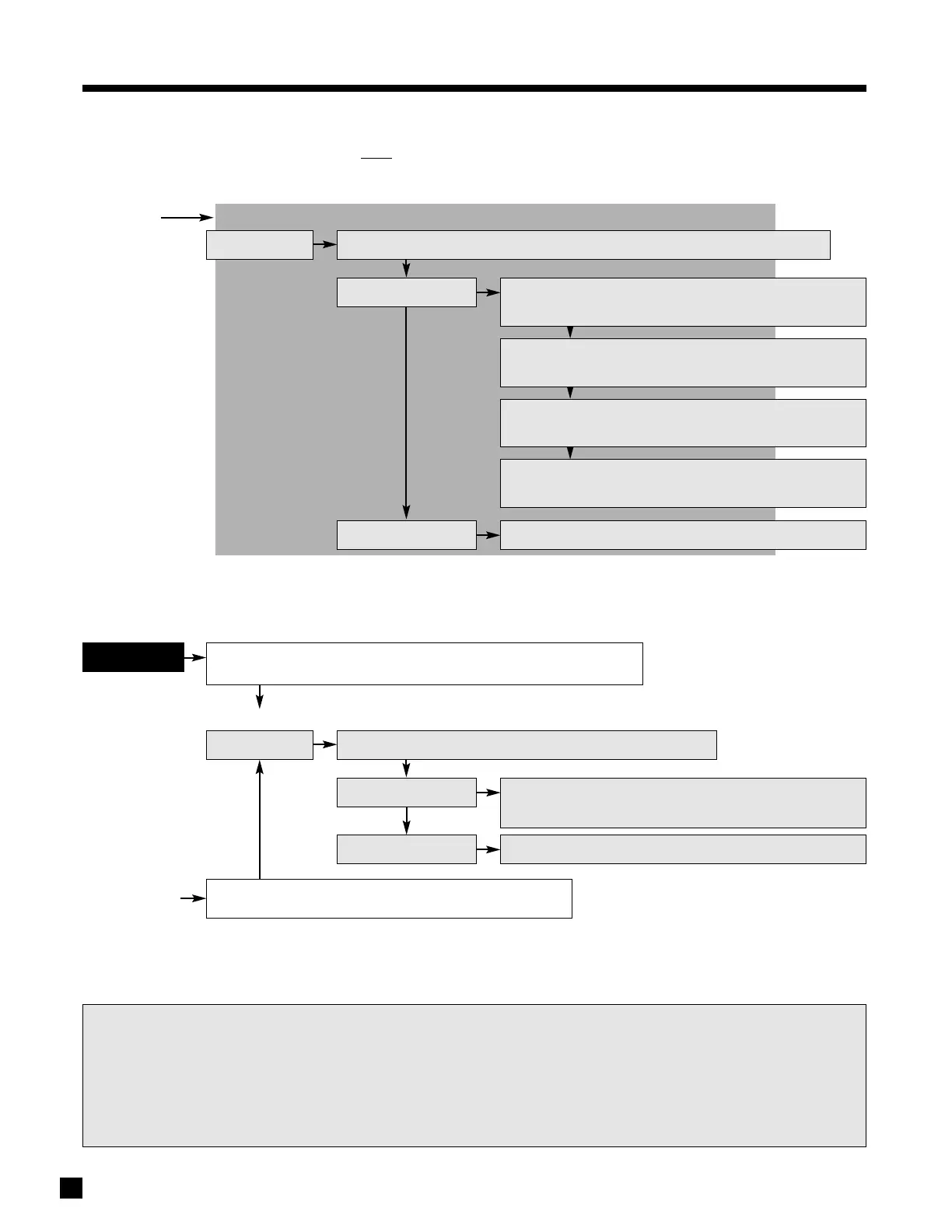
Press Mode
DTS Neo:6: On using
MCK
(or North/South keys on remote control)
Output channels – 6.1 (LF, C, RF, RS, LS, Rear, LFE/Sub)
DTS 5.1
5.8.9 Mode and THX Operation for DTS
Program Material (THX operation is optional)
5. FRONT PANEL OPERATION
continued …
Press THX 2nd Time
RE-EQ Filter: On/Off
using MCK
(or N/S keys)
THX for DTS Neo:6 / DTS-ES Mtx / DTS-ES Dis
Processing – Re-EQ, Timbre Matching
Output channels
– 6.1 (LF, C, RF, RS, Rear, LS, LFE/Sub)
DTS-ES Matrix
Autodetected
Output channels – 6.1 (LF, C, RF, RS, Rear, LS, LFE/Sub)
DTS-ES Discrete
Press THX
DTS 5.1
THX Options
THX Cinema
Processing – Re-EQ, Timbre Matching, Adp.Decorrelation
Channels – 5.1 (LF, C, RF, RS, LS, LFE/Sub).
THX Ultra2 Cinema
Processing – Re-EQ, Timbre Matching, Adp.Decorrelation, ASA (Cinema)
Output channels
– 7.1 (LF, C, RF, RS, RR, LR, LS, LFE/Sub)
THX MusicMode
Processing – Timbre Matching, Adp.Decorrelation, ASA (Music)
Output channels
– 7.1 (LF, C, RF, RS, RR, LR, LS, LFE/Sub)
THX for DTS
Neo:6
(automatically engages Neo:6)
Processing – Re-EQ, Timbre Matching
Output channels
– 6.1 (LF, C, RF, Rear, LR, LS, LFE/Sub)
Press THX 2nd Time
RE-EQ Filter: On/Off
using MCK
(or N/S keys)
Cycles THX Modes:
Select using MCK
(or N/S keys on remote control), or Off
Select THX Mode
Press THX
THX Options
Cycles THX Modes:
Select using MCK
(or N/S keys), or Off
Select THX Mode
THX Processing (for complete descriptions see section 5.8.6):
• Re-Equalization – De-emphasizes treble. Defeatable by turning RE-EQ:Off.
• Timbre Matching – Matches the sound character, or timbre, of the surround channels to the front channels.
• Adaptive Decorrelation
– When content of L/R-Surrounds is mono, adjusts time and phase to restore spaciousness.
• ASA (Cinema) – Blends Surrounds and Rear for optimal mix of ambient and directional surround sounds.
• ASA (Music) – Applied to the Surrounds of all 5.1 music sources to provide a wide stable rear soundstage.



 To Next Page