EN
67
REMOTE CONTROL
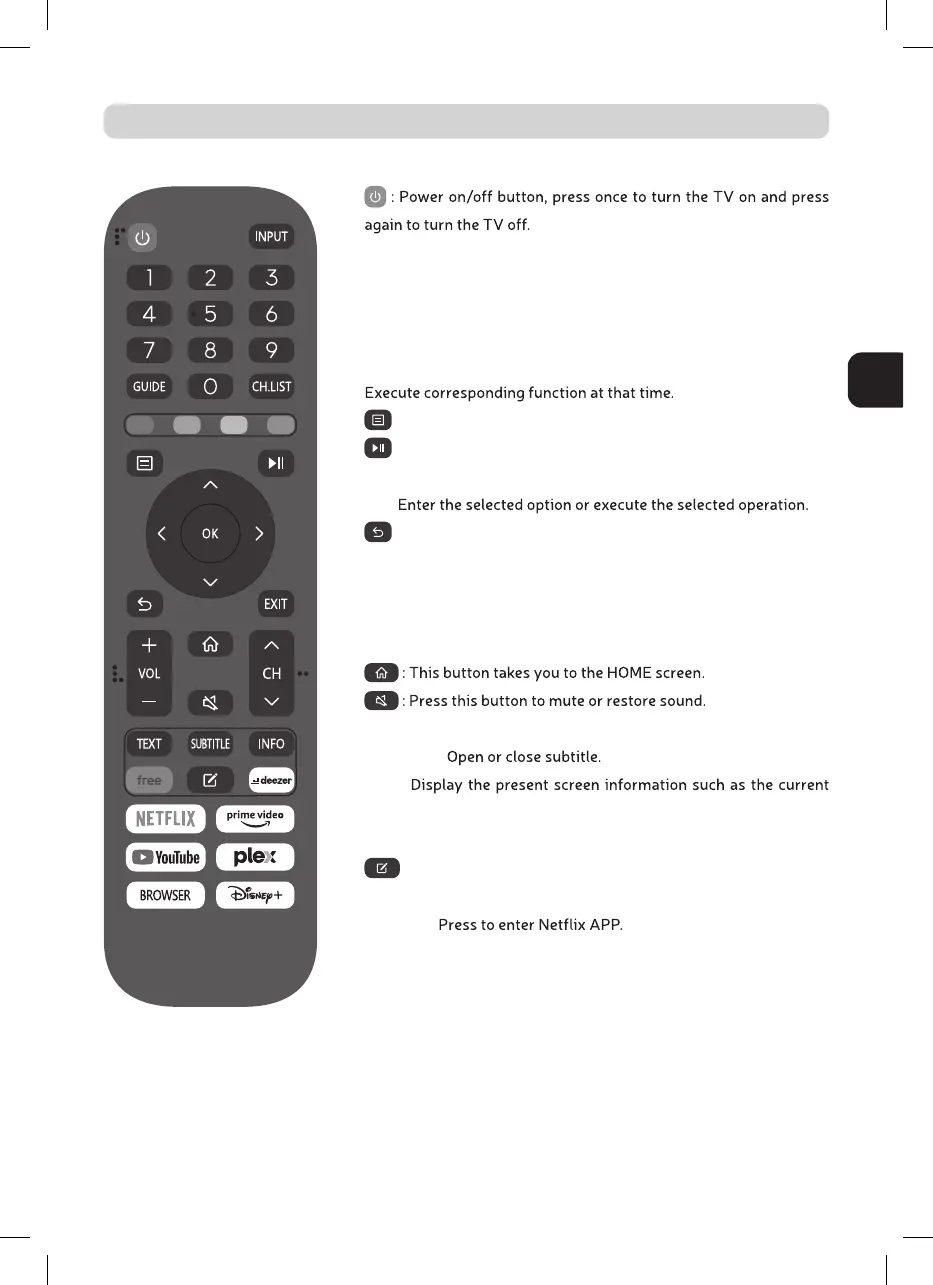
INPUT: Press to change signal source.
0-9: Select and switch to a channel using 0 - 9.
GUIDE: Launches the EPG (Electronic Program Guide)
CH.LIST: Display program list.
COLOR BUTTONS (RED, GREEN, YELLOW, BLUE):
: Displays the main TV menu.
: Press to start playing/pause playing the MEDIA.
(In USB models)
OK :
: Switch back and front between the current and previous chan-
nels.
EXIT: Exit the main TV menu.
VOL-/VOL+: Adjust the volume.
CH /CH : Change the channel up and down.
TXT: Press to enter the Teletext mode.
SUBTITLE:
INFO:
channel and input source.
FREE: Press to enter VIDA Free APP.
: Press to EDIT shortcut keys.
DEEZER: Press to enter deezer APP
NETFLIX:
PRIME VIDEO: Press to enter prime video APP.
YOUTUBE: Press to enter YouTube APP.
PLEX: Press to enter PLEX APP.
BROWSER: Press to enter Browser APP.
Disney+: Press to enter the Disney+ APP.



 To Next Page