General Settings
User Enroll
②
②
Click “Enroll
Face” and input
ID for quick
face
registration.
Keep face in the center of the detection frame, according to the
device request.
Slightly move head left and right, up and down during the
registration.
If the registration process takes too long or fails, please change
the registration position.
In some cases, the detection frame might move to the top, it
might be triggered by glasses. Take the glasses off, and try one
again.
① Click“User”/“Add” to input ID,
Password and Name. Click”Register
Face” to enroll.
Click’”Card ” and swipe the card at
the card detection area to finish the
registration.
Registration of Other Authentication Methods
Quick Face Registration
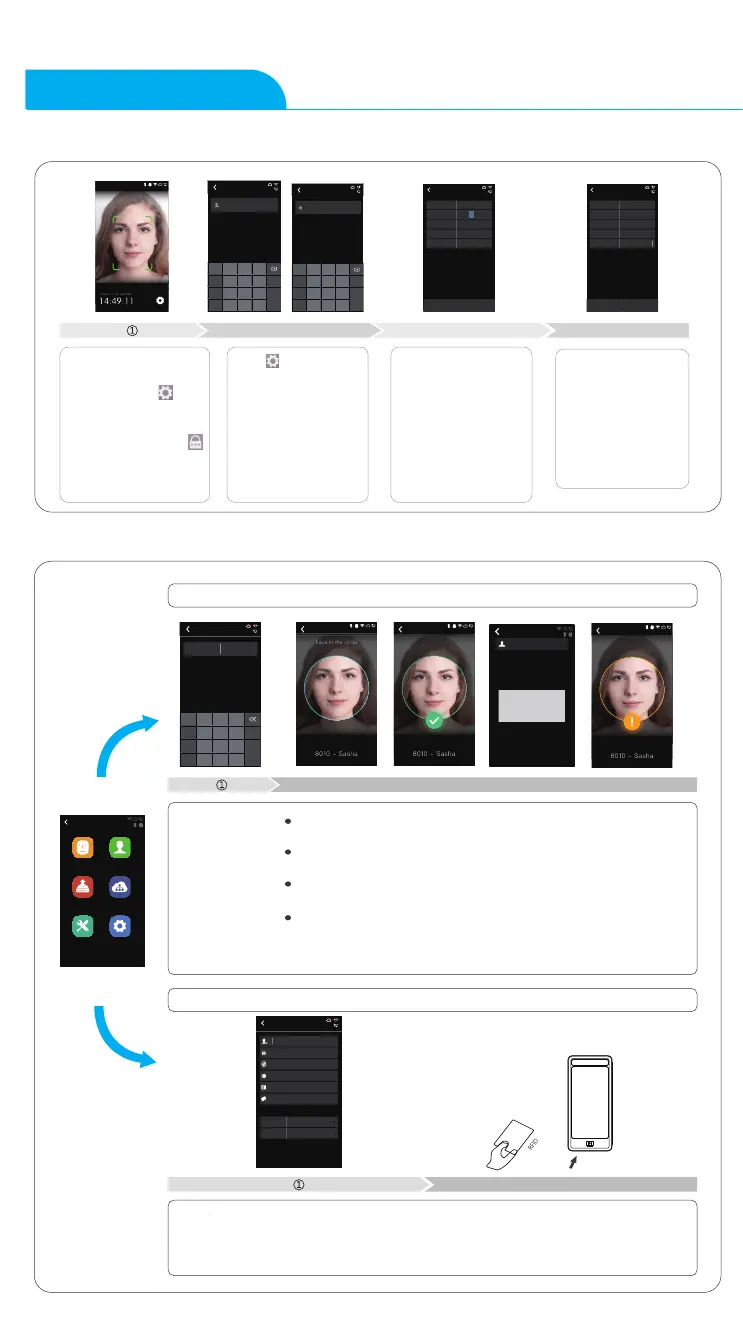
Power on the FaceDeep
5 and wait for the
activation.Click ,
then enter admin ID
and password to access
the main menu.Click
, then input employee
ID and password to
verify.
②
③ ④
Click ,then input
defualt ID “0”,
password “12345”to
enter main menu. You
can change the admin
password according to
your needs, or set
other users as
administrators.
Enter system settings
\ time to set date and
time.
Check or edit device
ID and admin
password in system
settings\device.
8213
Sasha
ID
123
EN
Pin
._@/#
1
4
7
.
2
5
8
0
3
6
9
Space
Return
Tab
Password
123
EN
Pin
._@/#
1
4
7
.
2
5
8
0
3
6
9
Space
Return
Tab
Time
Mode Manual
Time
Date
Time format
Date format
15 : 33 : 12
2018/05/25
24hr
MM-DD-YY
Set
Device
Volume 4
Device ID
Admin PIN Code
web switch
web port
1
12345
Yes
80
Factory Reset Restart
Project Description:
1.Device ID:(0-99999999
)
NEXT
ecaF retsigeR
ecaF retsigeR
8010
Face enroll successfully.
ID:8010
Quick Guide
Already exist
Enrolled
123
EN
Pin
._@/#
1
4
7
.
2
5
8
0
Register Face
3
6
9
Space
Return
Tab
Add
ID
Password
System default
System default
Name
Card
Admin 0-User
Group ID 1-NO
Main
Enroll Face
Data
Setting
User
Network
Advanced


 To Next Page