
 Need help?
Do you have a question about the ANYKIT NTS500 and is the answer not in the manual?
High-performance industrial borescope with 5-inch LCD, ergonomic design, snapshot/recording, TF card storage, and built-in flashlight.
Instructions for safe operation, probe care, temperature limits, keeping the tool dry, and handling damaged devices.
Guidance on using a 5V charger, device operation during charging, and periodic charging to prevent battery damage.
Details on the borescope's camera probe connector, light control, snap button, enter button, selection buttons, mode switch, settings, power, hanging ring, charging port, and TF card slot.
Instructions for turning the device on/off and connecting the camera cable to the monitor for optimal image display.
Guidance on inserting and ejecting TF cards, requirements for TF cards, and switching between photo/video/viewing modes.
Steps to access and change the device's display language from the settings menu.
Instructions for taking photos, recording videos, and navigating playback mode, including deleting files.
Methods for copying photos and videos using a TF card reader or USB cable, with a safety note.
Detailed technical data for the display resolution, probe resolution, image and video resolutions, camera diameter, cable length, resolution, viewing angle, and depth of field.
Information on LED flashlight, battery capacity, battery life, operating temperature, charging time, waterproof rating, certifications, and included accessories.
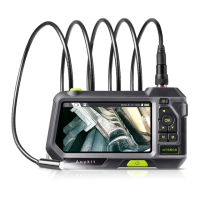
The ANYKIT Industrial Borescope, model NTS500, is a high-performance industrial inspection tool designed for detailed visual inspection in various environments. It features a 5-inch high-definition color LCD, providing clear and precise images and videos of inspection areas. The device is ergonomically designed, allowing for comfortable one-handed operation, which enhances user convenience during prolonged use.
The primary function of the NTS500 borescope is to capture snapshots and record videos of hard-to-reach areas. These visual data are saved to a TF memory card (micro-SD card), enabling users to document their inspections for later review, analysis, or reporting. The device is equipped with multiple illumination features to ensure visibility in dark conditions. It integrates high-brightness illumination, a quick-access flashlight, and a 6-LED ringlight around the camera probe. This comprehensive lighting system ensures that the inspection area is adequately lit, allowing for clear image capture even in the darkest environments.
A key feature of the NTS500 is its interchangeable camera probe. This allows users to swap out probes with different lengths, diameters, view angles, and focal lengths, making the device highly versatile for a wide range of inspection tasks. This adaptability ensures that the borescope can be configured to suit specific inspection requirements, from narrow pipes to larger cavities.
The device supports three main modes of operation: photo taking, video recording, and playback. Users can easily switch between these modes using the dedicated mode button. In photo taking or video recording mode, a snap button allows for quick capture of images or initiation/termination of video recording. For reviewing captured media, the playback mode, combined with up and down selection buttons, enables users to navigate through photos and videos. An "Enter" button serves to confirm selections or freeze the screen, providing flexibility during inspection and review.
The NTS500 also includes a settings menu, accessible via a dedicated button, where users can adjust various parameters such as date and time. The device's language settings are comprehensive, supporting English, Chinese, German, French, Spanish, Italian, Russian, and Japanese, with English as the default. This multi-language support makes the device accessible to a broader international user base.
To operate the NTS500, users first need to connect the camera probe to the main monitor. It is crucial to ensure a proper connection to prevent noisy images on the screen. The device is powered on by long-pressing the power button. Once on, the light control button allows for adjustment of the LED brightness on the camera probe, optimizing illumination for different inspection scenarios.
The device comes with a TF memory card pre-inserted. Users are advised to power off the device before inserting or removing the TF card and to ensure correct orientation to avoid damage. The NTS500 requires a Class 10 high-speed TF card for proper functionality; lower speed cards (e.g., Class 4) may not work correctly. Photos and videos can only be taken when a TF card is inserted.
For data transfer, the NTS500 offers two methods. Users can either use a TF card reader to directly copy files to a computer or connect the device to a computer using a Micro-USB cable. When using the USB cable for copying and charging, it is important to first pull out the probe camera to prevent any potential issues.
The device is powered by a built-in 3500mAh rechargeable lithium battery, which provides a working time of up to 4 hours on a full charge. It can also operate while charging. The charging port is a Micro-USB interface.
Maintaining the NTS500 ensures its longevity and optimal performance. Users should avoid hitting the camera probe and refrain from pulling on the cable, as this can cause damage. The camera probe is protected by a waterproof layer, and care should be taken not to damage this layer.
Temperature sensitivity is an important consideration for the camera probe. It should not be exposed to temperatures above 113°F (45°C). When inspecting automotive engines or other hot environments, it is essential to ensure that the engine or component has cooled down sufficiently to prevent damage to the probe.
The tool should be kept dry and clean, free from oil, water, gas, or any other materials that could cause corrosion. This helps preserve the integrity of the device and its components.
For battery maintenance, it is recommended to use a 5V household charger that complies with safety regulations. If the device is not used for an extended period, it should be charged at least once every 3 months. This practice prevents irreparable damage to the battery caused by excessive discharge, ensuring the battery remains in good condition.
The NTS500 is designed for industrial use and is not intended for medical applications or human examination. It is also not intended for use by individuals with limited physical, sensory, or mental capabilities. During operation, bystanders and children should be kept away from the tool for safety.
In case of device damage, users are advised not to disassemble it. Instead, they should contact customer service for assistance, as detailed on the last page of the manual. This ensures that any repairs or maintenance are performed by qualified personnel, preserving the device's warranty and functionality.
 General
| Focal Distance | 3-10 cm |
|---|---|
| Battery Capacity | 3500 mAh |
| Resolution | 1280 x 720 pixels |
| Waterproof Level | IP67 |
| Cable Length | 5 meters |
| Screen Size | 5 inch LCD |

 To Next Page