53
10. Firmware and DDC Instruction
10.1 Firmware Instruction(Novatek ISP for exemple NT68676)
Step 1:OPERATION CONDITIONS:
1) An i486 (or above) personal computer or compatible.
2) Microsoft operation system Windows 95/98/2000/XP.
3) ISPTool programs programs.
4) Printer cable and VGA cable.
5) ISP board (PN: 715GT034-B,715GT048-1 or715GT035-A).
6) ISP Firmware/Software
Step 2:Connection:
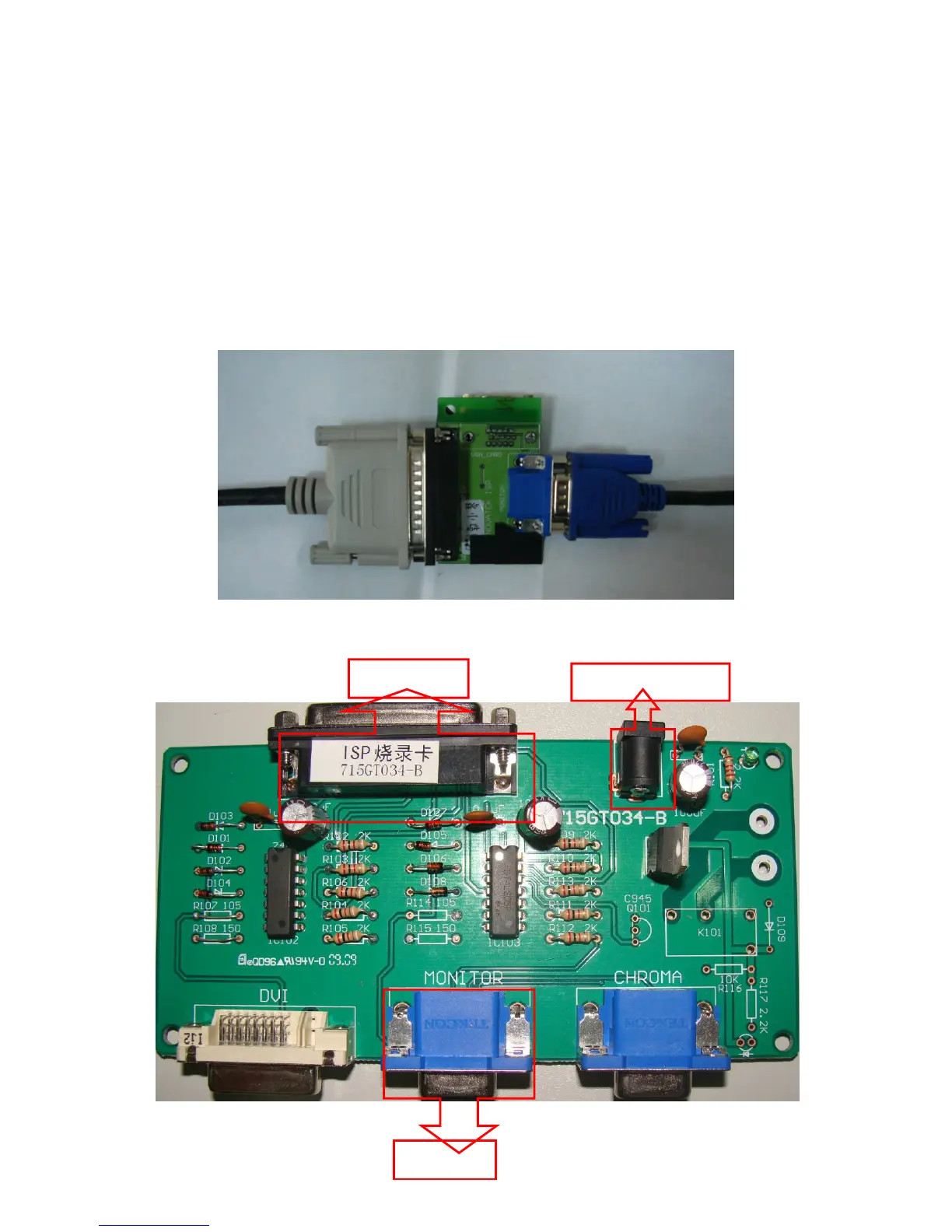
1) LPT cable connect PC and ISP board ;
2) VGA cable connect monitor and ISP board ;
3) Reference picture as below
NO1. TPV Part No. : 715GT048-1 or 715GT035-A(715GT048-1 or 715GT035-A)
NO2. TPV Part No : 715GT034-B(NEW LCD EDID TOOL :715GT034-B)
To PC LPT Port
Connect 12V power
To Monitor


 To Next Page