EasyManua.ls Logo

AOC LM725 - User Manual

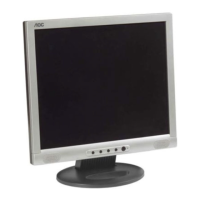
AOC LM725
51 pages
Print Icon
To Next Page IconTo Next Page
Loading...
AOC LM725
1
17” LCD MONITOR
LM725
THESE DOCUMENTS ARE FOR REPAIR SERVICE INFORMATION ONLY. EVERY REASONABLE EFFORT HAS
BEEN MADE TO ENSURE THE ACCURACY OF THIS MANUAL; WE CANNOT GUARANTEE THE ACCURACY OF
THIS INFORMATION AFTER THE DATE OF PUBLICATION AND DISCLAIMS RE LIABILITY FOR CHANGES,
ERRORS OR OMISSIONS.
SERVICE MANUAL

Questions and Answers

  • W
    william87Aug 3, 2025
    How to troubleshoot no power on AOC LM725 Monitor?
    • J
      Jenna RiveraAug 3, 2025
      If your AOC monitor has no power, first press the power button to see if the picture appears normal. If not, reinsert the AC power cord, ensuring it's properly connected and that the power outlet is providing a normal 100-240V. If the issue persists, measure U201 PIN2, it should be 2.5V, and U202 PIN2, it should be 3.3V. Also, verify that X601 and X401 oscillate and their waveforms are normal. If problems continue, consider replacing U601, checking or reinserting the Adapter/Inverter, checking CN201, or replacing U201, U202, X601, X401, or U401.
  • M
    Melissa BarnesAug 12, 2025
    What to do if my AOC Monitor has no picture and the LED is orange?
    • K
      Kimberly HernandezAug 12, 2025
      If your AOC monitor's LED is orange but there's no picture, and the X601 isn't oscillating, try replacing X601. Also, check the reset circuit for any issues and examine the corresponding components. Measure U201 PIN2 to ensure it reads 2.5V and U202 PIN2 to ensure it reads 3.3V. If problems continue, consider replacing U601, U201, U202, or X401. Also, check the corresponding components.
  • A
    Angel BakerAug 25, 2025
    Why does my AOC LM725 Monitor have a white screen?
    • B
      Benjamin WilsonAug 25, 2025
      If your AOC monitor displays a white screen, start by measuring the voltage at the base of Q204. Then, check if Q204 is broken, or if the reset circuit of CN503 has a soldering issue. Verify that U601 is functioning normally. If the issue persists, consider replacing X601, PANEL or U601.

Summary

1. Monitor Specifications

3. Operating Instructions

3.1 General Instructions

Basic steps to power on, connect cables, and adjust settings.

3.2 Front Panel Control

Details front panel buttons, power indicator, and their functions.

3.3 Picture Adjustment & OSD

Guide to adjusting picture settings like contrast, brightness, focus, and OSD.

4. Input;Output Specification

4.1 Input Signal Connector

Details the pinout and layout of the VGA connector.

4.2 Factory Preset Display Modes

Lists supported display resolutions and timing modes.

4.4 Panel Specifications

Details panel features, display, optical, and electrical characteristics.

6. Schematic

6.1 Main Board Schematic

Schematic diagram for the monitor's main logic board.

6.3 Power Board Schematic

Schematic diagram for the monitor's power and inverter board.

6.2 Audio Board Schematic

Schematic diagram for the monitor's audio board.

8. Maintainability

8.1 Equipment and Tools

Lists necessary equipment and tools for maintenance and repair.

8.2.1 Main Board Troubleshooting

Diagnosing and resolving issues with the main logic board.

8.2.2 Power;Inverter Board Troubleshooting

Diagnosing and resolving issues with the power and inverter board.

8.2.3 Keypad Board Troubleshooting

Diagnosing and resolving issues with the keypad board.

9. White-Balance, Luminance Adjustment

AOC LM725 Specifications

General IconGeneral
Screen Size17 inches
Resolution1280 x 1024
Aspect Ratio5:4
Brightness250 cd/m²
ConnectivityVGA
Panel TypeLCD
Viewing Angle160° (H)
Input ConnectorsVGA

Related product manuals