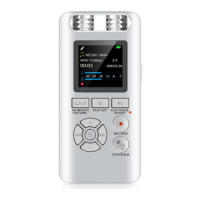
10)Play Music (Used as Player)
11)Delete Files
1. Please connect device to your computer.
1. Delete One:
2. Delete All:
① In the play / pause position, short press the ‘M’
button to access the main menu.
② To select the ‘Delete’ menu, then short press the
Play/Pause button, choose ‘Yes’ to select.
① In the play / pause position, short press the ‘M’
key to access the main menu.
② select ‘Delete all’ menu, then short press the
Play/Pause button, choose ‘Yes’ to delete all the
audio files.
NOTE : When you turn on the device, we can press
the ‘ >/<‘ button to select the files we want to delete.
By default, it will read the latest files, so if we're
going straight to delete, it will delete the latest file.
Deleted file cannot be found, please remember to
backup.
2. To copy music files from your computer to the device.
3. After finished the coping, please make it security
ejected. Please do not unplug the USB cable directly.
4. Long press the ‘M’ button to switch to the music
playing page. Long press the ‘M’ again to switch to
recording files page.
7


 To Next Page