AOMWAY8VISIONSYSTEMS
WWW.AOMWAY.COM
1) Pressdownatcenter:shortpresstoselectdisplaymode
between AV 2D, AV 3D, HD 2D and HD 3D mode; and long
press5stoshutoffRFinput,otherwiseDVRcannotplayback;
2) Moveup/downforcontrast‘+/‐’adjustment;
3) Moveleft/rightforbrightness‘‐/+’adjustment.
Key④( pressbuttononleftside):
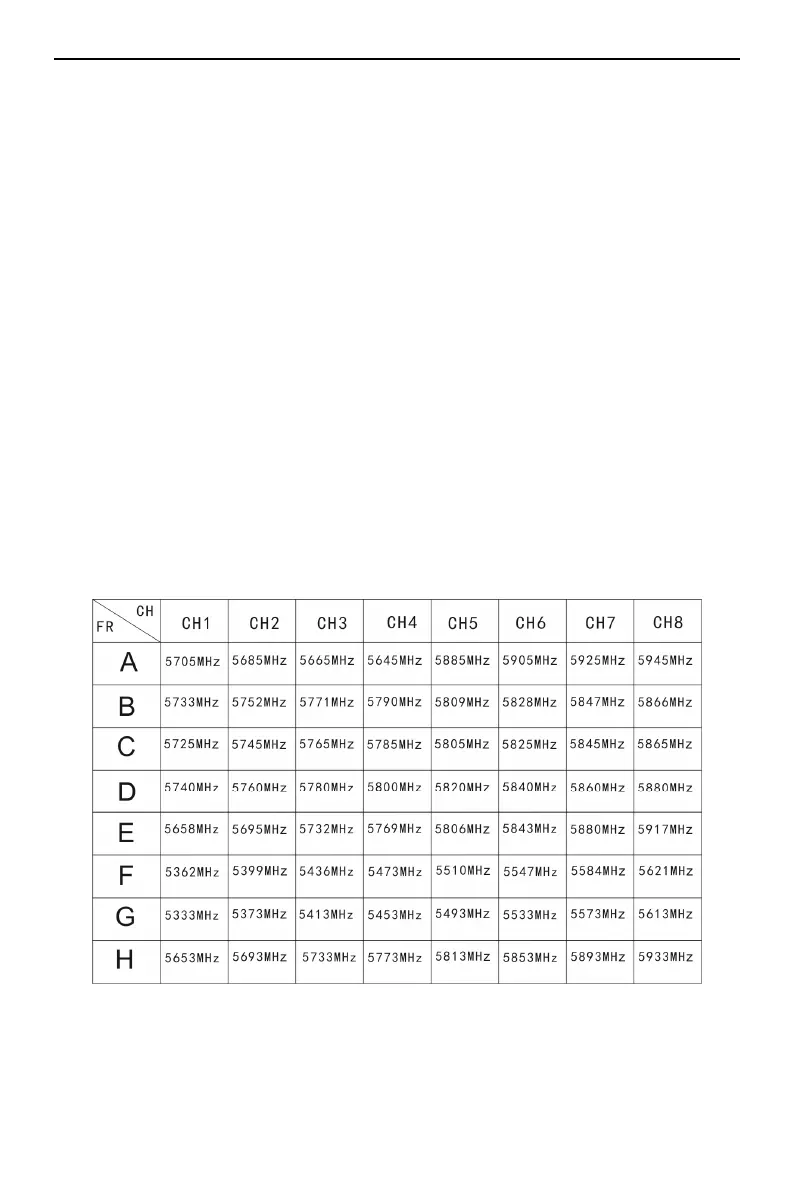
1) Each time long press button 3s to select the next band
betweenbandA,B,C,D,E,F,G,andH;
2) ShortpressbuttontoselectchannelfromCH1to8;
3) Longpressbutton5stostartautoscanbetween64CH
and
wholeprocesslastsabout6s;
4) When selecting band/channel, channel# will display on
screenfor5s.
Position⑤:TF cardslot for DVRrecording,maximum
supportto32GB;


 To Next Page