EN-13
The Function page
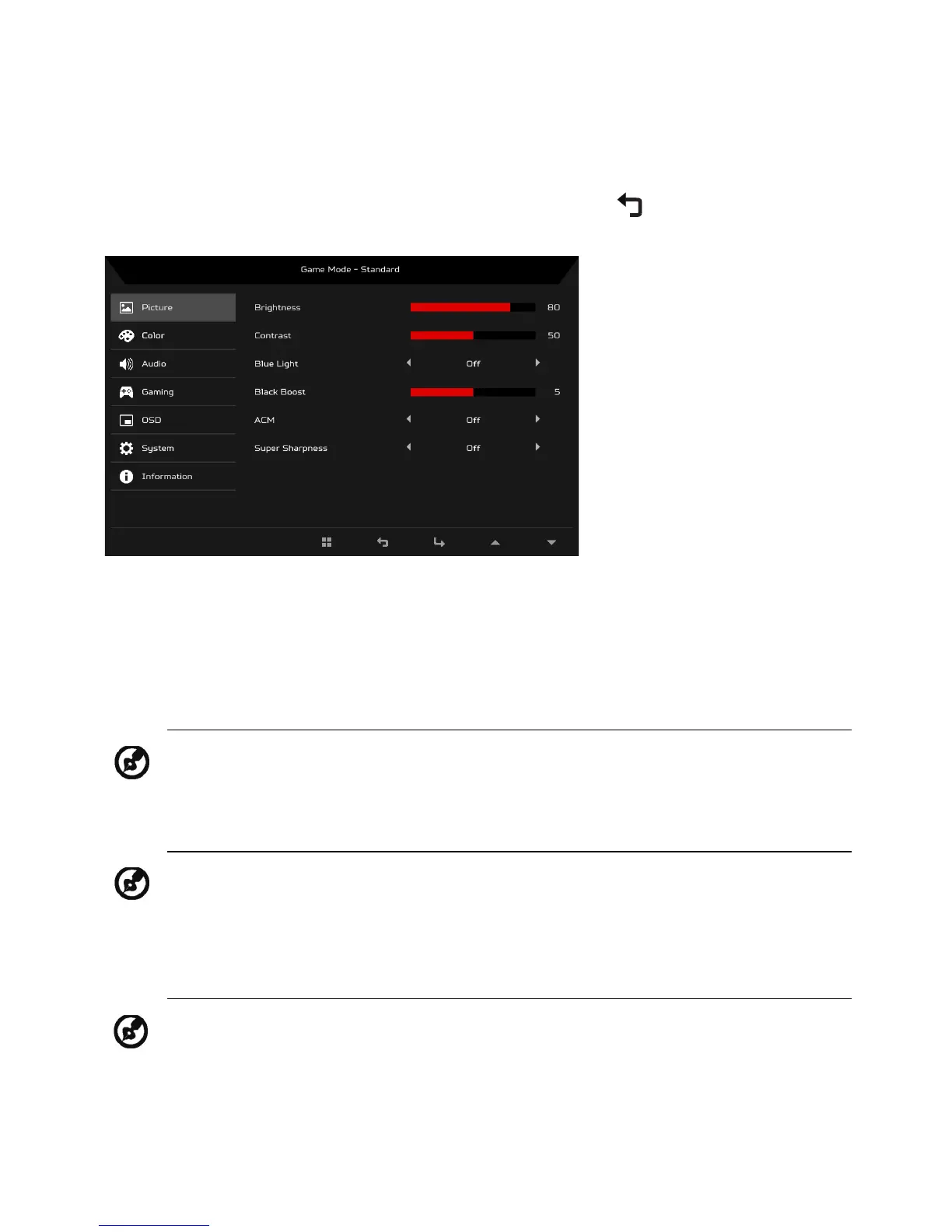
Open the Function page to select a menu function, and adjust the settings
which you want using the arrows. You can also view your monitor’s system
information from this page. When you are done, use to go back one level.
Adjusting the Picture
1. Press the MENU key to bring up the OSD.
2. Using the
/ keys, select Picture from the OSD. Then navigate to the
setting you wish to adjust.
3. Use the / keys to adjust the sliding scales.
4. Brightness: Adjust the brightness from 0 to 100.
5. Contrast: adjust the contrast from 0 to 100.
6. Blue Light: filter out blue light by adjusting different Blue Light showing
ratio - 80%, 70%, 60%, 50%
.
7. Black Boost: This boosts the amplitude of the dark color levels of the
display– blacks will be less black. The higher the level, the higher the
boost.
Note: Adjusts the balance between light and dark shades.
Note: Sets the degree of difference between light and dark areas.
Note: Higher values allow more blue light through. For the best
protection, select a lower value.


 To Next Page