EN-17
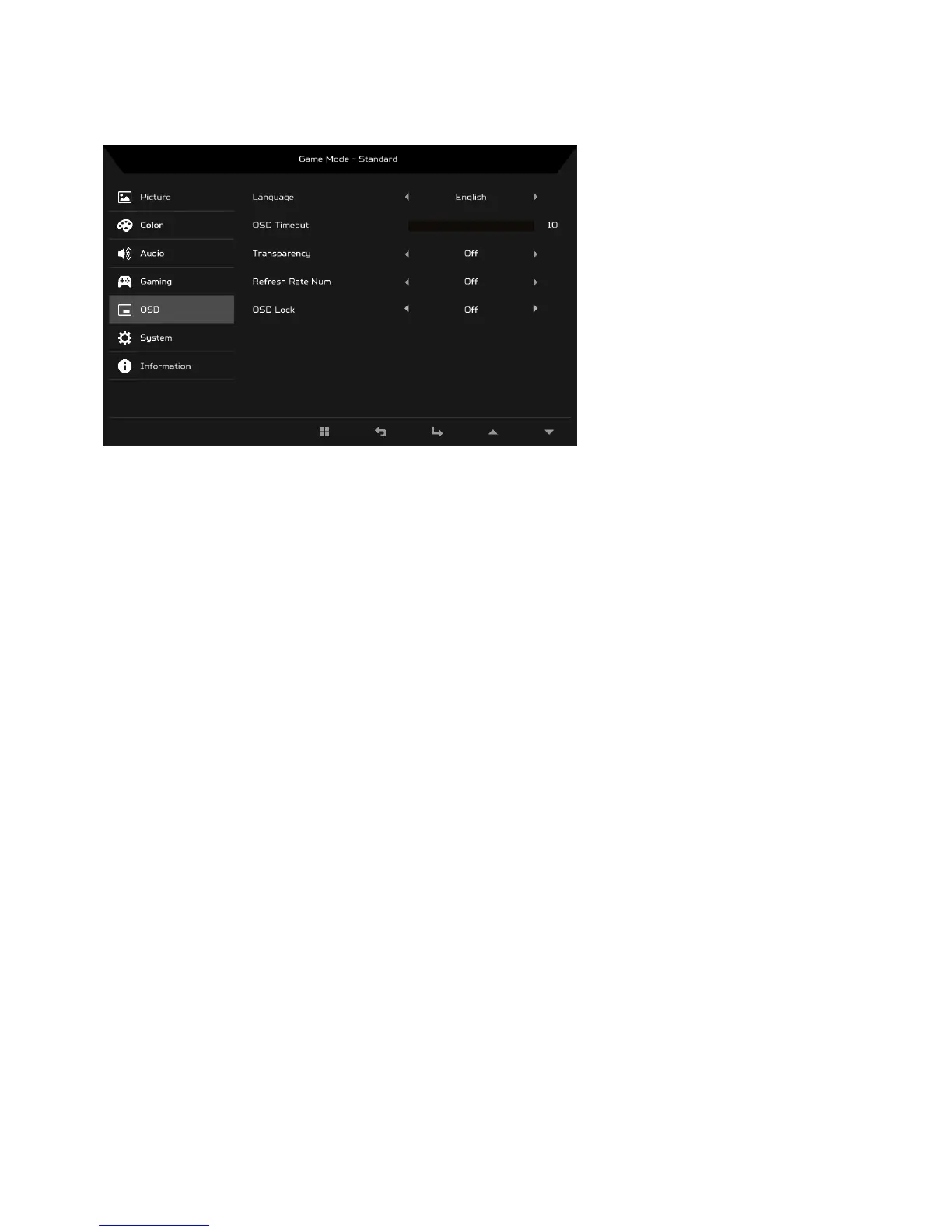
Adjusting the OSD
1. Press the MENU key to open the OSD.
2. Using the
/ keys, select OSD from the OSD. Then navigate to the
setting you wish to adjust.
3. Use the / keys to adjust any sliding scales.
4. Language: Set the OSD menu language.
5. OSD Timeout: Adjust the delay before turning the off the OSD menu.
6. Transparency: Select the transparency when using gaming mode. The
transparency can be 0% (OFF), 20%, 40%, 60%, or 80%.
7. Refresh rate num: Display the panel’s current refresh rate on the screen.
8. OSD Lock: OSD Lock function is used to prevent OSD button from being
pressed accidentally. To remove the OSD Lock message, press and hold
any key (except power button) continuously for 3 seconds until the
message disappears. If the OSD Lock message remains, please check
whether the button is stuck.


 To Next Page