Model slicing
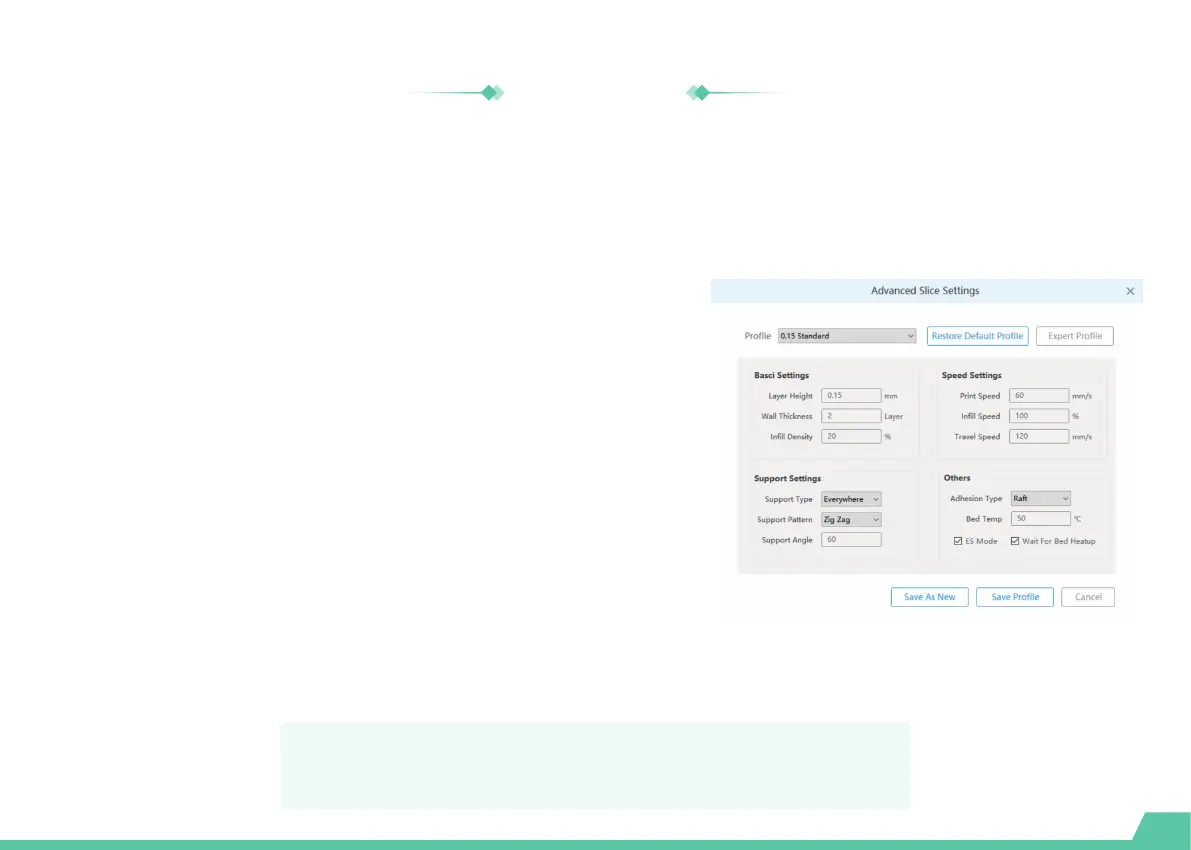
Prepare the model for slicing before the print stage. Go to "Settings -> Slice settings" and set
the parameters control.
28
Layer height: The Layer height is the thickness at which each horizontal
layer is sliced. A thinner layer height produces a higher resolution. Similarly a
thicker layer heights reduce resolution.
Infill density: The Infill density refers to the printing of internal structures. A 0%
infill prints a completely hollow model. A 100% infill prints a completely solid model.
Print speed: A faster print speed decreases print time, but with reduced
strength and toughness.
Bed temp: Set the bed temperature during printing.
Adhesion type: Different adhesion types helps to improve the adhesion to the
base plate to prevent the model from sliding. These parts needs to be removed
after printing.
Support type: Some models have overhanging parts. In this case, you must
print a support structure under the model to prevent these parts from falling
down. The support structures can be removed during post-processing.
For more information about the X-PRINT, please consult the
X-PRINT user manual at en.ime3d.com/Support/XMaker


 To Next Page
 Loading...