9
Connections
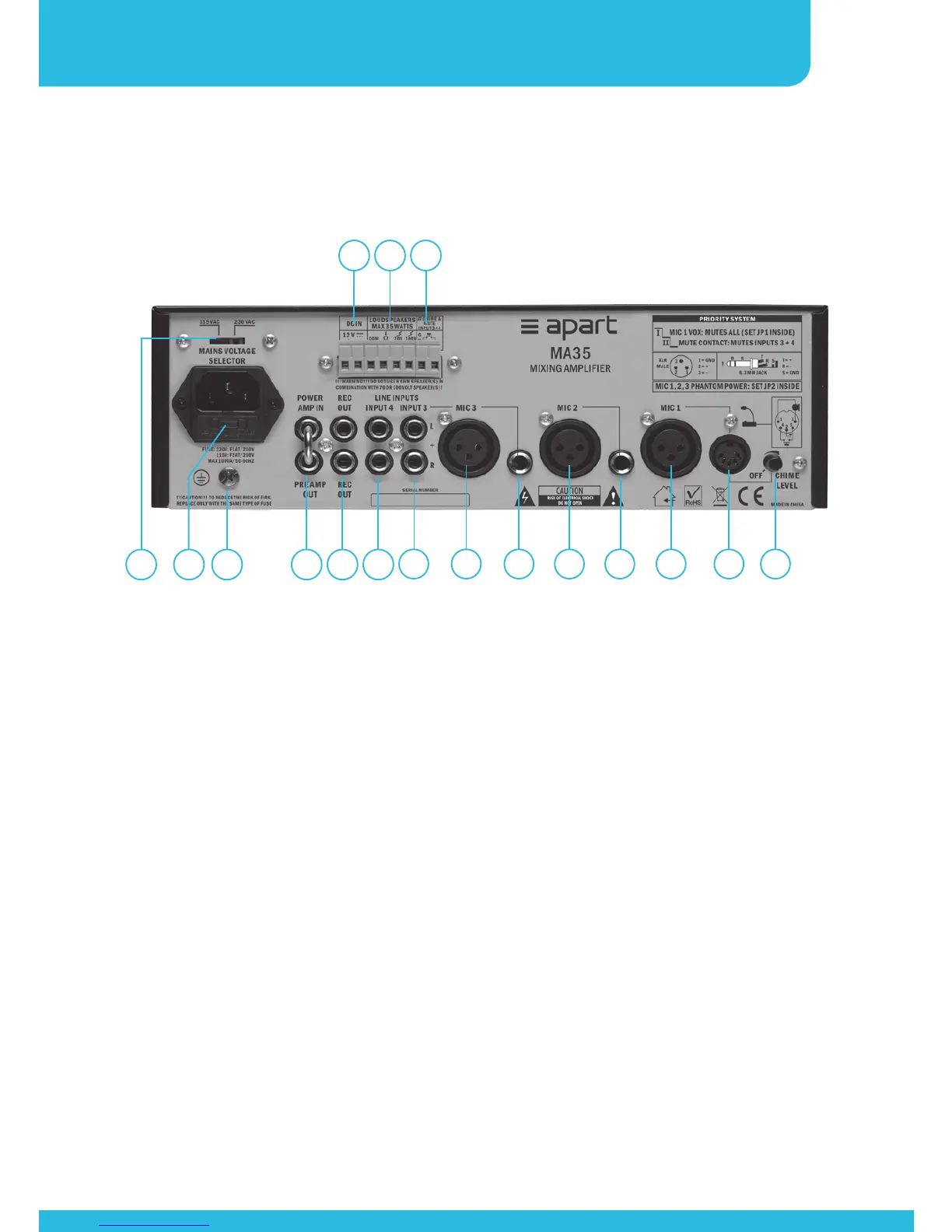
1 2 3 7
4
8
5
9
6
11 12 13 14 15 16 1710
1. Mains Voltage selector: to set the local Voltage. In case of
doubt, contact your dealer.
2. Mains socket/fuse holder: connect the IEC type power cord
here. The socket has an integrated 5 x 20 mm fuse holder.
Replace the fuse only with the same type and size. When the
fuse blows often, contact your nearest dealer.
3. Ground terminal: connect the ground of your audio cables here
if required. If hum occurs, use a ground loop isolator instead.
4. Emergency power supply connector: connect the emergency
DC supply here. 12 VDC for MA35, 24 VDC for MA65. Please
note that the output level may vary up to 3 dB when the
emergency supply is in use.
5. Speaker output: only one type of output can be used: 8 Ohms
or 70 Volt or 100 Volt. COM is the speaker ground or common
connection for all types of speakers. Maximum output power is


 To Next Page