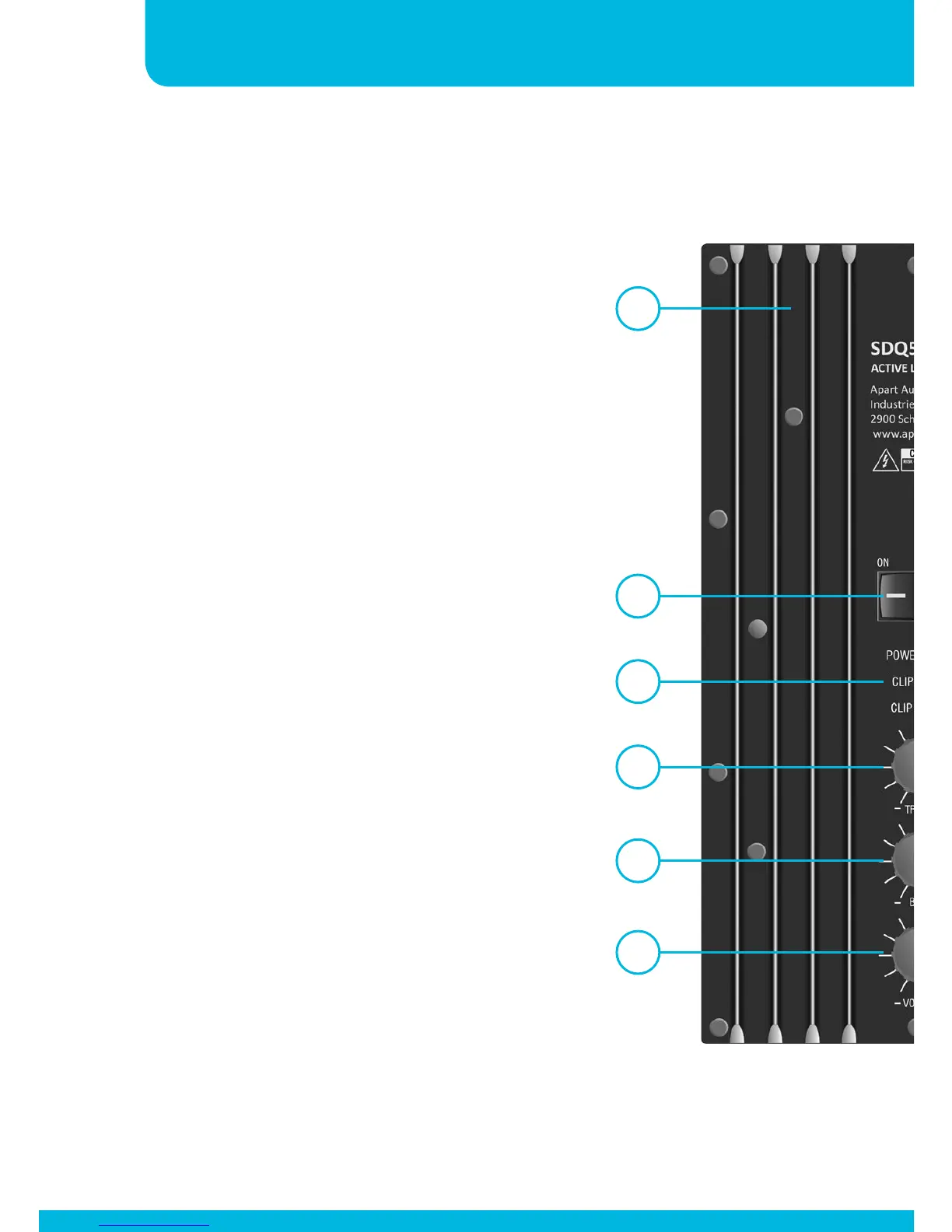
Rear panel
1. Volume control: set the desired
volume.
2. Treble control: add or decrease
the high frequencies. Adding high
frequencies may improve intelligibility.
Adjust to the desired level.
3. Bass control: add or decrease the
low frequencies. Decreasing bass can
improve the intelligibility of spoken
messages, especially in reverberant
rooms.
4. On / Off: turn the unit on or off with
this button. When the unit is switched
ON, the green “power” led will
illuminate.
5. Clip leds: each channel has its own
clip led, indicating that max. power
is reached. Turn down the volume if
these leds are flashing regularly.
6. RCA inputs: connect your unbalanced
line level signals here.
7. 3.5 mm stereo jack input: connect
your unbalanced line level signals
here. The signals from the minijack
and RCA connectors are mixed
together.
1
3
2
4
5
12


 To Next Page