Need help?
Do you have a question about the Apevia PREMIER Series and is the answer not in the manual?
Certified 80 PLUS GOLD for 90%+ efficiency, ensuring energy savings.
Shuts down the PSU when DC outputs fall below 60% of maximum value.
Lists nominal, minimum, and maximum voltage limits for protection.
Defines short circuits and PSU response to protect rails.
The power supply shuts down when output power is 110%-150%.
Verify power supply and cord connections to socket and components.
Ensure PSU I/O button is on and allow 5-second interval when restarting.
The Apevia Premier Series Power Supply is a high-quality, modular power supply designed for various computing needs, offering reliable and efficient power delivery. It is available in three wattage options: 850W, 1000W, and 1200W, catering to different system requirements from standard builds to high-performance gaming rigs and workstations.
The primary function of the Apevia Premier Series Power Supply is to convert alternating current (AC) from a wall outlet into direct current (DC) that is required by the various components of a computer system. This conversion is crucial for the stable operation of the motherboard, CPU, graphics card, storage drives, and other peripherals. The power supply ensures that each component receives the correct voltage and current, preventing damage and ensuring optimal performance.
A key feature of this power supply is its modular design. Unlike non-modular power supplies where all cables are permanently attached, the Apevia Premier Series allows users to connect only the cables they need. This significantly reduces cable clutter inside the computer case, improving airflow and making cable management much easier. Better airflow contributes to lower internal temperatures, which can extend the lifespan of components and enhance overall system stability. The modularity also simplifies the installation process and makes future upgrades or troubleshooting more convenient.
The power supply is equipped with heavy-duty protections to safeguard your system from various electrical issues. These include Over Voltage Protection (OVP), which prevents components from being damaged by excessive voltage, and Over Power Protection (OPP), which shuts down the unit if the total power draw exceeds its safe limits. Short Circuit Protection (SCP) is also integrated, providing a crucial safety measure against short circuits that could otherwise cause severe damage to the power supply and connected components. These protections ensure a safe and stable operating environment for your valuable computer hardware.
Another significant functional aspect is the inclusion of a built-in Active Power Factor Correction (APFC) mechanism. APFC helps to improve the power factor of the power supply, making it more efficient in drawing power from the AC mains. A higher power factor means less reactive power is drawn, leading to reduced energy waste and lower electricity bills. The APFC in the Apevia Premier Series operates at rates greater than 0.9, indicating a high level of efficiency in power utilization.
The power supply also features a DC to DC converter design. This advanced design provides superior dynamic response and greater system stability. It ensures that the 12V DC rail output is maximized, which is particularly beneficial for modern high-performance components like graphics cards and CPUs that heavily rely on the 12V rail. This design contributes to a more stable and reliable power delivery, especially during sudden load changes, which are common in demanding applications and gaming.
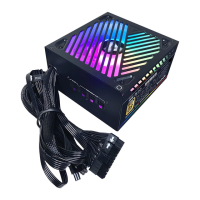
The Apevia Premier Series Power Supply is designed with several features to enhance user experience and system performance. One notable feature is its Addressable RGB lighting function, offering 366 different RGB lighting modes. This allows users to customize the aesthetic of their build, synchronizing the power supply's lighting with other RGB components in their system. The RGB lighting is controlled via a dedicated button on the back of the PSU. A single click cycles through the various modes, providing a wide range of visual options. For users who prefer a consistent lighting theme or wish to revert to a default setting, pressing and holding the RGB button for 3 seconds will return the lighting to the first automatic playable mode, indicated by a single flash of the RGB light. If the RGB lighting is not desired, holding the button for more than 4 seconds will turn off the illumination, with two flashes indicating the "off" mode. Pressing the button again will reactivate the RGB modes. This flexibility allows users to tailor the visual appeal of their system to their personal preferences.
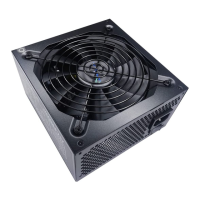
The power supply incorporates a 135mm silent automatically thermal fan. This fan is designed to operate quietly while effectively cooling the internal components of the PSU. The "automatically thermal" aspect means that the fan speed adjusts based on the internal temperature of the power supply. At lower loads and temperatures, the fan spins slower, resulting in minimal noise. As the load increases and temperatures rise, the fan speed automatically increases to maintain optimal cooling, preventing overheating and ensuring stable operation. This intelligent fan control contributes to a quieter computing experience, especially during less demanding tasks.
The modular cabling system is a significant usage feature. The 850W and 1000W models are semi-modular, meaning some essential cables (like the 24-pin ATX main connector) are permanently attached, while others are detachable. The 1200W model is full-modular, allowing all cables to be detached. This modularity provides flexibility in cable management, allowing users to connect only the necessary cables for their specific setup. This reduces clutter, improves airflow within the PC case, and makes installation and maintenance easier. The power supply supports a wide array of connectors, including ATX Main, EPS 12V, PCIe 5.0 12VHPWR, PCI Express, SATA, and Peripheral (Molex) connectors, ensuring compatibility with a broad range of modern and legacy components. The inclusion of PCIe 5.0 12VHPWR connectors is particularly important for supporting the latest generation of high-power graphics cards, ensuring future-proofing for demanding GPU platforms.
The power supply is designed to support single 12V output for higher power usage, which is crucial for modern CPUs and GPUs that draw significant power from the 12V rail. It also supports multi-CPU technologies with various pin configurations (6-pin, 8-pin, 12+4-pin), making it suitable for high-end motherboards and workstations. The ample +12V output with enhanced current capability broadens utilization possibilities, ensuring stable power delivery even under heavy loads.
Maintenance for the Apevia Premier Series Power Supply primarily revolves around ensuring proper installation and environmental conditions to maximize its lifespan and performance. The device itself is designed to be largely maintenance-free due to its robust construction and protective features.
One of the most important aspects of maintenance is ensuring adequate airflow around the power supply. The built-in 135mm fan is responsible for cooling the internal components, and its effectiveness depends on unobstructed air intake and exhaust. Users should periodically check that the fan intake and exhaust vents are free from dust and debris. While the manual does not explicitly detail fan cleaning, general PC maintenance practices suggest using compressed air to gently clear dust from the fan and vents. However, users are strictly warned not to open the power supply case, as this can expose them to dangerous electrical components and void the warranty.
Environmental conditions play a crucial role in the longevity of the power supply. The manual advises avoiding exposure to humidity. High humidity can lead to corrosion of internal components and electrical shorts, significantly reducing the lifespan of the unit. Operating the power supply within its specified temperature range (0°C to 40°C ambient temperature) is also important. Extreme temperatures can stress components and lead to premature failure. Ensuring the PC case has good ventilation and is placed in a cool, dry environment will contribute to the power supply's stable operation and extended life.
In terms of troubleshooting, the manual provides simple steps to address common issues if the power supply fails to operate. These steps are designed for user-level diagnosis without requiring internal access to the unit. Users are advised to check that the power supply and power cord are properly connected, the power cord is plugged into the wall socket, and the I/O button on the power supply is switched to the "I" (on) position. Additionally, verifying that all connectors (motherboard, floppy, peripherals) are properly connected is essential. If the power supply was manually switched off, a 5-second interval before turning it on again is recommended to allow internal components to reset. These basic checks can resolve many common power-related issues without needing professional intervention.
The modular design also indirectly contributes to easier maintenance. If a cable becomes damaged or needs to be replaced, only that specific cable needs to be swapped out, rather than dealing with a permanently attached bundle. This simplifies repairs and upgrades.
For any issues beyond basic troubleshooting, Apevia provides support through their website, phone number, and email. This ensures that users have access to professional assistance and warranty information, further supporting the long-term usability and maintenance of the product. The heavy-duty protections (OVP, OPP, SCP) are internal maintenance features that automatically safeguard the unit and connected components, reducing the need for manual intervention in case of electrical faults.
 General
| Maximum Power | 850W |
|---|---|
| AC Input | 100 - 240 V |
| Series | PREMIER |
| Type | ATX |
| Connectors | 1 x 6+2-Pin PCI-E, 8 x SATA, 1 x Floppy |
| Protection | OVP, UVP, OPP, SCP |
| Modular | Full |
| Operating Temperature | 0°C to 40°C |
| Dimensions | 160 x 150 x 86 mm |

 To Next Page