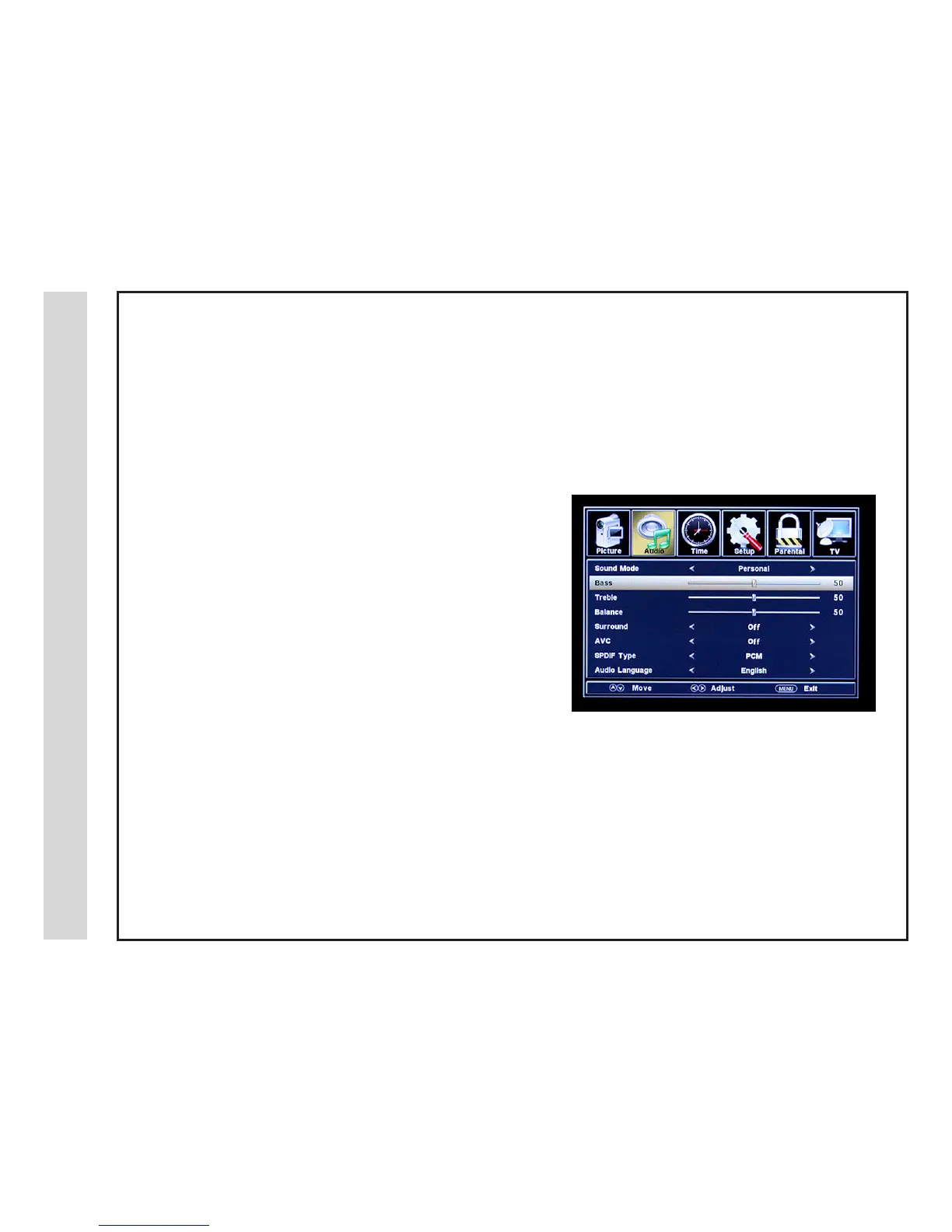
The AUDIO menu offers options to make sound enhancements while listening through the built-in speakers or to select digital audio options
when connected to a Dolby Digital receiver though a (SPDIF) coaxial digital output.
How to Navigate:
Press the MENU button on the remote control. Navigate using t u arrow buttons to select AUDIO. Press the q arrow button to highlight
SOUND MODE, then press the u arrow button to select your sound preference from 4 factory options:
PERSONAL > STANDARD > MUSIC > MOVIE.
• Use down q arrow button to highlight Bass. Navigate using the
t u arrow buttons to increase or decrease low frequency intensity.
• Use down q arrow button to highlight Treble. Navigate using the
t u arrow buttons to increase or decrease high frequency intensity.
• Use down q arrow button to highlight Balance. Navigate using the
t u arrow buttons to adjust sound towards the left or right speaker.
• Use down q arrow button to highlight Surround. Press the u arrow
button to turn the dimensional surround effect ON or OFF. (for built-in
speakers only).
• Use down q arrow button to highlight AVC. Navigate using the u
arrow button. In the ON position, Automatic Volume Control will limit
the level of increased volume heard during television commercials and
volume differences between inputs.
• Use down q arrow button to highlight SPDIF type. Navigate using
the t u arrow buttons to select between PCM (Analog Audio) > RAW
(Digital Audio). See page 15.
To make more critical sound adjustments based on your own preferences in PERSONAL:
Menu Adjustments
Audio Menu
19 20
• Use down q arrow button to highlight Audio
Language. Navigate using the t u arrow buttons
to select to listen to an alternative language broad-
cast (if available) English > Spanish > French.
(You may select an alternative language using the
remote control by pressing MTS)
Note: When adjustments are completed, you may select another menu by pressing the Menu button.



 To Next Page