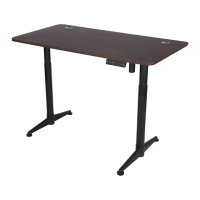
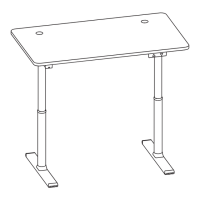
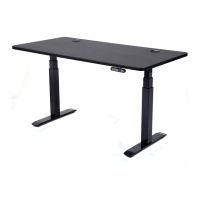
The ApexDesk Flex Series Electric Height Adjustable Desk is an electric sit-to-stand desk designed for indoor use in dry work areas. Its primary function is to allow users to adjust the desk height to their preferred sitting or standing positions, promoting a more ergonomic and dynamic workspace.
Function Description:
The desk features electric motors that enable smooth and quiet height adjustments. Users can raise or lower the desk to their desired height using a memory controller. This controller allows for the storage of up to four preset height positions, making it easy to switch between preferred sitting and standing configurations with a simple button press. The desk is designed to accommodate various desktop sizes, with a recommended top width between 48" to 78" and a depth of 28" to 38". The frame includes a crossbeam that can be extended or retracted to fit different top widths, providing flexibility for users who wish to use their own tabletops.
Important Technical Specifications:
- Frame Type: Electric height-adjustable sit-to-stand desk frame.
- Recommended Desktop Dimensions: 48" to 78" width, 28" to 38" depth.
- Motor System: Electric motors for height adjustment.
- Control System: Memory controller with LED display.
- Power Requirement: 110-120V.
- Weight: The assembled desk weighs over 100 lbs, requiring two people for moving and turning.
- Hardware: Includes M8x25mm Hexagon Screws & Bolt Sleeves (A), M6x16 Hexagon Screws (B), M6x40 Hexagon Screws (C), M6x6 Hexagon Screws (D), ST4.8x13mm Pan Head Screws (E), ST5x12mm Hexagon Head Washer Screws (F).
- Tools: Phillips Screwdriver (G), 3mm Allen Wrench (H), 5mm Allen Wrench (I), 6mm Allen Wrench (J).
Usage Features:
- Height Adjustment: Electric motors provide effortless height adjustment.
- Memory Presets: The memory controller allows users to save up to four preferred height positions for quick recall. To set a preset, press and hold the 'M' button and a number button (1-4) simultaneously until the displayed height blinks. To activate a preset, press the corresponding number button twice or press and hold it.
- Initialization/Reset: The desk must be initialized before first use or if it malfunctions. This involves pressing and holding the UP and DOWN arrow buttons until "000" appears on the display, then releasing. The desk will cycle through its lowest and highest positions before settling at mid-height (approximately 38").
- Desktop Compatibility: The frame is compatible with ApexDesk Elite 60" and Vortex 60" tops, as well as non-ApexDesk tabletops within the recommended dimensions.
- Cable Management: Features cable guards to help organize motor cables.
- Safety Precautions: Users are advised to ensure no obstacles are in the desk's path, the desktop is not touching walls, and all cords are of appropriate lengths. Objects taller than 20" should not be placed underneath the desk. Users should not sit or stand on the desk, crawl or lie under it, or open any components due to the risk of electric shock.
Maintenance Features:
- Troubleshooting Guide: The manual provides a comprehensive troubleshooting section for common issues such as the desk not moving, uneven column movement, wobbling, "HOT" display, or unusual noise.
- Error Codes: A list of error codes (E0, E1, E3, E4, E5, E6, E7, E8, E9, E11) is provided with corresponding solutions, ranging from re-initialization and cable checks to contacting the dealer or reducing load.
- Noise Reduction: If the desk is unusually noisy, especially when one stage extends into another, applying silicon-based lubricant is recommended.
- Overheat Protection: If "HOT" is displayed, the desk has overheated, and users should stop using it for 10 minutes to allow it to cool down.
- Anti-Collision Protection: The desk may feature anti-collision protection (E11 error), which can be adjusted for sensitivity or turned off.
- Warranty: ApexDesk offers a two-year warranty on the lifting mechanism and electronic parts, covering defects in material and workmanship under normal use and service. The warranty does not cover misuse, abuse, negligence, alteration, accident, freight damage, or improper installation/cleaning.
- Customer Support: Contact information for customer support (email, phone, website) is provided for technical assistance, missing/damaged parts, and warranty claims.


 To Next Page
 General