7
Getting Started
Welcome to your new Chameleon 20™ Braille display.
This user guide provides instructions for orientation, usage, navigation,
and updating of the device. For more information please refer to the
Chameleon 20 product page on the APH website or call APH Customer
Service at 1(800) 223-1839.
In the Box
The box contains the following items:
• Chameleon 20™ braille display
• USB-C to USB-A cable
• USB to AC adapter
• Three thermoplastic polyurethane (TPU) bumper cases in
pomegranate, purple, and teal
• Nylon carrying case with lanyard
• Sheet of various bug stickers and logos
• Print and Braille Getting Started guides
Orientation of Chameleon 20
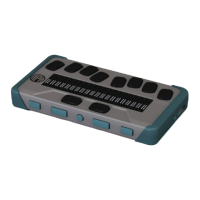
The Chameleon has a 20-cell braille display, a Perkins-style keyboard, two
Space bars, a Home button and four thumb keys for navigation.
Top Face
The top face of the Chameleon can be divided into two sections: front
and rear.
The front section of the top face consists of a refreshable braille display
containing 20 braille cells and 20 cursor routing buttons. Each cursor routing
button is associated with the braille cell directly below it. When editing text,
pressing one of the cursor routing buttons moves the editing cursor to the
associated braille cell.
When you are not editing text, any cursor button activates a selected item.


 To Next Page