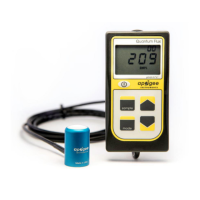
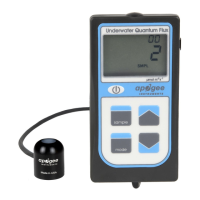
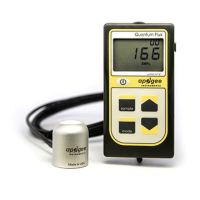
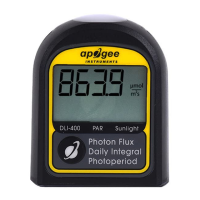
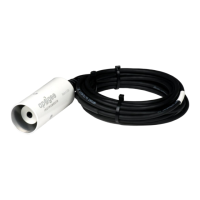
The Apogee MQ-510 is an underwater quantum meter designed for measuring Photosynthetically Active Radiation (PAR), specifically Photosynthetic Photon Flux Density (PPFD). PAR is defined as total radiation across the 400 to 700 nm range and is quantified in micromoles per square meter per second (µmol m⁻² s⁻¹). This device is crucial for biological, chemical, and physical processes in natural waters and aquariums.
Function Description:
The MQ-510 measures PPFD, which is the sum of photons from 400 to 700 nm incident on a planar surface from all angles of a hemisphere. Unlike air-calibrated quantum sensors, the MQ-510 is specifically designed for underwater measurements and automatically applies an immersion effect correction factor of 1.25 in its firmware. This correction accounts for the higher refractive index of water (1.33) compared to air (1.00), which causes more light to be backscattered out of the sensor in water, leading to lower readings if uncorrected. The meter consists of a waterproof quantum sensor connected via a waterproof cable to a handheld meter. It provides real-time PPFD readings on an LCD display and includes both manual and automatic data logging features for spot-check measurements or calculating Daily Light Integral (DLI).
Important Technical Specifications:
- Calibration Uncertainty: ± 5%
- Measurement Range: 0 to 4000 µmol m⁻² s⁻¹
- Measurement Repeatability: Less than 0.5%
- Long-term Drift (Non-stability): Less than 2% per year
- Non-linearity: Less than 1% (up to 4000 µmol m⁻² s⁻¹)
- Response Time: Less than 1 ms
- Field of View: 180°
- Spectral Range: 389 to 692 nm ± 5 nm (wavelengths where response is greater than 50%)
- Spectral Selectivity: Less than 10% from 412 to 682 nm ± 5 nm
- Directional (Cosine) Response: ± 5% at 75° zenith angle
- Azimuth Error: Less than 0.5%
- Tilt Error: Less than 0.5%
- Temperature Response: -0.11 ± 0.04% per °C
- Uncertainty in Daily Total: Less than 5%
- Detector: Blue-enhanced silicon photodiode
- Housing: Anodized aluminum body with acrylic diffuser
- IP Rating: IP68 (sensor and cable only; handheld meter is not waterproof)
- Operating Environment: 0 to 50 °C; less than 90% non-condensing relative humidity up to 30 °C; less than 70% non-condensing relative humidity from 30 to 50 °C; separate sensors can be submerged in water up to a depth of 30 m.
- Meter Dimension: 126 mm length; 70 mm width; 24 mm height
- Sensor Dimensions: 24 mm diameter; 37 mm height
- Mass: 100 g (with 5 m of lead wire)
- Cable: 2 m of two-conductor, shielded, twisted-pair wire; additional cable available; TPR jacket
- Battery: CR2320 coin cell battery (included)
Usage Features:
The MQ-510 features a user-friendly interface for quick and easy measurements.
- Power Button: Activates the LCD display. The meter enters sleep mode after two minutes of non-activity to conserve battery life.
- Mode Button: Accesses the main menu for selecting manual (SMPL) or automatic (LOG) logging and for resetting the meter.
- Sample Button: Records a reading in manual measurement mode.
- Up/Down Buttons: Used to make selections in the main menu and to view/scroll through logged measurements on the LCD display.
- LCD Display: Shows the total number of logged measurements (upper right), real-time PPFD value (center), and selected menu options (bottom).
- Logging Modes:
- SMPL (Manual Logging): Records up to 99 manual measurements. A counter indicates the total saved measurements.
- LOG (Automatic Logging): The meter powers on/off every 30 seconds to take a measurement. Every 30 minutes, it averages sixty 30-second measurements and records the averaged value to memory. It can store up to 99 averages, overwriting the oldest once full. Every 48 averaged measurements (a 24-hour period), the meter stores an integrated daily total in moles per meter squared per day (mol m⁻² d⁻¹).
- Reset Function: Erases saved measurements for the selected mode (SMPL or LOG). This is done by pressing the mode button three times (until RUN blinks), then pressing the down button, and then the mode button once.
- Data Review/Download: Logged measurements can be reviewed on the LCD using the up/down buttons. Integrated daily total values are only accessible by downloading data to a computer.
- Apogee AMS Software: Requires an AC-100 communication cable (sold separately) and free ApogeeAMS software to download stored data. The software allows viewing sample data, 30-minute averages, and daily totals, which can be saved as a .csv file or copied to a spreadsheet.
- Accessories:
- AL-100 Leveling Plate: Recommended for ensuring the sensor is level when attached to a cross-arm, featuring a bubble-level.
- AM-310 Sensor Wand: An extendable telescopic wand (up to 33 inches/84 cm) for reaching hard-to-access areas in greenhouses and growth chambers. Not suitable for wet environments.
- AM-320 Saltwater Submersible Sensor Wand: A 40-inch segmented fiberglass wand, well-suited for saltwater use, allowing placement of the sensor in aquariums or other hard-to-reach underwater areas.
Maintenance Features:
- Cleaning: The domed diffuser and housing are designed for improved self-cleaning by rainfall. However, active cleaning may be necessary.
- Dust/Organic Deposits: Remove with water or window cleaner and a soft cloth or cotton swab.
- Salt Deposits: Dissolve with vinegar and remove with a cloth or cotton swab. Avoid solvents like alcohol or acetone.
- Caution: Use gentle pressure when cleaning to avoid scratching the diffuser. Never use abrasive materials or cleaners.
- Recalibration: Apogee sensors are stable, but nominal accuracy drift is normal. Recalibration is generally recommended every two years to maintain maximum accuracy.
- Determining Recalibration Need: Use the Clear Sky Calculator (www.clearskycalculator.com) website or smartphone app to compare sensor PPFD measurements to calculated PPFD for clear sky conditions. If measurements consistently differ by more than 6% over multiple days near solar noon, clean and re-level the sensor. If differences persist, contact Apogee for further assistance.
- Battery Replacement: The meter uses a CR2320 coin cell battery. The positive side ("+") should face out from the circuit board. Using an incorrectly sized battery can damage the battery cradle and void the warranty.
- Battery Removal for Storage: To preserve battery life during long-term storage (many months), remove the battery as the meter draws a slight current even in sleep mode to maintain logged measurements.
- Master Reset: Can correct non-responsive behavior or anomalies (e.g., low battery indicator after replacement). This will erase all logged measurements. To perform, activate the LCD, slide the battery out until the display fades, wait a few seconds, then slide the battery back in. The LCD will flash all segments and show a revision number, then return to normal.
- Error Codes: The LCD may display error codes (Err 1-4) indicating issues such as battery voltage out of range, sensor voltage out of range, not calibrated, or CPU voltage below minimum. Most errors can be fixed by replacing the CR2320 battery and performing a master reset.
- Cable Modification: While possible to splice additional cable to the sensor, care must be taken as wires are soldered directly to the meter's circuit board. Refer to the Apogee webpage for detailed instructions on how to extend sensor cable length.

 Need help?
 General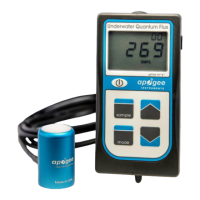

 To Next Page