EasyManua.ls Logo

Apogee Quantum - User Manual

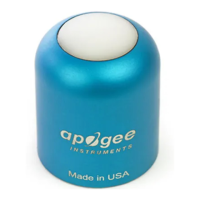
Apogee Quantum
12 pages
Print Icon
To Next Page IconTo Next Page
Loading...
APOGEE QUANTUM

Questions and Answers

  • A
    Anthony HansonJul 28, 2025
    How to troubleshoot Apogee Quantum sensor not responding?
    • S
      Scott CastanedaJul 28, 2025
      If your Apogee Measuring Instruments sensor isn't responding, check the power to both the sensor and the logger. Inspect the sensor cable and stereo plug connector for any damage. Ensure that the sensor's SDI-12 address is set to 0, which is the factory default. You can verify this using ZENTRA Utility by navigating to Actions, selecting Digital sensor terminal, choosing the correct port, and sending the ?I! command to the sensor from the dropdown menu.
  • H
    Heather JonesAug 11, 2025
    What to do if Apogee Measuring Instruments cable or stereo plug connector failed?
    • A
      Angela EdwardsAug 11, 2025
      If the stereo plug connector of your Apogee Measuring Instruments is damaged, get in touch with Customer Support for a replacement connector or splice kit. If the cable itself is damaged, refer to the METER wire-splicing guide for cable repair.

Summary

Introduction to Apogee Quantum Sensors

Installation Guide for Apogee Quantum Sensors

Set Up Mounting Assembly

Details how to assemble and mount the Apogee Quantum sensor using the provided AL-120 bracket and leveling plate.

Connect to METER ZENTRA Series Logger

Guides on connecting the Apogee sensor to METER ZENTRA series data loggers using a 3.5-mm stereo plug.

Data Interpretation for Apogee Quantum Sensors

Troubleshooting Apogee Quantum Sensors

Customer Support for Apogee Quantum Sensors

Apogee Quantum Specifications

General IconGeneral
BrandApogee
ModelQuantum
CategoryMeasuring Instruments
LanguageEnglish

Related product manuals