20
Operation - APP Setting
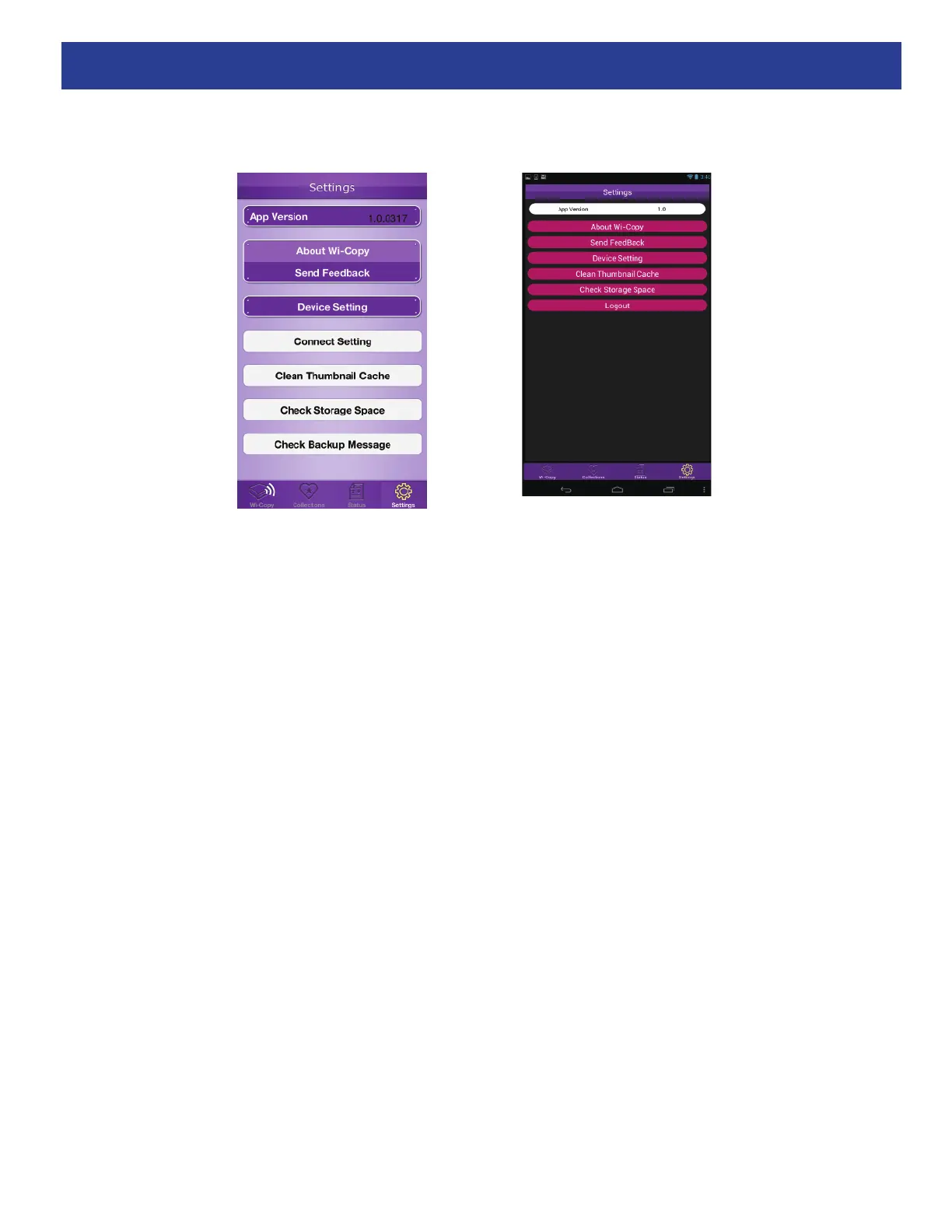
Tap the Settings icon at the bottom right of the main Wi-Copy screen to bring up the Settings screen.
The items listed on this screen perform the following:
App Version: This is the App version.
About Wi-Copy: If connected to the internet, tap this to see more information about the Wi-Copy.
Send Feedback: Tap to send feedback about Wi-Copy or the Wi-Copy app.
Device Setting: Tap to enter the Settings.
Connect Setting (iOS only): Used by iOS, you will not need this unless instructed.
Clean Thumbnail Cache: Tap to clean the Thumbnail Cache which takes space on your device.
Check Storage Space: Tap to view the Free Space and the Collection Files Used Space.
Check Backup Message (iOS only): Tap to view the Tempo/Results of the Copying.
Logout (Android only): Tap to log out.
iOS
Android


 To Next Page