•
•
-
Running
older
Apple
II
programs
on
an
Apple
lie
-
..
-
I
11}C
Apple
lie
em
take advantage
of
software developed for the
Apple Ilc-softwlIrc that runs faster and has beneT graphics than was
possible on earlier models
of
the Apple lie. Your new Apple
lie
is
completely compatible with software designed for the Apple lie with
an Extended BO-Column Text Card.
Programs designed
fOf
C:l.rlicr models
of
the
Apple
II
won't
take
:lIdv:mugc
of
spedal
chal'3ctcrs available
on
the Apple lie. But you
may notice lillie apples
and
check marks
In
place
of
uppercase
lnn'~
chal"ll:ctcrs
In
older
programs.
1'hese
odd
characters
appear
because the origin
...
]
charaaer
generator
RO~I
(Ihc
RO.\I
th.lIl
gcner.nes screen Char.ldcrs)
had
(wo
ldentiol
SCtS
of
upperosc
inverse chanCier.;,
one
of
which
""'35
unocccss.lry.
In
the
new
chanu:!.cr
generator
RO\I,
the
redunwnt
sct
ofuppcrcasc
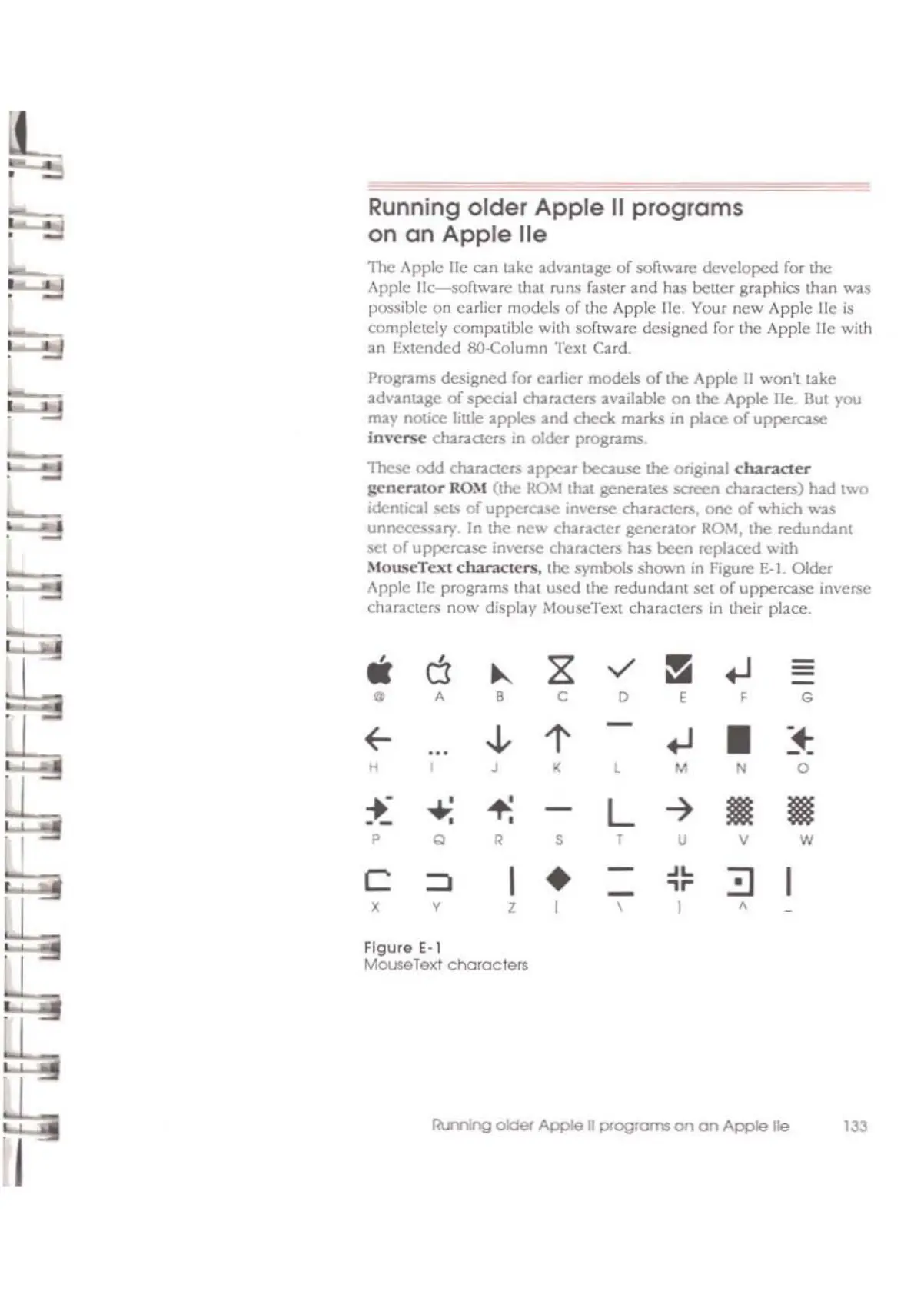
inverse Chal'3dcrs has been replaced wilh
MouscTcxl
characters.
the symbols
shown
in
figure
E-l. Older
Apple lie programs
that
used
the
redundant
SCi
or
uppercase inverse
characters
now
display MouseTclI:t characters
in
their place.
II
0
~
Z
v'
!i
.-J
-
0
A B C
0
,
F G
f-
,!,
l'
.-J
•
-~
H
J
<
l M N
0
.-
...,:
+.
-
L
-7
• •
•
•
p
C
•
S
I
U V
W
c
I
•
-
~L
:=::J
I
::::l
-
,
..
X V
Z
\
I
,
Figuro E·l
MouseToll:t
characters
RIsnng
oIdef
Apple
J1
programs
on on
Apple
lie 133



 To Next Page