Escape sequences in
BASIC
You
can
find
more
lechnical IOfonnation, including instructions
for using
the
text card's auxiliary memory, in
the
Apple
lIe
Tec.hnkal
Ke/~.
The
esape
sequences with the directional arrow keys
are
the
stand2ifd cursor-moving keys on the Apple lie.
1be
escape codes
with the
I,),
K,
and
M keys are the standard cursor-moving keys
on
the Apple
II
Plus,
and
are present on the Apple
lIe
for
compatibility.
On
the Apple lie, you can type
the
esc2pe
sequences
in
either uppercase
or
lowercase letters.
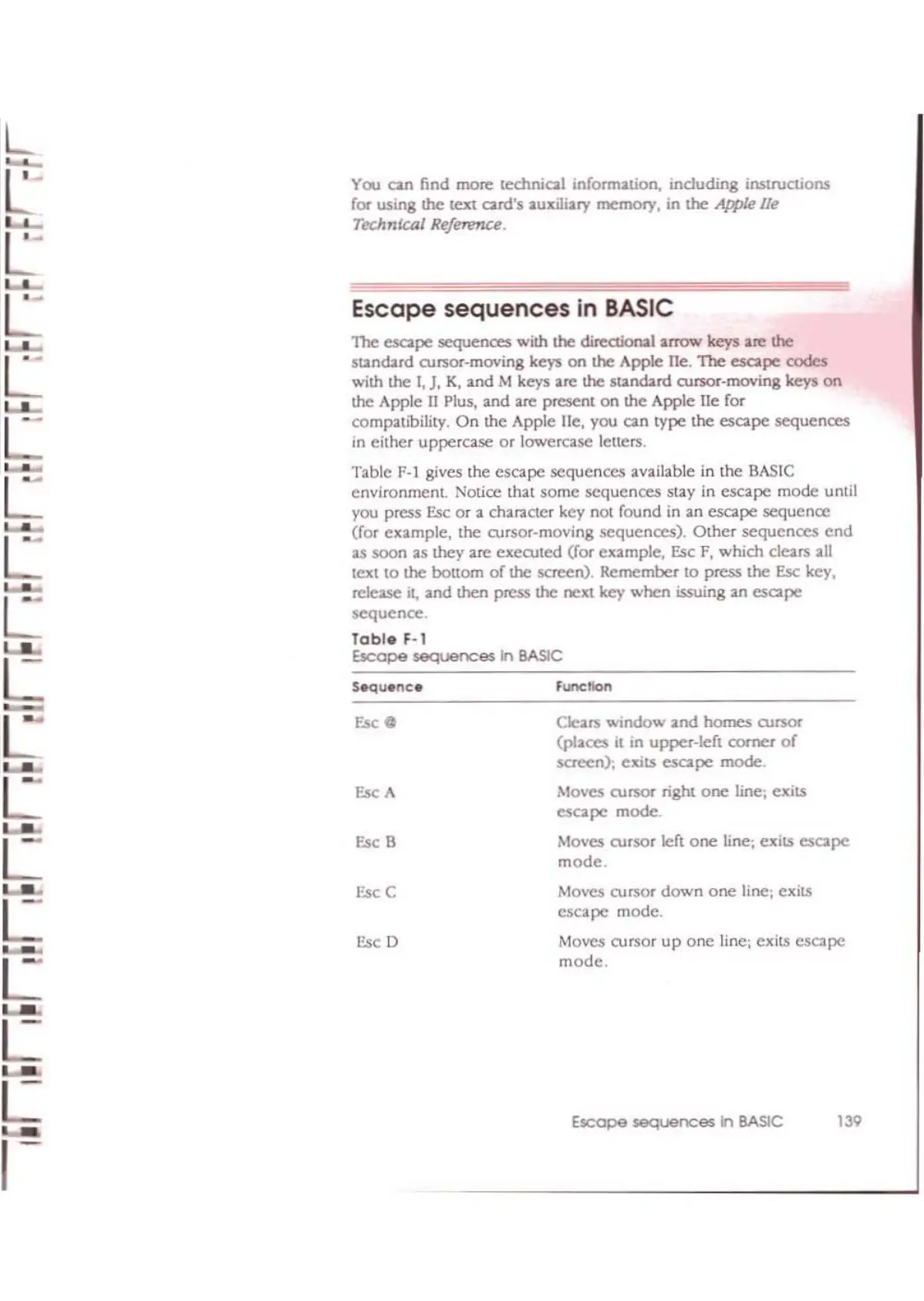
Table
F-I gives the
escape
sequences
available
in
the
BASIC
environmcnt
Notice that
some
sequences
stay in
escape
mode
until
you press
Esc
or
a character key not found in
an
escape
sequence
(for example, the cursor-moving
sequences).
Other
sequences
end
as
soon
as
!hey arc
exeruted
(for example, Esc F,
which
dears
all
text
to
the bottom
of
the
sc~n),
Remember
to
press the
Esc
key,
release
it,
and
!hen press the next key
when
issuing
an
esape
sequence.
Table
F-I
Escape
sequences
in
BASIC
function
S~u.nc.
L
L
L
L
EKO
L
EKA
La.<
L
EscS
Esc
C
L
Esc 0
L
L
L-.
L
,-
Clears
window
and
homes cursor
(places
il
10
upper-left
corner
of
screen): exits
escape
mode.
Moves cursor right
one
line; exits
escape
mode.
Moves cursor left
one
Hne; exits escape
mode.
Moves cursor
down
one
line; exits
escape
mode.
Moves cursor
up
one
Iinc; exits
escape
mode.
Escape sequences
In
BASIC
139



 To Next Page