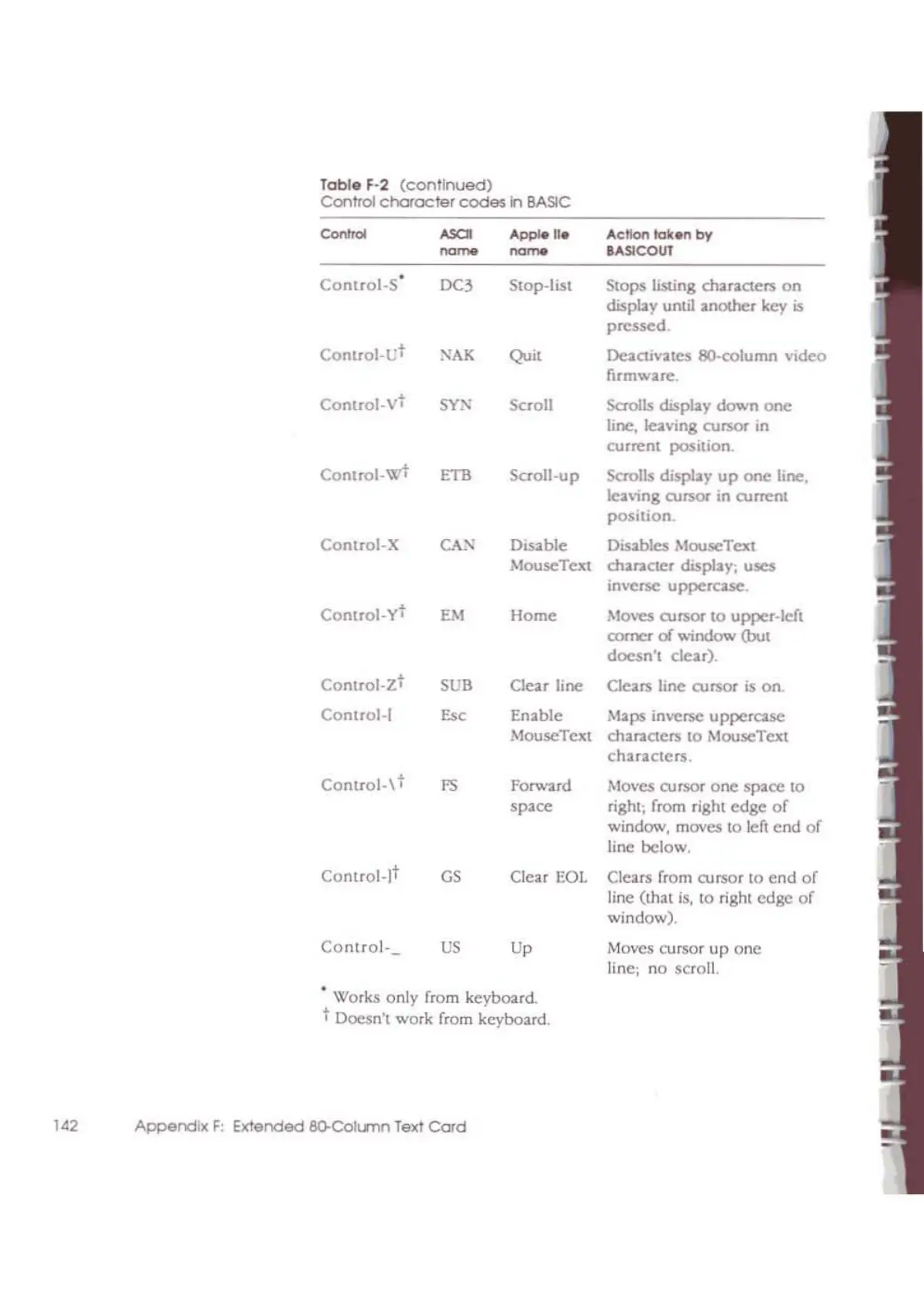
Table F·2
(continued)
Control
character
codes
n
BASIC
Con"'"
ASCI
"PP'-Il.
Action
Iok~
by
~~ ~~
IASlCOUT
Control_S'
OC3 Slop-list Stops listing
char;1;C1ers
on
display until another key
is
pressed
Control-L't
NAK
Quit
DeaClivatCS 8O-column video
firmware.
Comrol-V
t
SYN"
Scroll Scrolls chsplay
down
one
line.,
leaving cursor m
curren( posItion
Control-W
t
ETB Scroll-up
Scrolls display
up
one
line,
leaving
cursor
in
current
position
Control-X
CAN
Disable
Disables MouseText
MouseTcxt character display; uses
inverse uppercase.
Conlrol-yt
EM
Home
Moves cursor to upper-left
romcr
of
window
(bot
doesn't
clear).
Control-Z
t
SUB
Clear line Clears line cursor
is
on.
Control-!
E"
Enable Maps inverse uppercase
MouscText
charaCiers
10
MouseText
characters.
Control-\
t
FS
Forward
Moves
cursor
one
space
to
space
right; from right
edge
of
window, moves to left
cnd
of
line below.
Control-It
GS
Clear
EOl
Clears from cursor to
end
of
linc (that
is,
to
right
edge
of
window).
Control·
US
Up
Moves cursor
up
onc
line: no scroll.
•
Works only from keyboard.
t Doesn't work from keyboard.
142
Appendix
F:
Extended
8O-CoIlSnn Text
Card



 To Next Page