EasyManua.ls Logo

Apple II - Page 161

Apple II
188 pages
Print Icon
To Next Page IconTo Next Page
To Previous Page IconTo Previous Page
Loading...
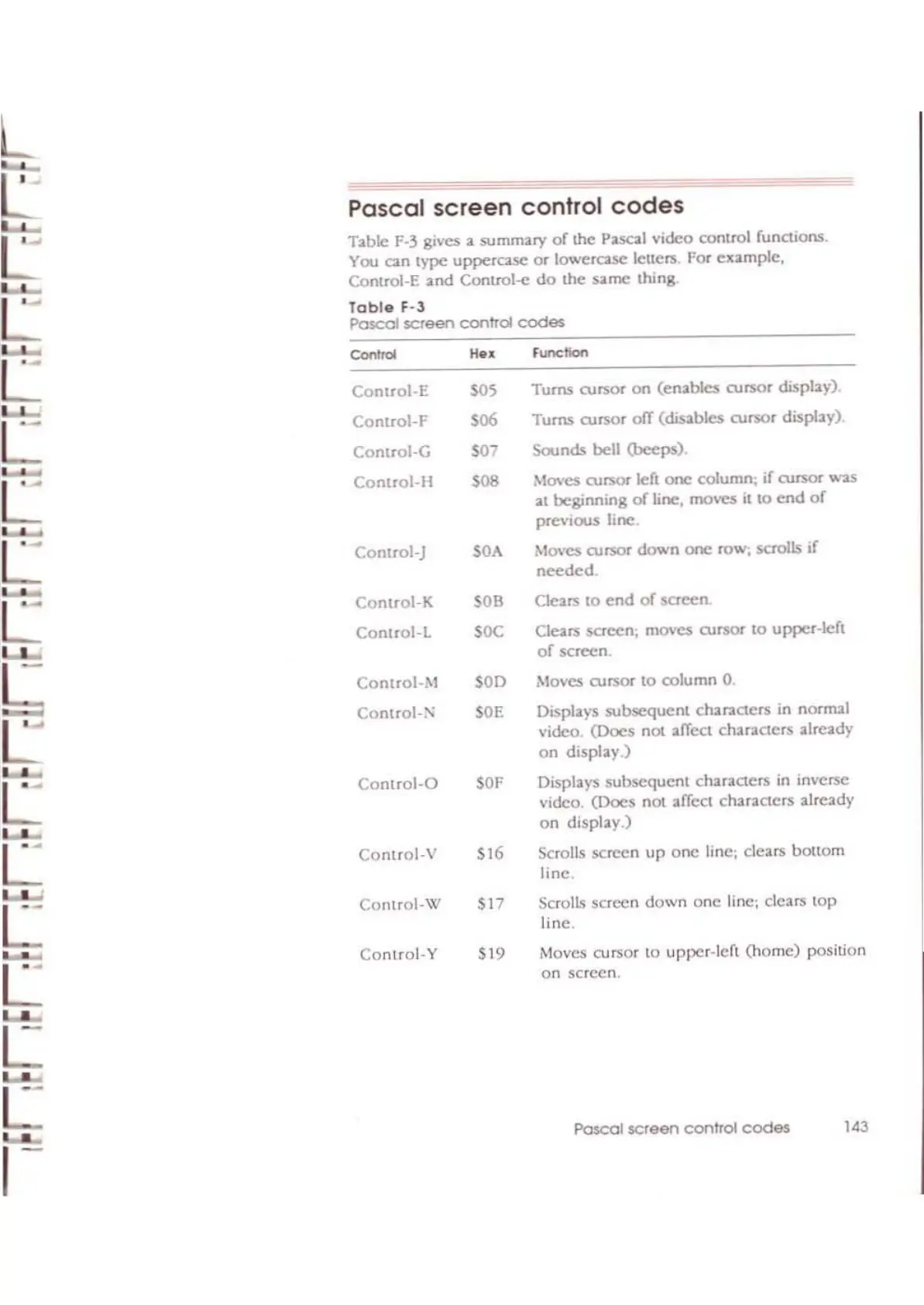
Pascal
screen
control
codes
Table
1'-3
gives a
summary
of
me
Pascal video control functions.
You
an
type
upperCol5C
or
lowercase letlers. For cltample,
Comrol-E
and
COlltrol-e
do
the
S<lrTlC thing
Tobie
F-3
Pascal
screen
control
codes
Pascal $Creen
control
codes
143
Moves cursor
to
upper-lert OlOmc) position
on screen.
Scrolls screen
down
one
Hne;
dears
tOP
line.
Displays
subsequent
duraeters
in normal
video.
(Docs
not affcct
chandcrs
:llrcady
on
display.)
Displays
subsequent
characters in inverse
video.
(Docs
not affect
characters
already
on
dispby.)
Scrolls screen
up
one line; dears
bouom
line.
Moves
cursor
to
column
0,
Movcs
cursor left
one:
column;
if
aJfS()I"
....
'2S
at
beginning
of
line, mo\'C$
il
to
end
of
previous
line.
Moves cursor
down
one row;
saolls
if
needed
Clears
to
end
of
screen
Clears
saeen;
moves aJrsor
to
upper-left
of
screen,
Turns
cursor
on
(enables
cursor
display).
Turns
OJr'SOf
ofT
(disables
ousor
display).
Sounds
bell
(beeps).
'OF
Control-O
"""".
He<
Control-E
'OS
Control-F
'06
Control-G
'07
Conuol-H
'08
Control-)
'OA
Control-K
'OB
Conuol-L
'OC
Connol-M
SOD
.~
Control-i'l
SOE
L
Control-V
'16
L
Control-\'II
'17
Control-Y
'19
L
L
L
,-
L
L
L

Other manuals for Apple II

Related product manuals