EasyManua.ls Logo

Apple II - Page 34

Apple II
188 pages
Print Icon
To Next Page IconTo Next Page
To Previous Page IconTo Previous Page
Loading...
Chapter
1:
Setting Up
the
Apple
lie
Importont
Make
sure
you
always
tighten
these screws. Otherwise.
connectors
can
work loose
and
cause
the
system
to
stop, A secure
connection
also helps
prevent
radio-frequency
Interference,
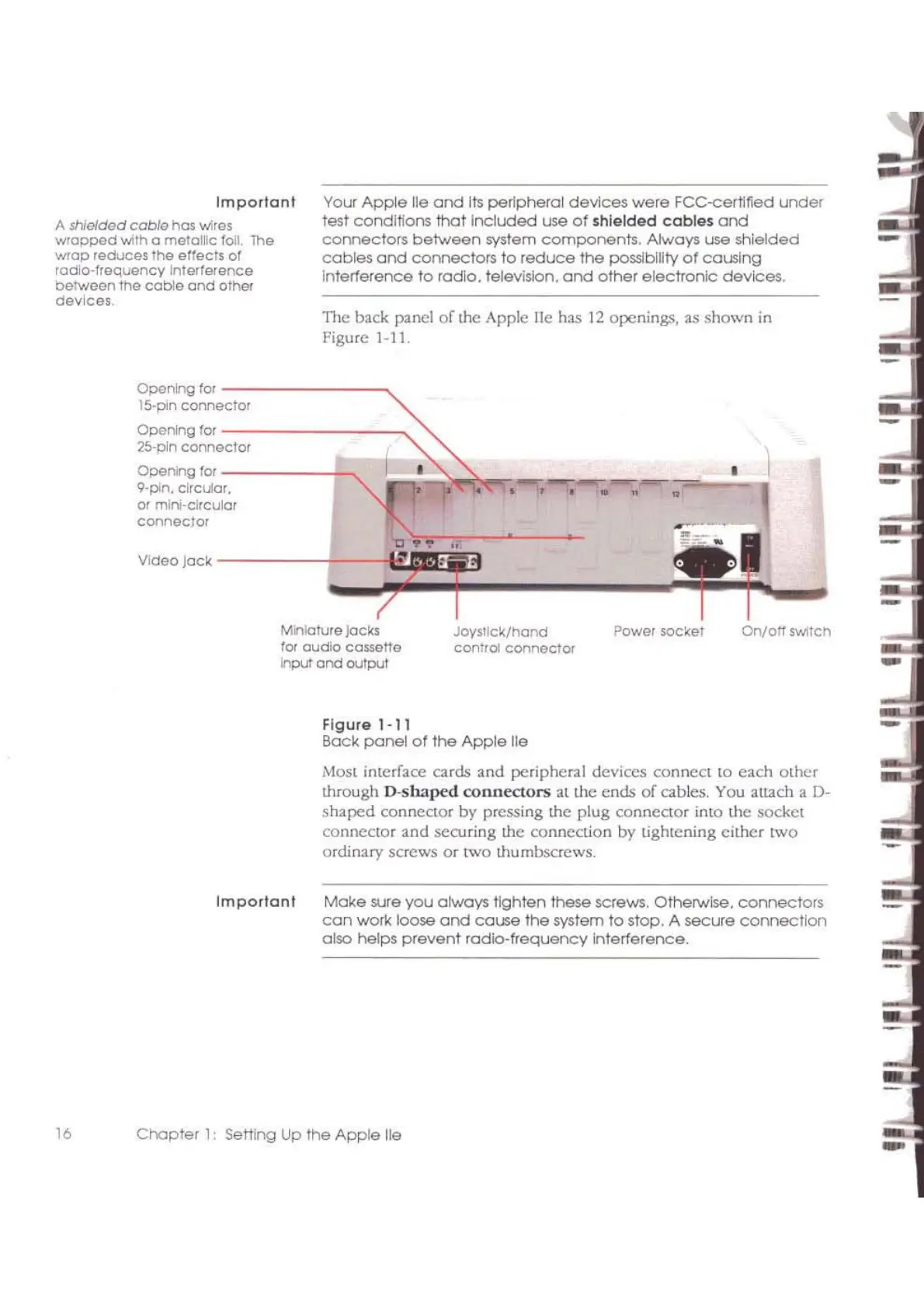
On/all
swltcnPower socket
Joysllck/hond
COnTrol
connector
TI1C
back panel
of
thc
Apple lie has
12
openings, as shown
in
Figurc
1-11.
Your
Ap~e
lie
and
lis
peripherol
devices
were
FCC-eertllied
under
test corlditlons
that
Included
use
of
shielded
cables
and
connectors
between
system
components,
Always
use
shielded
cables
and
connectors
to
reduce
the
possibility
of
causing
interference
to
radio. television.
and
other
electronic
devices.
Miniature jocks
for aUdio cossetle
input
and
output
OperUng for
-------_,
15·pin
connector
OPCrUng
lor
-,--------_,
25·pln
connector
Operung for
------t-,
9·pin. clrcutar.
a! mini-circular
connec/or
-
-----~::~!o~.~.~~
..
~~:.==::----J
Video Jack r
Figure 1-11
Bock
panel
of
the
Apple
lie
Most interface cards and peripheral devices connect to
each
other
through
D-shaped
connectors
at
the
ends
of
cables.
You
attach a
0-
shaped
conneCtor by pressing the plug connector into the socket
connector
and
seoJring the connection by tightening
eithcr
lWO
ordinary screws
or
two thumbscrews.
16
Importonl
A
shielded
coble
has
INires
wrapped
with 0
metol~c
fall.
The
wrap
reduces
the
elfects of
radio-frequency
InterlElfence
beTWeen
1t1e
coble
and
other
devices,

Other manuals for Apple II

Related product manuals