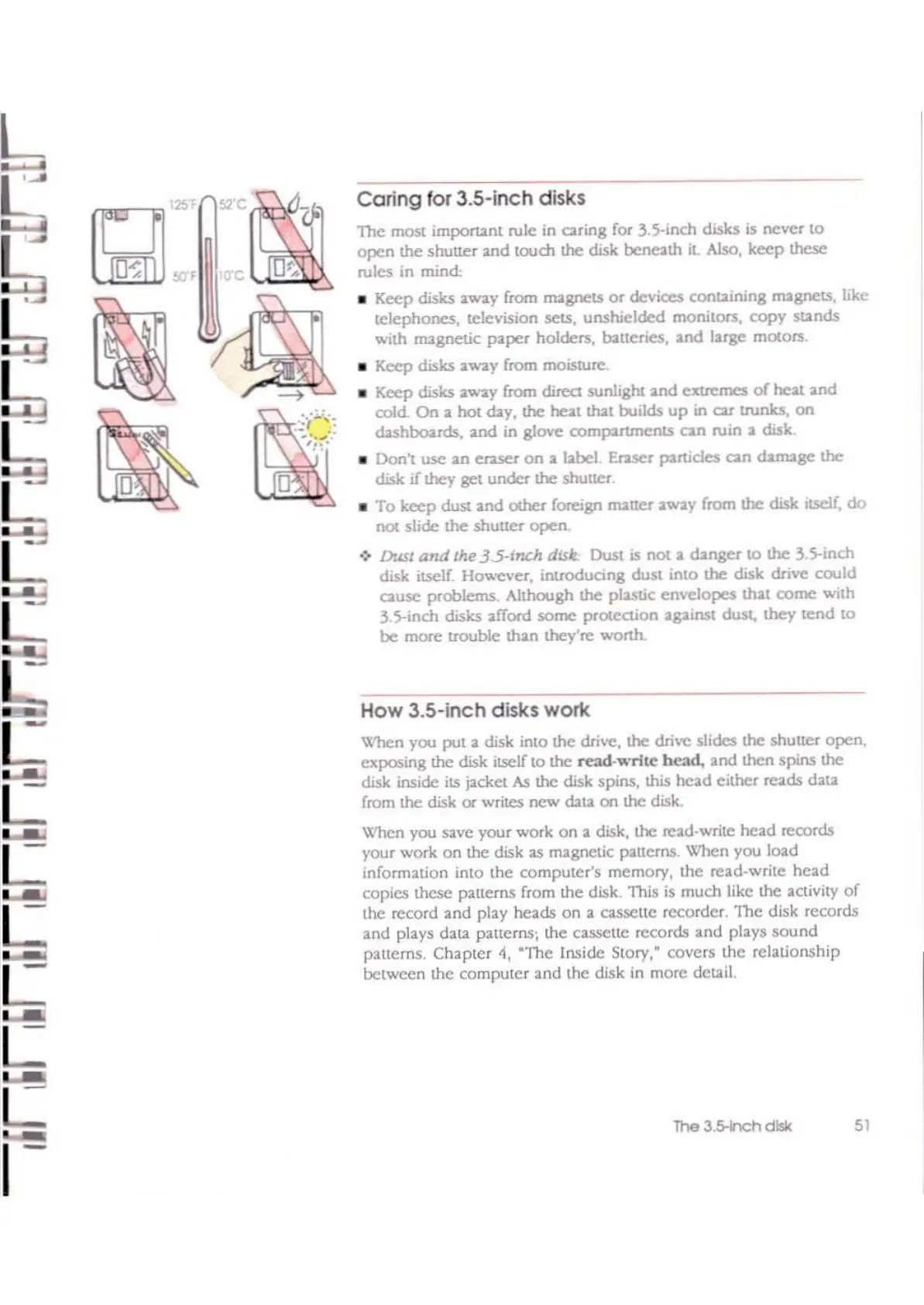
Coring for 3.5-inch disks
The
most
imporUnt
rule in caring for
l.5-inch
disks is
never
to
open
the
shuner
and
touch the disk
beneath
it
Also,
keep
lhese
rules in mind;
• Keep disks away from trnIgnets
or
devices
conuining
ITI2gnets, like
telephones,
television .sets,
unshielded
monitors.
copy
sunds
with ITI2gnelic
paper
holders, batteries,
and
large mOlors.
• Keep disks away from moisture.
• Keep disks away from direct sunlight
and
extremes
of
heat
and
cold;
On
a hot day. the heat that builds
up
in
car
(tunks,
on
dashboards,
and
in
glove
compartments
can
ruin a disk
• Don't
usc
an
enser
on
a label. Eraser particles
can
datrnlge
the
disk if they get
under
the shutler
•
To
keep
dust
and
olher
foreign trnItler
aW2Y
from the disk Itself,
do
nOl
slide
the
shutter
open.
->
Dusl
and
Ihe
35-fn£h
d!sk.
Dust is
nOI
a
danger
to
the
35-inch
disk itself Hov.'Cver.
inuodudng
dust
into
the
disk drive
could
cause
problems. Although
the
plastic
envelopes
thai
come
with
3.5-inch
disks
affor-d
some
pror.eclion against dust,
they
tend
to
be
more
trouble than they're worth.
How 3.5-inch disks work
When you
put
a disk inlo
the
drive, the drive slides the
shutler
open.
exposing the disk itself to the
read-write
bead,
and
then
spins
the
disk inside its jacket As the disk spins, this
head
either
reads
data
from the disk
Of
writes
new
(\au
on
the
disk.
When you save your work
on
a disk, the read-write
head
records
your work
on
the disk
as
magnctic patterns,
When
you load
information into
the
computcr's
memory,
the
read-write
hcad
copies thesc patterns from the disk. This is
much
likc the activity
of
thc record
and
play
heads
on
a cassettc recorder.
'llte
disk records
and
plays data patterns; the casselte records
and
plays
sound
patterns,
Chaptcr
4,
··l1te Inside
Story:
covers the
relationship
betwCCn the
computcr
and
the
disk in morc detail.
The3.s-nchdlsk
51



 To Next Page