EasyManua.ls Logo

Apple IIe - Page 167

Apple IIe
320 pages
Print Icon
To Next Page IconTo Next Page
To Previous Page IconTo Previous Page
Loading...
Apple
BASIC Reference
Guide
167
between
0 and
the
number
of
shapes
in
the
table. The
optional
column
and
row
denote
the
starting x and y
coordinates
for
the
shape.
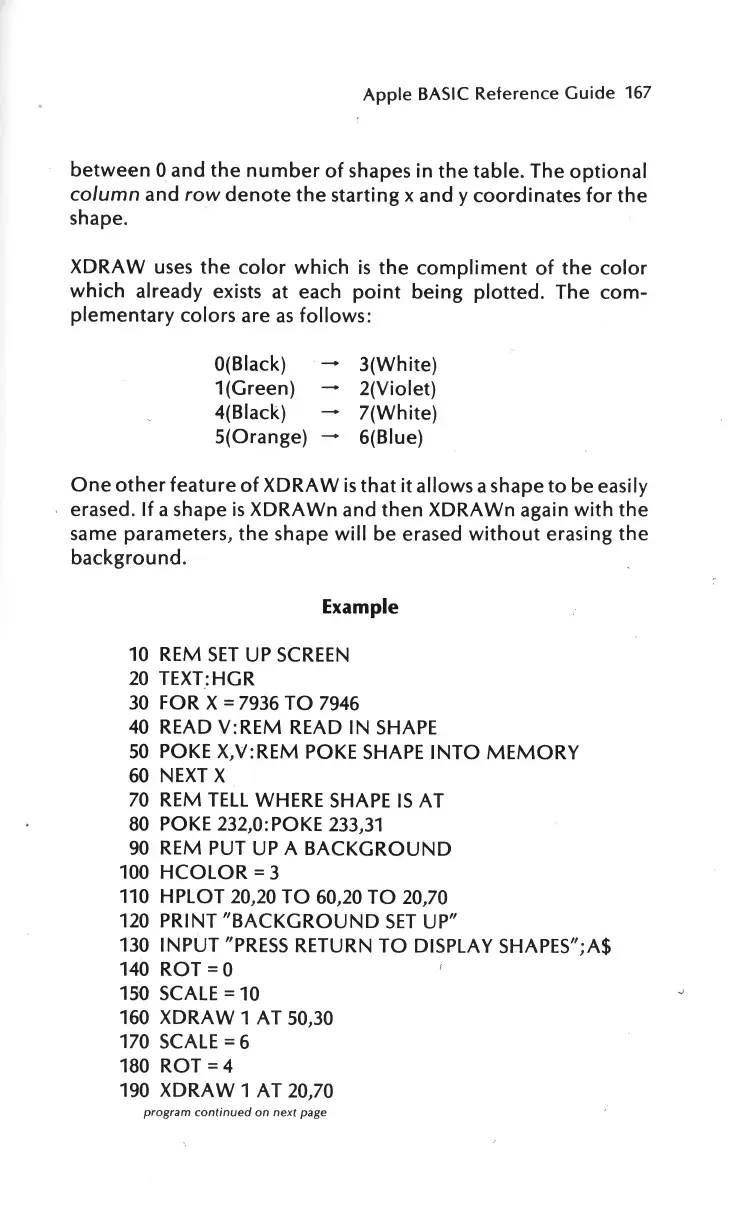
XDRAW
uses
the
color
which
is
the
compliment
of
the
color
which
already exists at each
point
being
plotted.
The
com-
plementary
colors are
as
follows:
O(Black)
1(Green)
4(Black)
5(0range)
3(White)
2(Violet)
7(White)
6(Blue)
One
other
feature
of
XDRAW
is
that
it
allows a shape
to
be easily
erased.
If
a shape
is
XDRAWn
and
then
XDRAWn again
with
the
same parameters,
the
shape
will
be erased
without
erasing
the
background
.
Example
10
REM
SET
UP
SCREEN
20
TEXT:HGR
30
FOR X =
7936
TO
7946
40
READ V:REM READ IN
SHAPE
50
POKE X,V:REM
POKE
SHAPE
INTO
MEMORY
60
NEXT
X
70
REM
TELL
WHERE
SHAPE
IS
AT
80
POKE 232,0:
POKE
233,31
90
REM
PUT
UP
A
BACKGROUND
100
HCOLOR
= 3
110
HPLOT 20,20
TO
60,20
TO
20,70
120
PRINT
"BACKGROUND
SET
UP"
130
INPUT
"PRESS
RETURN
TO
DISPLAY SHAPES";A$
140
ROT=O
150
SCALE
= 10
160
XDRA W 1 AT 50,30
170
SCALE= 6
180
ROT=
4
190
XDRAW
1 AT 20,70
program continued on next
page

Other manuals for Apple IIe

Related product manuals