iMac (24-inch) Take Apart —Power Supply, AC/DC 73
Removing the AC/DC Power Supply
WARNING: The AC/DC power supply PCB remains powered up whenever the system is
plugged in, whether or not the system has been turned on. Use extreme caution when
troubleshooting the system with the front bezel removed.
Don’t work alone. In the event of an electrical shock it is important to have another
individual present who can provide assistance.
Keep one hand in your pocket when working on any iMac (24-inch) system that is
plugged in. This will help ensure that your body does not provide a path to ground in
the event that you accidentally make contact with the line voltage.
Don’t wear jewelry, watches, necklaces, or other metallic articles that could present a
risk if they accidentally make contact with the power supply circuitry.
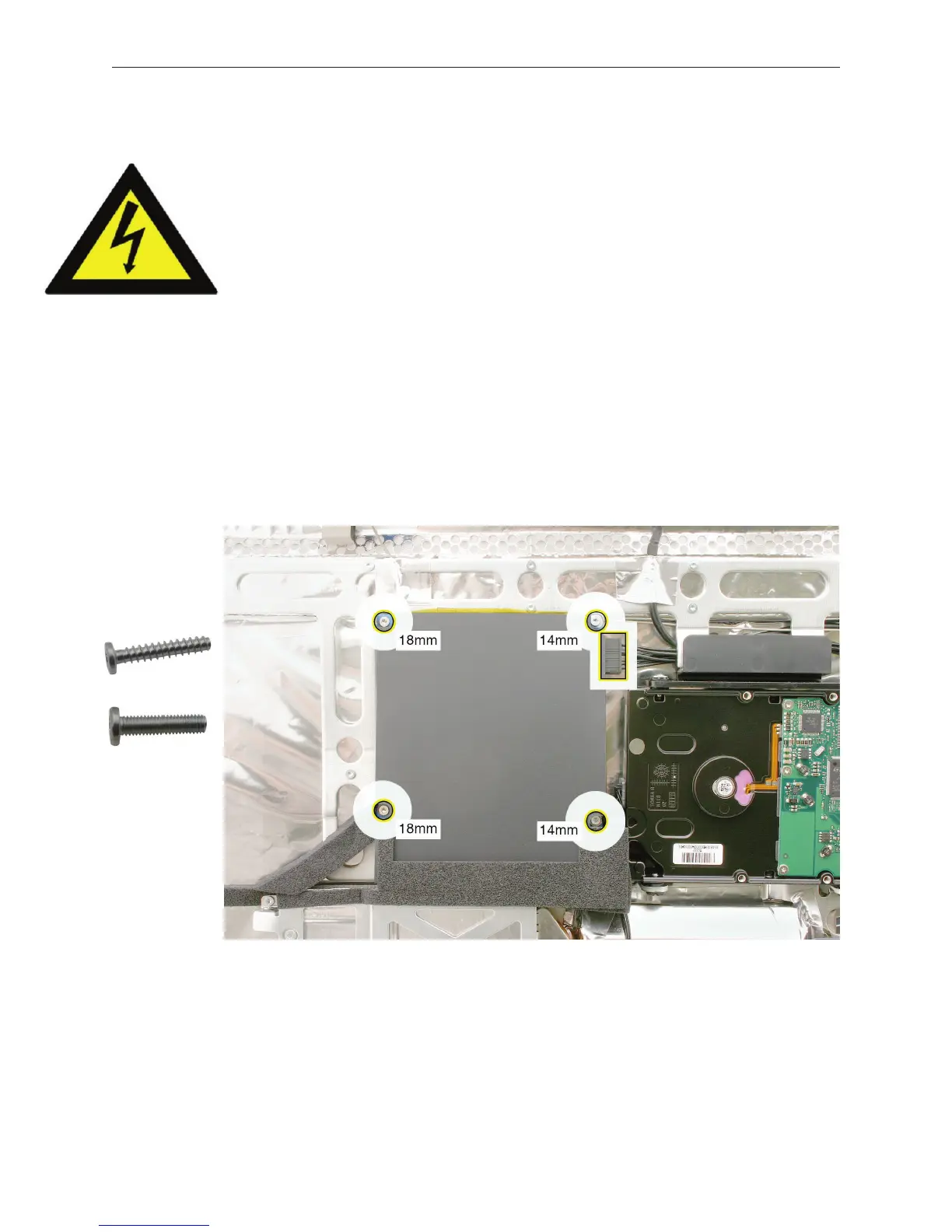
Using a Torx T10 screwdriver, remove the four screws from the AC-DC power supply board.
Replacement Note: Install the shorter machine screws (at right corners) rst when installing
the power supply.
Pinch the back tab on the locking connector to disconnect the power supply cable at the
right side of the drive.
•
•
•
1.
2.



 To Next Page