EasyManua.ls Logo

Apple Mac Pro - Page 15

Apple Mac Pro
16 pages
Print Icon
To Next Page IconTo Next Page
To Previous Page IconTo Previous Page
Loading...
073-1255 Rev. A 15
© 2009 Apple Inc. All rights reserved.
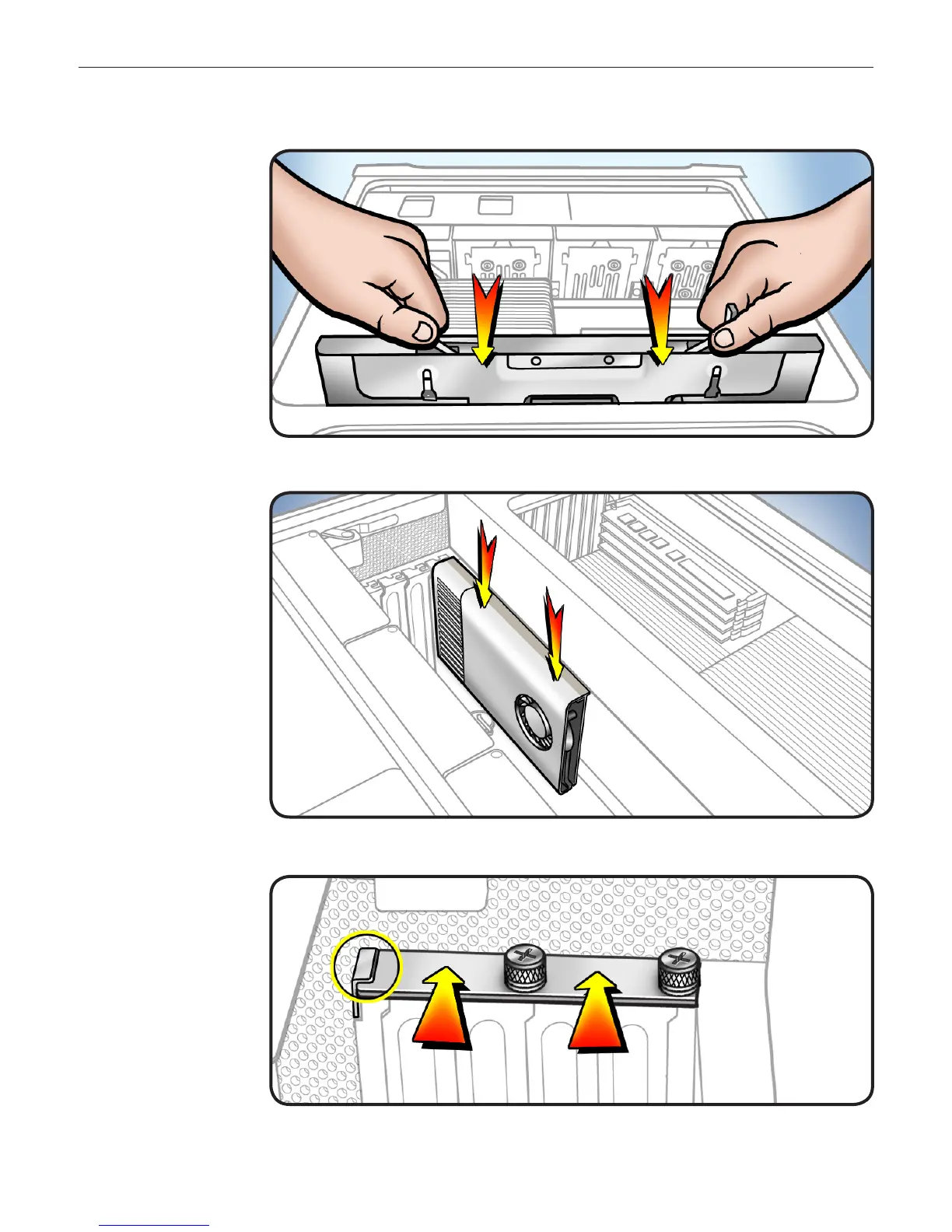
Processor Tray
Holding tray by 14
latches, lower it into
processor cage.
Make sure latches are 15
closed ush with front
of processor tray.
Graphics Card
16 Reinstall graphics card
in slot 1.
Note: Align card’s
connector with
expansion slot and
press down until
connector is inserted
all the way into slot.
If installing a 12-inch
card, make sure card
engages correct slot
in PCIe card guide.
If card includes 17
booster cables,
reconnect cables.
18 Slide PCIe fan to the
right to lock card in
place.
Replace PCI bracket 19
and tighten screws.
Note: Slide bracket
under circled tab.

Other manuals for Apple Mac Pro

Related product manuals